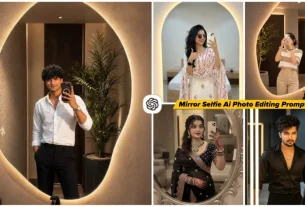
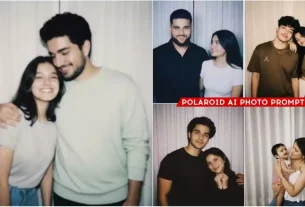
Some time ago, when we used to create our images like Aesthetic Dp Chatgpt Ai Photo Editing Prompts , it was very difficult to create such a DP. At that time, we needed to work very hard. We had to face a lot of problems. Then we were able to create such a thing. But now things have changed a lot. If you want to create this, then you can create it in such a simple way. You can probably never think about it. But I am going to tell you here. If you want to create this edit, then you can make it with the help of Chatgpt because the trend is going on right now. We will learn to edit it with that. What did we do earlier? We used to edit each and every thing. Then such a DP is created and it used to take a lot of hard work. But here, by following this step, you can create it in a very simple way.
Aesthetic Dp Chatgpt Ai Photo Editing Prompts
I am talking about this aesthetic DP. This was also such a popular DP at one time that people were crazy about it. People had to create such DPs, but they had to work very hard in time. A lot of things had to be added to it. We could create such photos and DPs using many applications, but you want to make it. You can make such DP in a very easy way using this image. In this article, I am going to discuss that if you want to create a DP with your name in aesthetic type using your image. You want to put it on your Instagram or any social media. You can easily put it as I explain. Follow it once and your editing is going to be the best.
Update :-
In this article, we’ve provided some new aesthetic DP prompts that are trending right now. I’ve already provided some of the previous prompts in this article. You can use them to create your DP. This one is very similar, but some new ones are trending right now. That’s why I’ve added some new prompts here. You can create this photo following the exact same process. And with these updated prompts, you can use this photo as your DP on social media platforms like Instagram, Facebook, and WhatsApp. I mentioned another special feature, but it’s been updated now. You can generate this type of photo using Google Gemini, Grok AI, and Chatgpt. If you know how to use them, just use the prompts there. If you don’t have one, you can follow the same process as Chatgpt.
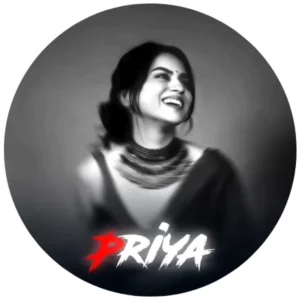
Upload a clear smiling photo of a person (male or female). Apply a black-and-white soft blur portrait effect with cinematic lighting. Retain the original face and clothing, matching the grayscale style. Add a circular white glowing frame around the image. At the bottom, write the name “[YourName]” in bold horror-style font — the first letter in bright red and the rest in white. Use a 1:1 ratio and dark blurred edges for a dramatic effect.

"Create a vibrant, high-contrast digital portrait using the uploaded image. Preserve the original face, hairstyle, and clothing of the person. Use a bold pink and purple cyberpunk-style background with glowing light streaks, abstract shapes, and slight halftone textures. Add a soft circular frame with dark edges, blending smoothly into the background. Overlay a cute decorative element (like a flower clip or icon) on the hair. Below the portrait, add the name in large, bold cursive typography (NAME) gradient-colored with pink to purple tones, casting a soft glow. Ensure the lighting highlights the subject's face clearly, keeping the mood vibrant and futuristic. Maintain a 1:1 aspect ratio for social media profile use."
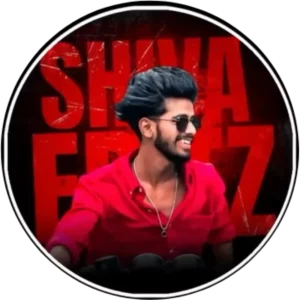
"Use the uploaded image to create a stylish portrait. Keep the person's real face, hairstyle, clothing style, and accessories (like sunglasses or necklace) as seen in the uploaded image. Add a dramatic red and black grunge background with bold capital text in cracked font style (e.g., SHIVA ERAZ). The person should be smiling and looking sideways (right-facing). Apply a circular frame with a thin white outline around the image. Maintain a strong contrast lighting to give a bold cinematic effect. The image should be in a 1:1 square ratio, suitable for both male and female portraits."

"Use the uploaded person's real face and clothing exactly as shown in their image. Apply a deep red monochrome color filter over the entire image with a soft blur and swirl distortion effect around the edges. Add a circular black background frame with a thin white border. Keep the person slightly turned or covering part of their face naturally (if present in the original). Below the person, write their name in bold capital brush-stroke font — the first letter in bright red, rest in white (e.g., 'FATIMA'). The overall image should have a mysterious, moody, and aesthetic vibe, maintaining a 1:1 square aspect ratio. This design should work for both boys and girls."

"A circular profile picture design featuring use given image. The image has a strong monochromatic green and neon magenta aesthetic. The background features large, translucent block text reading 'neha' and a horizontal CRT scanline texture overlay. At the bottom, there is sharp, stylized white text that reads 'neha'. High contrast, digital fan art style, glowing neon lighting."

Ultra-realistic modern graphic portrait of a young man taking a smartphone selfie, half-body, serious expression, sharp jawline, styled hair, wearing a casual button-down shirt. Holding a triple-camera smartphone.
Subject in black & white (monochrome).
Background: bright blue circular frame with halftone comic dots.
Top background text: "BRO” bold white uppercase, slightly overlapping head.
Small yellow comic alert triangles near phone.
Clean cut-out, soft shadow, studio lighting, high detail, social media DP style, 1:1 ratio. Suitable for Profile picture, with circle. Fill black outside the circle, realistic image. Realistic image. Generate image.
Negative: blur, low quality, extra fingers, bad anatomy, watermark, text errors. 100% Face Match

"A circular profile picture design featuring Indian young boy. He is wearing a crisp white button-down shirt and looking intensely at the camera with a serious expression, his right hand raised with fingers touching his temple. The image has a strong monochromatic purple and neon magenta aesthetic. The background features large, translucent block text reading 'Sagar' and a horizontal CRT scanline texture overlay. At the bottom, there is sharp, stylized white text that reads 'Sagar FX'. High contrast, digital fan art style, glowing neon lighting."

Ultra-realistic modern graphic portrait of a young man taking a smartphone selfie in a half-body frame, with a sharp jawline, neatly styled hair, and a confident serious expression, wearing a smart casual button-down shirt and holding a clearly visible modern triple-camera smartphone in hand; the subject must appear completely black & white (true monochrome with natural skin texture and realistic studio lighting), while the background is colorful and premium-looking, featuring a vibrant electric-blue to deep navy gradient circular frame with a soft radial glow behind the head for depth, subtle geometric textures like thin diagonal lines and a faint grid pattern for a modern tech aesthetic, a thin clean white circular ring outline around the subject for separation, small semi-transparent abstract UI-style elements for added visual interest, and subtle neon cyan light streak accents near the phone for dynamic energy; at the top inside the circle place bold white uppercase text "SUMIT" in a clean modern sans-serif font slightly overlapping the head with a soft drop shadow for layered depth; ensure a clean precise cut-out with a soft natural shadow under the shoulders, high detail, sharp focus, professional lighting, and realistic image quality; composition must be perfectly centered in 1:1 square ratio suitable for social media profile picture inside a circle, with the area outside the circle completely solid black; negative: blur, low resolution, extra fingers, bad anatomy, distorted hands, watermark, spelling mistakes, unwanted text artifacts, noise, oversharpening.
Create With Chat Gpt With Your Photo?
This DP which is being created, we are creating it from Chatgpt. It is not being created through any other application. For confirmation, I am telling you beforehand so that you do not get confused. It is so easy to edit with Chatgpt today. You might already know about it because I have already told in many articles. But you should pay a little attention to what kind of photo you will use and how you will edit it. Then you will never like this editing and you will say that the editing you have told is not right, then our friend will come in it. Because of this, we do not want that I have some friend of ours because whenever you will use the photo in it. You have to pay attention first of all. The photo that is in it. It should be a selfie type in which if you see your face properly, then this kind of edit is there. You will also not have any problem in creating it easily. When you will use the photo in the way we have told.
How To Use Aesthetic Dp Chatgpt Ai Photo Editing Prompts
Look, to create these DPs, some prompts will be shared with you in the article. There are some big points using which you can generate DPs exactly like that. If you want to create them? Whichever prompt you find right from it, you will be given a button below it. You can copy it by just clicking on it. If you do not see the button, then you have to select it. The prompt you get to see below the image. As soon as you copy it, you have to go to the side gpt. Whose button I have added below. When you click on it, the chat gpt will open. There we have to upload our normal image. I told you to upload the selfie image, after uploading it, the prompt you have copied. You have to paste it and then click on generate. Your image will be generated and ready in a few minutes.
Conclusion
I think these details will be enough for you and you will be able to generate your image from it. Now don’t you think you will. If you are facing any problem here then you can ask us that we are facing this problem. If we want to fix it then how can we do it. We will explain it in detail to you that how can we do it?