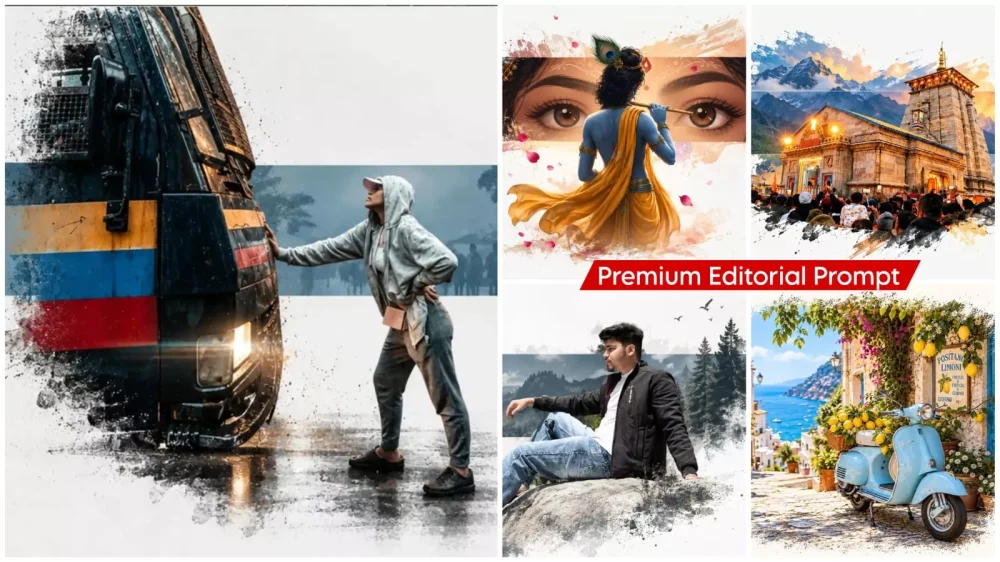
Premium Editorial Ai Photo Editing Prompts – Photos featuring “editorial-style” posters are going viral on social media; people love them because of their attractive presentation and unique aesthetic—something that naturally appeals to audiences looking for something different. You will likely appreciate them too. I can explain how you can easily create this kind of edited image yourself. You don’t need to learn anything complex; if you know how to use ChatGPT, you can easily create these designs. I will walk you through the steps you need to follow.
Premium Editorial Ai Photo Editing Prompts
This is the kind of creativity you have. You can present your photo in a visual and style like a fashion editorial, cinematic post, magnesium ice cream or any modern brand campaign. The most special thing about this editing is that you only have to change the background. Its purpose is to showcase the styling of a person very well. This means that the colors are perfectly coordinated, the text is placed in the right place and the structure is created. If you want to post a style list photo on your Instagram, then this will be the best for you. You will get photos presented in a united manner and I will guide you through it.
What is an editorial poster?
Let’s understand it. It is a visual design style where you present a person, a fashion concept, or a brand in a unique, stylized manner. You see visuals that resemble high-fashion spreads, professional magazine photoshoots, or campaign designs. It goes beyond a simple photograph of a person; it showcases a complete design composition where elements like styling, clothing, lighting, and the background are presented artfully. For instance, if you want to transform a standard portrait into an editorial-style image, you might darken the background, focus the lighting on the face, and add striking typography in the negative space. This completely transforms the style of the photograph.
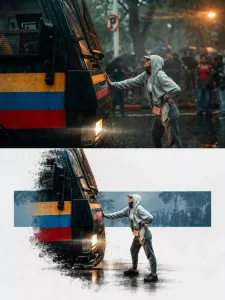
Use the uploaded image as the exact visual reference and preserve the original scene, subject placement, perspective, colors, lighting and major details. Do not redesign the scene. Transform the reference photograph into a minimal premium editorial poster composition on a clean warm off-white / ivory background.

Keep the main recognizable portion of the original photograph centered in the lower-middle area of the canvas, as if the photograph has been artistically extracted from its original background.

Behind the photograph, place one wide horizontal solid-color rectangular block spanning approximately 70-80% of the canvas width. Choose a muted color sampled from the original image, such as warm beige, dusty teal, muted orange, sage or soft blue.

Important composition effectthe photograph should NOT appear as a normal hard-edged rectangle. Preserve the central part sharply, but gradually fade, feather and dissolve the lower edge and portions of the side edges into the off-white background, creating a soft dry-brush / watercolor-mask/textured feathered transition. The fading should be subtle and elegant, not smoky or glowing.

Allow important objects from the original photograph - such as a tree, vehicle, person, flowers, architecture or other main elements - to extend naturally beyond the rectangular color block, creating a layered editorial collage effect.

The central scene should remain photorealistic and detailed. Keep the horizon, road, landscape, vehicle, buildings and other important features consistent with the reference image.
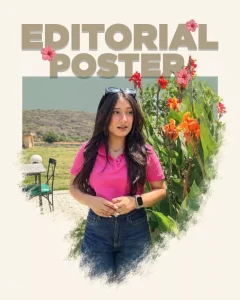
Use the uploaded image as the exact visual reference and preserve the original scene, subject placement, perspective, colors, lighting and major details. Do not redesign the scene. Transform the reference photograph into a minimal premium editorial poster composition on a clean warm off-white / ivory background.

Keep the main recognizable portion of the original photograph centered in the lower-middle area of the canvas, as if the photograph has been artistically extracted from its original background.

Behind the photograph, place one wide horizontal solid-color rectangular block spanning approximately 70-80% of the canvas width. Choose a muted color sampled from the original image, such as warm beige, dusty teal, muted orange, sage or soft blue.

Important composition effectthe photograph should NOT appear as a normal hard-edged rectangle. Preserve the central part sharply, but gradually fade, feather and dissolve the lower edge and portions of the side edges into the off-white background, creating a soft dry-brush / watercolor-mask/textured feathered transition. The fading should be subtle and elegant, not smoky or glowing.

Allow important objects from the original photograph - such as a tree, vehicle, person, flowers, architecture or other main elements - to extend naturally beyond the rectangular color block, creating a layered editorial collage effect.

The central scene should remain photorealistic and detailed. Keep the horizon, road, landscape, vehicle, buildings and other important features consistent with the reference image.
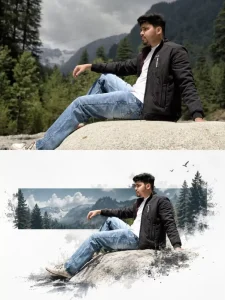
Each uploaded photo must be made into a separate, independent, premium editorial poster, and
multiple photos must not be combined. Use a strict 3:4 vertical canvas. Split the canvas horizontally in
the exact center: the upper half and the lower half each occupy 50% of the height, are equally wide,
and equally high, with no alteration of proportion.
The upper half uses the original photo directly and must not be regenerated. Preserve the identity of
the main subject, the human body or architectural structure, proportions, perspective, spatial
relationships, texture, natural light and shadow, color, and environment in their entirety. Only slight
cropping and restrained premium color grading are permitted; re-drawing the main subject, fictional
light, HDR, excessive saturation, plastic texture, and fictional content are prohibited. When needing to
adapt to the frame, only environmental areas such as sky, water surface, ground, walls, plants, or
background can be extended.
The lower half extracts and reconstructs the "narrative core" of the photo: it can be a single primary
subject, or a group of related elements that together embody the photo's identity, scale, action, or
story relationship. Maintain its realistic, recognizable appearance, proportion, internal structure,
texture, and relative position. Do not remove important related elements, and do not directly use
rectangular photo cutouts. The reconstructed subject typically occupies 55%–80% of the width of the
lower area. It should naturally extend based on the photo's primary direction and retain plausible
ground, water lines, shadows, or softly dissipated edges to integrate into the background, avoiding a
sticker-like or floating appearance.
Incorporate a narrow, low-saturation geometric color field behind or through the center of the subject,
serving as a "critical window" between reality and editorial abstraction. The color of the window must
be extracted from the original photo, and its orientation (horizontal, vertical, or diagonal) chosen
based on the overall narrative direction.
The subject must actively pass through the window: part of it is within the color field, and part enters
the open negative space, naturally crossing the window's boundary to create occlusion, penetration,
and spatial depth. The window is not a frame or a card; it must not fully enclose the subject. Only one
primary window is allowed; multiple color blocks, thick borders, rounded corners, strong gradients,
and drop shadows are prohibited.
Use a white, cool white, very light gray, or near-white background for the lower half, coordinated with
the photo. Employ a restrained asymmetrical composition and abundant negative space to establish
a three-tier hierarchy:
Reconstructed subject or narrative composition
Low-saturation geometric window
How to choose the right photo for an editorial poster?
If you want to create a great image, your photo needs to be sharp and clear, ensuring your face and identity are distinctly visible. You are essentially creating a visual, so the choice of photo is crucial. When selecting one, ensure your face is clear—not blurred—and that your stance and styling are spot-on. Don’t worry too much about the background, as that can be adjusted later. Also, avoid using unnecessary filters; paying attention to these details will help you achieve the best results.
How To Create This Image?
To create the photo, first open ChatGPT, as that is the platform we will use. Start by pasting the prompt, then navigate to the ‘plus’ option to upload your reference photo. Uploading a reference photo ensures a better result. After that, simply paste the prompt we provided and hit generate. It will create a professional-quality photo that you will love; the editing style is also highly appreciated by many.