Pre Wedding Ai Photo Editing Prompts Chatgpt – The trend of pre-wedding suits is growing rapidly, and you’ll see that all couples want to create their own pre-wedding photos. Nowadays, not everyone has an expensive camera or the money to hire a photographer. But times have changed. You can create such pre-wedding photos yourself, without going to any location, without hiring a photographer. Yes, I’ll tell you how. All you need is two selfies ready. A selfie of you and your partner. The rest of the work will be learned in this article: how to create a pre-wedding photo. You can use a normal photo, and in this article, I’ll teach you how to create these photos in cinematic, royal, and different styles.
What Is Ai Photo Editing
AI Photo Editing is a method of editing. We upload any of our photos and specify the details we want to change in the photo: background, location, color grading, etc. It generates the corresponding photo and returns it to us in seconds. You’ll find many of the best available tools for this, such as Google Pocket, Grok, and Chatgpt. You can use it to generate your own photos for free and with the best results. It also offers the option of text-to-image editing. As I mentioned, you can upload photos. Alternatively, you can simply type text, and the image will generate photos exactly as you typed.
How To Use Pre Wedding Ai Photo Editing Prompts Chatgpt
How can you convert your normal photo into a pre-wedding photo? Let me explain. First, you need to select a high-quality photo. For photos, select two photos of you and your partner. Then, open any other application. For example, you can open Google Gemini or Grok, or even Chatgpt. For example, we’ll open the Chatgpt application. Here, you’ll first select the “Create Image” option. There, you’ll need to paste the prompts. Paste the copied prompts, and then click the “Plus” option to upload photos of you and your partner. These can be placed in front or behind, you can do this before or after; there’s no problem. Then, generate them. Your photo will be ready, styled exactly like the copied prompts. Absolutely professional.

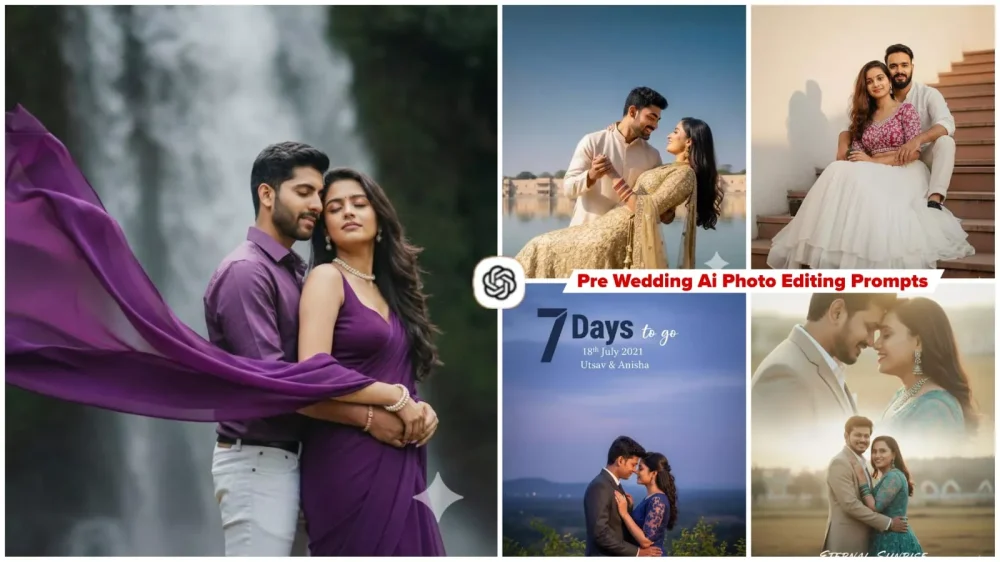
A romantic pre-wedding photoshoot at a beautiful waterfall. The girl is wearing a deep purple chiffon saree with a sleeveless, backless purple blouse. She is adorned with elegant pearl jewelry, including pearl bangles on her hands, close eyes. The saree's pallu flows dramatically in the wind, adding movement to the scene. Her long, lightly curled hair is open and cascading naturally. Behind her, the boy stands close, close eyes, wearing a purple shirt with white jeans. He gently holds her from the back as she rests her head tenderly against his chest. The waterfall creates a dreamy, romantic backdrop with misty droplets in the air, enhancing the magical atmosphere, Keep both face same 100% same as in the reference image

Create a high-resolution, ultra-HD romantic outdoor scene set beside a peaceful lake under a clear, vivid blue sky. A couple dressed in elegant traditional Indian clothing is the focus of the image. The woman is wearing an intricately designed golden lehenga with rich detailing, while the man is dressed in a soft, light-colored kurta. The man gently holds the woman in a graceful dip, and she clasps his hands as she looks at him with deep affection. Their expressions should convey warmth, love, and emotional connection.
In the background, the lake appears calm and reflective, adding serenity to the scene. Across the water, refined buildings with classic traditional architectural designs enhance the cultural elegance of the setting.
The lighting should be natural, bright, and sun-lit, creating a warm, romantic atmosphere with a luxurious and cinematic feel.

EDITABLE SECTION Countdown Number: 7 DAYS TO GO Wedding Date: 18th July 2021 Couple's Names: Utsav & Anisha DESIGN INSTRUCTIONS (DO NOT CHANGE) Core Directive for Face Preservation: Use the uploaded image only to preserve the couple’s faces and real likeness. Replace the pose, clothes, and background according to the description below — but ensure both faces match the uploaded couple’s appearance, tone, and expressions naturally. Overall Aesthetic: Romantic, elegant, and atmospheric, capturing

Create a soft, romantic couple poster of couple give in reference image
Keep face the same as 100% in my reference photo. Man is wearing Beige Suit and White Pants, Women wearing Teal Embroidered Net One Piece Gown with Matching Accessories, both man and women are wearing mentioned outfits in both the scenes, The design should include two blended scenes:
1. A close-up shot of both faces, smiling with eyes closed, touching foreheads gently.
2. 2. A full-body or mid-body shot where we are standing close, with my partner hugging me from behind while we both smile naturally.
Use warm sunlight, soft-focus background, and a dreamy cinematic color tone. The poster should have a smooth double-exposure, do not change face

Girl Outfit: She is wearing long red pre-wedding gown, long straight hair with princess curl on ends only hairstyle with huge volume hairs and tiny flower crown on hair. She is wearing silver heart shaped pendant. some silver bracelets on hand, silver watch in one hand. Boys Outfit: He is wearing black beach pant, white linen shirt with sleeves folded, black and brown threaded bracelet accessories in one hand and on another hand white stainless steel

100% face no change, create Close-up, romantic wedding portrait. South Asian couple. Bride in deep red/maroon traditional bridal wear, heavy gold jewelry, henna on hands, eyes closed with serene expression. Groom in dark suit/sherwani, head leaning towards bride's, arm around her. Pink sheer dupatta/veil softly draped over their heads/foreground. Soft, diffused outdoor lighting, blurred natural background. Intimate, emotional, cultural wedding photography.

Ultra - realistic cinematic young couples and She wearing a deep sky-pink fitted crop top bra with white work in it . With pleated voluminous layered white cream skirt. Oversized hips. Together a dark black coffee cup. Long dark brown little wavy hair style. Sitting gracefully on staircase. Looking slightly left smiling at the camera. I bath in a warm golden sunlight, which casts a long shadow on the white wall behind. Make it in 85mm lens and 8k depth of field. Face 100% matching

4k hyper-realistic dark green portrait cinematic young couples pre wedding image with dramatic smile actions. An elegant half-portrait of a framed by dark wooden window mullions, with soft, moody lighting. The background features deeply blurred, lush green foliage (bokeh), creating high contrast.

Out-of-focus green leaves in the foreground add depth. The overall aesthetic is serene, earthy, and cinematic. He is posed in a romantic yet stylish way, leaning casually out of the window.

@nagpurihiphoplover, Keep both face same 100% same as in the reference image
Compare Between Before And After Editing
Now I will tell you the before and after. Look, the photo we had earlier. I had told you all to use just two of your selfies. After that it converts your photo into a romantic scene and here your normal photo, in which there is very bad lighting or you can say it is a simple lighting. By changing it, it converts it into golden hour lighting, cinematic lighting, professional lighting. The color grading of your photo will be absolutely basic. By making more changes than that, it converts your photo into a completely professional color grading. These are some of its differences. If you see the before and after, you will find a lot of difference in the photos.
Some Mistake you Absolutely Must Avoid
When generating photos like this, you absolutely must avoid making the mistakes that you make. If you create photos like this, you should avoid overly smoothing the skin tone, like the style of the prompt. If you’re a little smart, you want to create something different by changing it, that’s fine. But don’t write the cartoon-style prompt in it. Don’t change the style at all. Avoid saturation completely. Don’t tamper with the colors in it. Don’t add digital painting to the prompt. If you want a realistic look, you should use this realistic one. If you ask, I’ll provide you with a special article on digital painting. I might have. You can check once. Don’t smooth the skin tone too much. If you don’t want a natural lighting smoothness, this is perfect.