Google Gemini God Hugging AI Photo Editing Prompts – If you’re currently watching reels on Instagram, you’ll know that this video of God hugging God is going viral, and it didn’t take much effort to make. It’s made in a very simple way, and I’ll tell you how to make such a video. I’ll first teach you how to take a photo. Then, you can make such a video. What things will you need to make such a photo? How can you make such a photo? I’m going to explain all of that. Here, if you want to create photos with different gods, everyone has their own gods, which people believe in. If you want to create photos with them, you can do it with them. I’ll explain how later.
Google Gemini God Hugging AI Photo Editing Prompts
Just as I told you, you need to create a photo of God hugging each other. That’s absolutely correct. You must have a photo of your favorite God. For example, go to this type of photo and from there you can select any God’s photo. You can save your favorite God there. Then you need to save your own photo. After that, we’ll generate them using both photos. Now, what we’ll use to generate them? I’ll explain that later, because it’s very important to explain it to you from here on. If you don’t understand which tool we’ll use to generate them, your editing won’t work.
TRENDING GOOGLE GEMINI PROMPTS
Update –
Look, I had taught about the photo of hugging God in this article. But now I saw that many other photos of taking blessings from God and many other different types of photos are also going viral. I thought I would add them in this article itself because it is better to learn one editing. Today you should learn some related and unique editing, so I updated this article. In this, I have added some more different types of images. You can see them here. We have added the most trending images here so that you can use them and create your own photos by following the process.

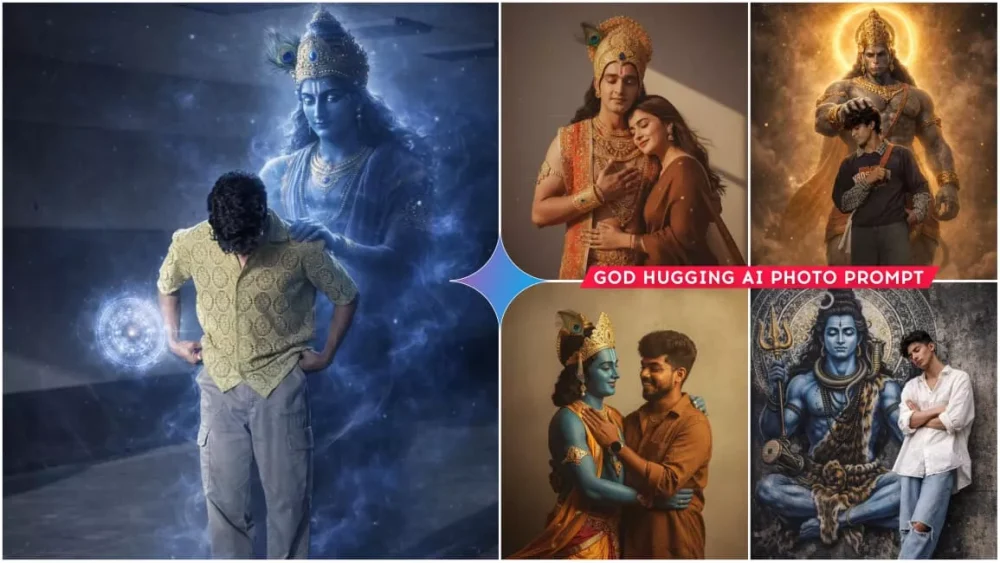
A provided images-one of the boy and one of the God Krishna-so that it looks like both are hugging each other. The final composition should have a retro, vintage, grainy yet bright Pinterest aesthetic. The atmosphere should feel windy, dreamy, and blessed, as if the God is lovingly giving blessings to the boy.The boy must look happy and smiling,wearing a Pinterest-style brown shirt with a vintage effect. Both are standing against a solid wall deep shadows and contrast drama, creating a mysterious and artistic atmosphere where the lighting is warm with a golden tones of evoking a sunset or golden hour glow. The background is minimalist and slightly textured the expression on his face is moody, calm yet happy and introspective.

Prompt- Merge the two provided images-one of the girl and one of the God-so that it looks like both are hugging each other. The final composition should have a retro, vintage, grainy yet bright Pinterest aesthetic.
The atmosphere should feel windy, dreamy, and blessed, as if the God is lovingly giving blessings to the girl.
The girl must look happy and smiling, wearing a Pinterest-style brown saree with a vintage effect.
The God must also appear happy and smiling, radiating warmth and blessings Both are standing against a solid wall deep shadows and contrast drama, creating a mysterious and artistic atmosphere where the lighting is warm with a golden tones of evoking a sunset or golden hour glow. Make sure both of their eyes is closed. The background is minimalist and slightly textured the expression on her face is moody, calm yet happy and introspective.

Transform this photo into a cinematic divine fantasy scene.
Lock the main person 100% unchanged - same face, same identity, same pose, same expression, same outfit, same body proportions, same hairstyle, same lighting on the face, same camera angle, same framing, same background environment.
Add a divine, ethereal presence of Lord Krishna emerging subtly from behind the person's back, slightly offset to one side. Lord Krishna should appear as a semi-transparent, celestial figure made of soft blue divine energy and sacred smoke, not solid, not overpowering the main subject. Krishna's form is tall and calm, with deep blue skin tone, glowing white-blue divine eyes, adorned with a golden crown featuring a peacock feather, faintly visible jewelry, and flowing spiritual aura.
Krishna's one hand gently rests on the person's shoulder, symbolizing protection and guidance. The other hand projects a glowing circular divine chakra / energy mandala, floating near the person's hand, made of

Transform this pic into a dark, cinematic fantasy scene, Keep the person exactly the same face, brown shirt and white dhoti, Add a shadowy, smoke-like lord shiva holding his golden glowing trident and Make a-half moon a bit small and place it on the side of lord shivas head On his locks, his one hand on models head keeping very softly and gently. Like he is giving blessing, Shiva figure masculine, Make shiva broad and strong with strong muscles, Keep lord shiva close b

Ultra-realistic cinematic 8K photograph, absolute face lock using the uploaded reference image as the only identity source. The face must remain exactly unchanged: identical bone structure, facial proportions, asymmetry, skin texture, pores, age, hairline, beard pattern if any, and natural expression. No beautification, no smoothing, no symmetry correction, no Al reinterpretation. Full-body wide-angle realistic photograph of a stylish young man leaning calmly against a textured urban wall. Eyes closed, arms crossed, one leg crossed over the other, peaceful and grounded body language. Natural, unposed stance. Wardrobe: loose oversized white button-down aesthetic shirt with rolled sleeves, light blue wide-leg jeans with ripped knees, barefoot. Minimal accessories: thin silver necklace only. Hair is volumized, messy dark wavy hair with a clean taper fade on the sides. Clothing fabrics must show real creases, weight, and daylight texture. Environment: behind him, a massive hyper-detailed s

Ultra-realistic cinematic digital art of Lord Hanuman (Bajrangbali) standing behind a me, Hanuman blessing him by gently placing one hand on his head and make full photo.

Lord Hanuman is tall, muscular, divine, grey stone-like skin, wearing golden crown (mukut), ornaments and dhoti, glowing golden aura and halo around his head, dramatic lighting.

dust particles, smoky atmosphere, golden sparks floating in air.

Hyper-detailed muscles, realistic skin texture, sharp focus.

Cinematic composition, low angle shot, 8K ultra HD, high contrast, volumetric lighting, godly glow, masterpiece, unreal engine, ultra-realistic fantasy realism.

And same to same no any change in body.

Create a realistic image of this girl sitting on a rock in the green grass fields under cloudy sky.wearing green saree with black blouse .her hair long and styled with flowers. Her skin glowing and natural. she closed her eyes with devoted while holding the giant blue hand of Lord Shiva that descends from the sky The divine hand is painted with sacred white tripundra lines and a red tilak, adorned with rudraksha beads around the wrist. thank you
How To Select Photos
So, for this, we’ll use Google Gemini. You know that currently, most photos are being created using Google Gemini, so you can do this too. You can also create such viral photos using Google Gemini. What you have to do is, first, prepare your photo. When you add your photo there, you just have to add the face part. It will automatically generate because the prompt I’ve given here defines your entire body, saying you’re going to look like this. In this photo, it will automatically generate it. It will simply pick up the face and place it there, and it will look quite realistic. It won’t appear as if your body doesn’t match your face.
How To Create Images Using Google Gemini
First, select whichever prompt you find appropriate. All the images created here were created using a single prompt. There’s no need to use another prompt. So, here’s what you need to do: First, copy this prompt. After copying, you’ll find a “Get it from Google” button below. Click on it. You’ll see a website where you’ll first paste the prompt. Paste the prompt there, and after pasting, you’ll get the option to “Generate.” First, you need to upload your photo there. Then, click “Generate.” This will give you excellent results, and your video will be amazing.
Conclusion
Now making such a photo is also very simple. Look, you don’t need to do anything else to make a photo. Like I have already told you how to make such a photo, but I will tell you how to make a video. To make a video also, you have to do it simply. You can use the VN Editor application. Just add all your video clips in it and the duration of the photo will be 1.5 seconds. After that, you have to add your audio there. Add any song and your video will be made and ready.