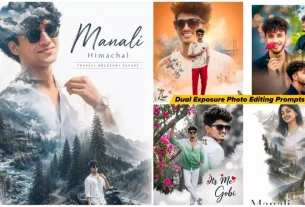
Google Gemini Retro Style Ai Photo Editing – Making photos from here has become very easy at this time and at this time you can make such photos with AI. For which you used to go to the studio and shoot photos and spend money on it, but now you do not need to do this at all if you want to create such a photo. Here you can create it in a simple way, I am going to explain it to you here. If you want to create such a retro photo. Which is going viral right now, then you can create it by following this simple method. Here three-four different styles have been shared. If you want, you can create all of these according to your own.
Google Gemini Retro Style Ai Photo Editing
So look at this viral editing. It is being liked by so many people that you yourself will be surprised how such editing can go viral because this kind of editing. Normally you cannot even think that this is editing because it looks absolutely realistic and it has been photo shooted. I will tell you what kind of photo you get to see with the help of a professional photographer. You must have seen that there is a normal coloured wall behind a simple wall. If you click a photo on it. Your photo looks a bit static and a bit professional. Normally I can say that if you have seen the pages of professional photographers on Instagram. You will know what kind of photos they click. Exactly in the same way we will generate this kind of photo.

Create a retro vintage grainy but bright image of the reference picture but draped in a perfect plain chiffon saree yellow color Pinteresty aesthetic retro saree. It must feel like a 90s movie dark brown wavy curly hair with a small flower tucked visibly into her curls and romanticising windy environment. The girl is standing against a solid wall deep shadows and contrast drama, creating a mysterious and artistic atmosphere where the lighting is warm with a golden tones of evoking a sunset or golden hour glow. The background is minimalist and slightly textured the expression on her face is moody, calm yet happy and introspective.
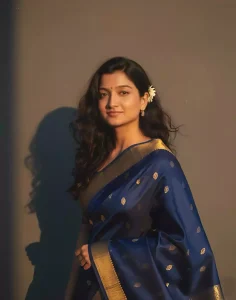
Create a retro, vintage-inspired image - grainy yet bright - based on the reference picture. The girl should be draped in a perfect red, Pinterest-style aesthetic retro saree. The vibe must capture the essence of a 90s movie brown -haired baddie, with wavy curls and a small flower tucked visibly into her hair, enhanced by a windy, romantic atmosphere. She stands against a solid wall, where deep shadows and dramatic contrasts add mystery and artistry to the scene, creating a moody yet enchanting cinematic effect.
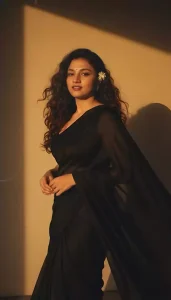
Create a retro, vintage-inspired image - grainy yet bright - based on the reference picture. The girl should be draped in a perfect blue cotton saree with small white flower prints, paired with a white blouse with sleeves above the elbow, styled in a Pinterest-inspired aesthetic. The vibe must capture the essence of a 90s movie dark-brown-haired baddie, with silky hair and a small flower tucked visibly into her hair, enhanced by a windy, romantic atmosphere. She is sitting on a wooden bench as a few leaves blow in the air, while dramatic contrasts add mystery and artistry to the scene, creating a moody yet enchanting cinematic effect. Her pose should suggest that she is reading a book.
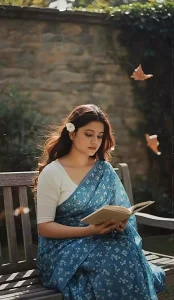
Create a retro, vintage-inspired image - grainy yet bright - based on the reference picture. The girl should be draped in a perfect off white cotton saree with red polka dots on it, Pinterest-style aesthetic saree. The vibe must capture the essence of a 90s movie dark brown -haired baddie, with silky hair and a small flower tucked visibly into her hair, enhanced by a windy, romantic atmosphere. She stands against a old wooden door, where deep shadows and dramatic contrasts add mystery and artistry to the scene, creating a moody yet enchanting cinematic effect. Make a pose like she is adjusting her saree
Create Photo For Boys ?
Now look at this retro style photo. Can boys make it? Yes, you can make it. If you follow this method, then first of all you will have to make changes in the prompt. You will have to do it according to your convenience. I will tell you how to do it. Look, in the prompt, you will see that if girls’ clothes are added there. You can change the thing and add boys’ clothes there or whatever colors etc. are there, you can change it if you want.
The second thing is that you should pay a little attention to the gender in it, the words that have been used for gender. Change that too. If you do this thing. Then you can use it for boys as well. If you guys say, I will make a separate article. In which I will teach you to create such photos of boys.
How To Use Google Gemini Retro Style Ai Photo Editing
And now to make this photo, you have to choose many different prompts shared here, you like them because it is already so viral on Instagram that people love it very much. Whichever you find right from it. You have to copy that prompt, after copying you will get a button called create image. You have to click on it, it will directly take you to a website. Which is Google’s website named Google gemini. On it, first of all you have to select the option to create Google. Which will be seen on the option above you.
After creating image, click on it. When you select that option, your photo will be generated absolutely perfect, after that now you have to go to the plus option there and upload one of your photos. Paste that prompt and then generate it. Your photo will be generated here in a few seconds. Your photo will be in the same style as you would have copied the prompt there.
Overall
And this is how you can generate your photos using this simple method. Here I have explained to you how easily you can create the image using this method and no one is going to explain it to you or teach you editing in such an easy way.