Google Gemini Retro Style Boys AI Photo Editing Prompts – As you all must have seen that retro images with girls are going viral and are being liked by people a lot. But now a problem is coming that the prompts shared with you create only photos of girls. If boys want to create, their photos also get converted into girls and this was becoming a big problem. I had just put the last prompt on it and I asked myself if you want a prompt with boys. You tell us, below that I got a lot of comments that brother give us such boys’ prompts too because these girls’ prompts are not being generated for us. Then I thought why not share it with you. Let me tell you how simple it will be to create such a photo.
Google Gemini Retro Style Boys AI Photo Editing Prompts
I will explain to you how these photos are being created because that is what people are not able to understand. If you understand this thing, how the photos are being prepared, then you will not face any more problem and it will never come again and let me tell you what kind of thing is happening, look, a retro type photo of yours is going to be generated, like what will happen in this is that when you have a normal photo, it will be converted and put in some simple clothes. There will be different colors there. You can change it if you want. After that, the etc. will be in the same style. Like everyone’s video is going viral. Similarly, you will have to create it. If you want to customize something different in it, you can do it yourself, but the thing that is going viral right now, I am explaining it to you.
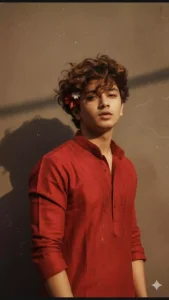
Create a retro, vintage-inspired image – grainy yet bright – based on the reference picture. The boy should be dressed in a perfect red, Pinterest-style aesthetic retro kurta. The vibe must capture the essence of a 90s movie brown-haired baddie, with wavy curls and a small flower tucked visibly into his hair, enhanced by a windy, romantic atmosphere. He stands against a solid wall, where deep shadows and dramatic contrasts add mystery and artistry to the scene, creating a moody yet enchanting cinematic effect.
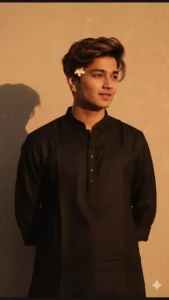
Create a retro vintage grainy but bright image of the reference picture but dressed in a perfect black color Pinterest's aesthetic retro kurta. It must feel like a 90s movie brown-haired baddie with a small flower tucked visibly into his curls and romanticizing windy environment. The boy is standing against a solid wall, deep shadows and contrast drama, creating a mysterious and artistic atmosphere where the lighting is warm with golden tones evoking a sunset or golden hour glow. The background is minimalist and slightly textured, the expression on his face is moody, calm yet happy and introspective.
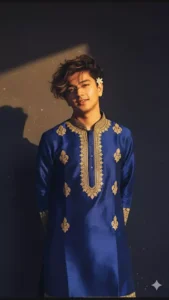
Create a retro vintage grainy but bright image of the reference picture but dressed in a perfect elegant royal blue silk kurta with golden motifs and a golden border, in Pinteresty aesthetic retro kurta. It must feel like a 90s movie brown-haired baddie with a small flower tucked visibly into his curls and romanticising windy environment. The boy is standing against a solid wall, deep shadows and contrast drama, creating a mysterious and artistic atmosphere where the lighting is warm with golden tones evoking a sunset or golden hour glow. The background is minimalist and slightly textured, the expression on his face is moody, calm yet happy and introspective.
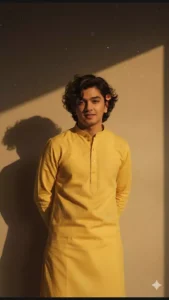
Create a retro vintage grainy but bright image of the reference picture but draped in a perfect plain kurta yellow color Pinteresty aesthetic retro kurta. It must feel like a 90s movie dark brown wavy curly hair with a small flower tucked visibly into his curls and romanticising windy environment. The boy is standing against a solid wall deep shadows and contrast drama, creating a mysterious and artistic atmosphere where the lighting is warm with a golden tones of evoking a sunset or golden hour glow. The background is minimalist and slightly textured the expression on his face is moody, calm yet happy and introspective.
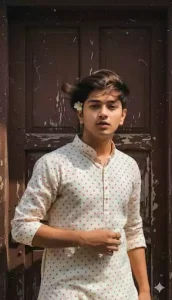
Create a retro, vintage-inspired image – grainy yet bright – based on the reference picture. The boy should be dressed in a perfect off-white cotton kurta with red polka dots on it, Pinterest-style aesthetic kurta. The vibe must capture the essence of a 90s movie dark-brown-haired baddie, with silky hair and a small flower tucked visibly into his hair, enhanced by a windy, romantic atmosphere. He stands against an old wooden door, where deep shadows and dramatic contrasts add mystery and artistry to the scene, creating a moody yet enchanting cinematic effect. Make a pose like he is adjusting his kurta.
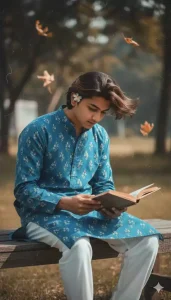
Create a retro, vintage-inspired image – grainy yet bright – based on the reference picture. The boy should be dressed in a perfect blue cotton kurta with small white flower prints, paired with white pajama, styled in a Pinterest-inspired aesthetic. The vibe must capture the essence of a 90s movie dark-brown-haired baddie, with silky hair and a small flower tucked visibly into his hair, enhanced by a windy, romantic atmosphere. He is sitting on a wooden bench as a few leaves blow in the air, while dramatic contrasts add mystery and artistry to the scene, creating a moody yet enchanting cinematic effect. His pose should suggest that he is reading a book.
How To Use Google Banana In Gemini ?
To create this, people use Google Gemini, but here is the biggest mistake that people are making in it. I will tell you that. In that you have to select the option of Google Banana. But people do not do this and because of that their photo is not getting generated as they want and let me explain to you that if you want to generate such photos, then for that you will have to select this option. If you are using the application, then you will find an image option written in it. You will have to select it because you will find a banana symbol on it. But if you use the browser now. Where I am going to give you the link now. In that, an option will come by creating your image. You have to click on it because only after selecting it, you can create your photo perfectly.
How To Use Google Gemini Retro Style Boys AI Photo Editing Prompts
Just like I have explained the things, what type of things will happen, it is absolutely correct, it will happen like that. What you have to do is whatever prompt you find right in it. You copy it because here I have shared different prompts in different styles. Now copy the one you like from it. After copying, your chat will not be secret. Here you have to use Google Gemini. I have also given you the link for that. Like you will click on it. You will go directly to that website. After going there, first of all you have to select the option of work and Google Banana. After that you have to paste the prompt there. Then after that now you have to go to the plus option. From there you go to the upload option. You can select any one photo of your boy. Like you will select it. Then here you have to generate and it does not take much time. Like it used to take a lot of time in chatgpt. Your photo here will be ready in a few seconds.
Overall
This is how you can generate these viral photos. I think you must have understood the editing I have explained and you must have created good photos with it. Now you have to tell me what kind of editing you like because I have tried to understand everything in this very well from my side and will continue to do so. In the future too, I will provide you even better articles than this, in which you will get a chance to learn even better editing.