Google Gemini Mahadev Blessing Ai Photo Editing Prompts – If you’re a devotee of God, you’ll love this Mahadev editing. What’s involved in this editing process? How is it going viral? In this article, I’m going to explain it. Creating such a photo is quite simple. You just need to know the correct method. We’ll create it using Google Gemini. Google Gemini offers free photo creation. We’ll use it to create such a Kamal photo. I’ll also explain how to create it in one click. It’s a perfect match for our faces. There’s not even the slightest change worth understanding, and we miss it. They just know how to copy and paste. Look, your face won’t match. If your photo is even slightly complicated, it will cause problems, and your editing won’t be done properly.
New trend google gemini Prompts
Detail Of These Photos?
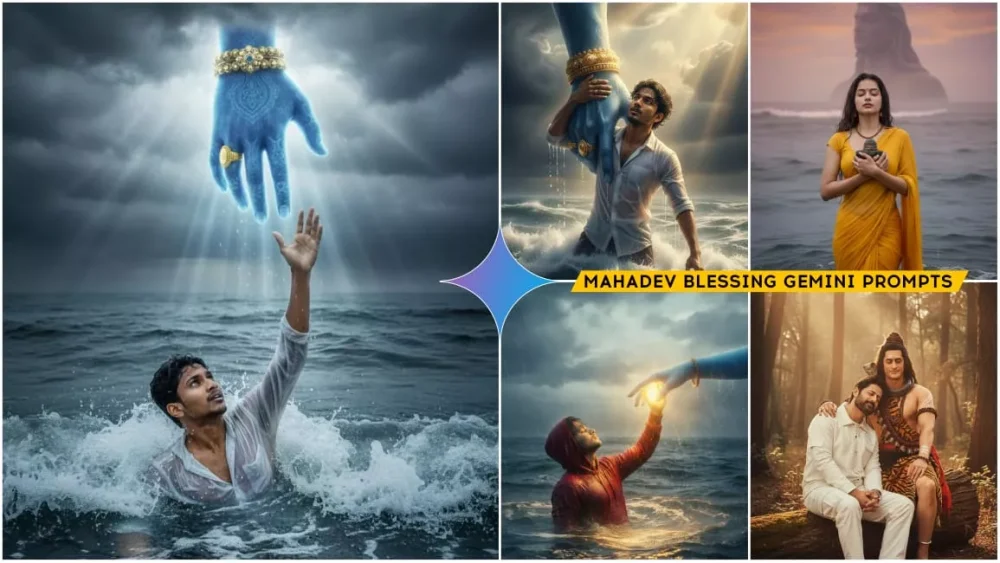
The details of a photo are of paramount importance. If you don’t understand the details of a photo, how can you edit it? Many people understand it simply by looking at a photo. Many people don’t understand this photo. I want to tell you that creating a photo based on this photo will be the simplest. Simply put, you need the Google Gemini app to edit it. Only then can you do it. Now, understand the details of the photo. What is depicted here is that you are underwater, and a hand is above you, supporting you. This hand is blue, and you also know that Lord Mahadev is called Neelkanth. Here, his hand is depicted, in which he is wearing a Rudraksha. He is supporting you and similarly I have tried to add some similar photos of Mahadev related to him here so that you people can create more photos of him together.

A hyper-realistic, cinematic photograph of (and 100% same face the reference photo) a young man, soaked and struggling in the deep, turbulent ocean waves. He is half-submerged, looking up with desperation and hope, and stretching his right hand out towards the sky for rescue. Above him, a massive blue hand (representing a deity like Lord Vishnu or Krishna), adorned with a detailed golden bracelet and a ring, descends from the ominous, dark storm clouds. Intense god rays and volumetric lighting stream down through the break in the clouds, illuminating the man's wet red hoodie and water droplets splashing around him, creating a dramatic divine moment. --ar 16:9 --v 6 --style raw --q 2 --uplight

A hyper-realistic, cinematic mid-wide shot of (and 100% same face the reference photo) a young man in a drenched red hoodie floating on stormy ocean waves at twilight. He's facing slightly upward, eyes closed as the massive blue divine hand of Lord Vishnu or Krishna gently touches his raised palm. Golden rays burst from the contact point, scattering through the rain and mist, while the ocean around glows softly with divine light. Wind ruffles his soaked hoodie, water ripples shimmer, and the atmosphere feels both chaotic and peaceful. Captured with a 35mm lens, volumetric lighting, ultra-detailed textures, real water reflection, cinematic tone. --ar 16:9 --v 6 --style raw --q 2 --uplight

A hyper-realistic, 8k professional portrait of a beautiful young Indian man in red velvet shirt and black jeans gently embracing a massive, striking *black stone bust of Lord Shiva (Mahadev)*. The man has a *vibrant red bindi and tikka* on her forehead which are clasped around the idol. The scene is set in an outdoor *temple courtyard* with white marble pillars in the background, during a *heavy monsoon rain*. The stone bust is slick with water. Atmosphere:** Deeply spiritual, serene,

A hyper-realistic close-up cinematic photo of (and 100% same face the reference photo) a young man in a drenched red hoodie half-submerged in rough ocean waves. The camera captures him from the side as a huge wave crashes beside him, with his hand raised toward the massive blue divine hand descending through storm clouds above. Droplets and sea spray glisten in midair, highlighted by god rays breaking through the darkness. Realistic water refraction, emotional expression, cinematic storm tone. --ar 16:9 --v 6 --style raw --q 2 --uplight
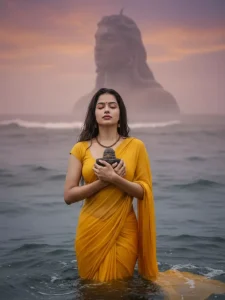
CREATE A HYPERREALISTIC PHOTOGRAPH OF A YOUNG, WOMAN(REFRENCE IMAGE GIVEN)STANDING AND HOLDING A SMALL SHIVLING ON HER HAND AND HUGGING IT EYES ARE CLOSED, WAIST-DEEP IN DARK OCEAN. HAIRS ARE WET SHE IS WEARING YELLOW SAREE & BLOUSE SHE WEARS A SIMPLE, BROWN-BEADED NECKLACE. IN THE VAST, SOME MISTY BACKGROUND, COLOSSAL, DARK STONE STATUE OF LORD A SHIVA IS THERE.
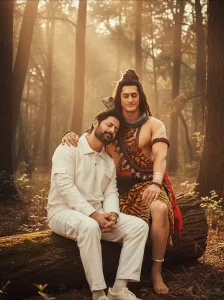
Create a cinematic emotional frame featuring the two actors persons together Combined my (your face) photo brown shirt and cargo pants with lord Mahadev. am head on lord Mahadev. And he is looking me and tuch my head. The setting is a tranquil, natural forest environment at dusk, with ancient trees and soft golden evening light filtering through the foliage. Both subjects are seated by a large, old tree trunk

A hyper-realistic, cinematic mid-shot capturing (and 100% same face the reference photo) a soaked young man in a red hoodie reaching up through stormy waves as a colossal blue divine hand of Lord Vishnu or Krishna descends toward him. The camera focuses slightly more on the divine hand, with the man's face illuminated by warm rays breaking through the dark thunderclouds. Water droplets freeze in motion, and the wet fabric of the hoodie clings naturally, enhancing realism. Intense volumetric lighting and mist create a holy, dramatic tone. --ar 16:9 --v 6 --style raw --q 2 --uplight

CREATE A HYPERREALISTIC PHOTOGRAPH OF A YOUNG, WOMAN(REFRENCE IMAGE GIVEN)STANDING WAIST-DEEP IN DARK OCEAN.HANDS ARE ABOVE HEAD PRESSING TOGETHER IN A PRAYER POSE. HAIRS ARE WET SHE IS WEARING YELLOW SAREE & BLOUSE REVEALING BACK.SHE WEARS A SIMPLE, BROWN-BEADED NECKLACE. IN THE VAST, SOME MISTY BACKGROUND, A COLOSSAL, DARK STONE STATUE OF LORD SHIVA IS THERE.
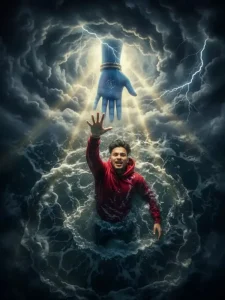
A hyper-realistic, cinematic aerial shot of (and 100% same face the reference photo) a young man wearing a soaked red hoodie, struggling in the deep turbulent ocean waves. The camera looks straight down from above as he reaches upward with his right hand toward a descending massive blue divine hand (Lord Vishnu or Krishna) emerging from storm clouds. Lightning flickers across the clouds, and rays of golden divine light pierce through, illuminating the swirling water and wet fabric. High-contrast cinematic lighting, volumetric mist, and ultra-detailed water texture. --ar 16:9 --v 6 --style raw --q 2 --uplight
Google Gemini Vs Chat GPT Editing
Many people talk to me about editing with Google Gemini and Chat Gpt. I’ve taught many people how to edit their faces in this way, and it’s quite simple. Let me tell you, these days, editing is a very easy task. Previously, I used to use Chat. Our faces didn’t match. To make them match, we had to follow an extra step: swapping our faces. Only then could our photos be perfect. But things have changed. Now, if you create your photos using Google Gemini, there’s no need to follow that step. Your face matches 100%, and I guarantee it. All the photos I’ve created here so far have 100% face matching. That’s why you’ll see most people using Google. Photos are ready very quickly. Whereas chat gpt used to take us 5 to 10 minutes.
How To Use Google Gemini Mahadev Blessing Ai Photo Editing Prompts
Now, how can we create it online? For this, we need the Google application or the Google Gemini browser, where we’ll create our account. Creating an account is simple: you can select your Gmail ID and create it. It’s completely free. After that, you’ll need to copy the prompt provided here. We write this prompt and provide it for you. It’s shared on various social media platforms. The creators who share it don’t want to take credit for it. Whatever they share, it’s theirs. After that, go to Google Gemini. First, you’ll need to paste the prompt and upload your photo. You can upload any photo you like. Then, click on the Generate option, and your photo is ready.
Conclusion
If your face isn’t matching here, I’ll share a tip for that too. First, you should clearly see your face in the selfie you click. Second, you’ll need to write your text correctly there, like, now you’ll need to add that my face is exactly as it is here. Keep it exactly one hundred percent the same. There’s no need to change anything. You can find it in many prompts, but you have to add it separately. You don’t find it in many.