Google Gemini Collage Style Ai Photo Editing Prompts – Nowadays, your photos only go viral unless you use a unique method. I’m telling you this because I have about 5 to 7 years of experience with Instagram, and I’m always exploring new things there, so I can share with you what you can create. To make your photos or videos go viral, I’m going to tell you about a new trending tool. It’s currently created using AI. This is a single photo. If you look at its style, you’ll be amazed to see that it’s a graded version of four or five photos. You may have seen graded photos. They look amazing if they’re styled correctly. People are very impressed by them. That’s what’s been done with these photos, and I’m going to tell you about editing them. How can you do it?
Google Gemini Collage Style Ai Photo Editing Prompts
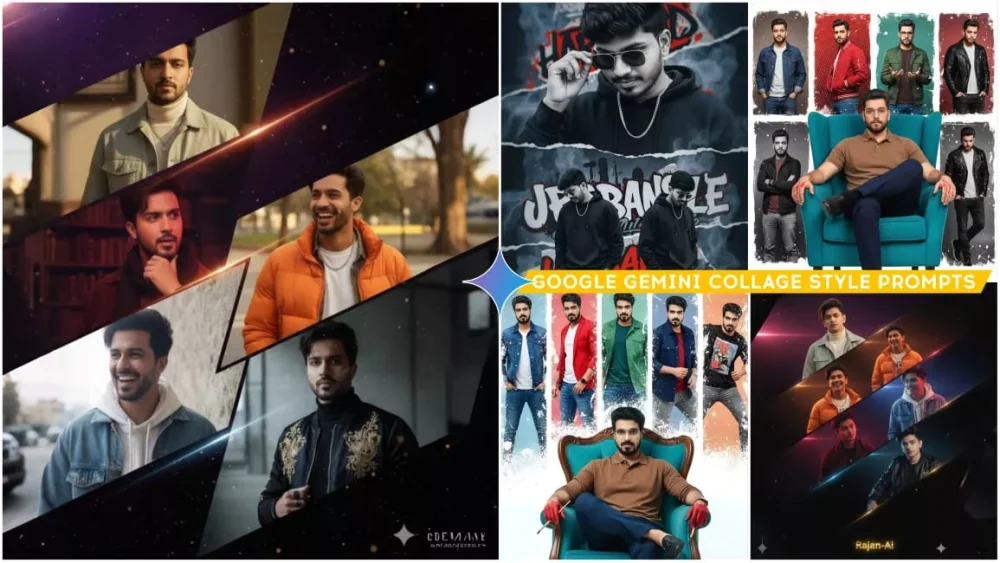
Speaking of the rest of the photo details, I want to make it clear that a graded photo will be created here. You’ll see it in the thumbnail, which I’ll include under the image section of the article. Your photo will be added there. Photos will be added in different small sections. You’ll see a border in the middle, if it’s set to the correct styling. This is why I’ve noticed it’s so popular on Instagram right now. Just look at how it works there. It immediately starts going viral on Instagram, and I’ve explored Instagram.
Some people’s photos have already gone viral. Not many people have created them yet. I also want to suggest this method if you don’t have a lot of good photos. It might generate your image from a single photo, but in some cases, you’ll have to upload multiple photos. That will depend on the prompt. Read the prompt carefully once.

Use face image: 8K ultra-realistic cinematic poster featuring five diagonal panels of the same young man, each showing a distinct emotion, outfit, and lighting style
- detailed yet natural, filmic, and tactile.
*Calm:* Light sage utility jacket over a cream turtleneck, soft jewelry shine, warm sunlight on a relaxed face.
*Smiling:* Orange puffer over white tee and silver chain, mid-laugh under golden light. *Laughing:* Oversized white hoodie with denim overshirt, radiant backlight and candid energy.

*Thoughtful:* Maroon corduroy shirt, dark scart, silver pendant, moody crimson-blue lighting, introspective gaze.

*Serious:* Black bomber with gold embroidery, matte accessories, half-lit face in cold directional light.

The five panels slice through a cosmic violet-to-black gradient, scattered with golden dust, lens flares, and neon streaks of red, amber, and blue. Fine film grain, cinematic shadows, and soft rim light create realism and depth.

Give the same exact face 8k ultra image. A stylish urban poster of a young man named HARI PRASAD. The design features a large close-up portrait of him with a modern hairstyle, looking down while adjusting his sunglasses. Below, there are two full-body versions of him standing in a casual pose, wearing a black sweatshirt, black pants, white sneakers, and a chain necklace. The background is artistic and abstract, with torn paper effects, graffiti-style text, and smoky textures.

A composite image featuring an very handsome lite skin young man(reference image), He is seated in a turquoise armchair, with a confident posture, his legs crossed, hands on the armrests, and sporting a brown polo shirt, dark blue trousers, and black loafers. Red colour and paint brush are visible on his hands. He wears glasses and has a serious expression. Around him, in a series of segmented one lines vertical panels, are six different images of the same man in various poses and outfits, each with a different style. These panels have a distressed, grunge effect, with white splatters that partially obscure the background. The man's various outfits in the panels include a blue denim jacket over a white t-shirt and jeans, a red jacket over a white shirt and jeans, a green jacket over a dark t-shirt and jeans, a navy blue jacket over a red t-shirt and jeans, and a black shirt over grey pants. He is standing and interacting with the camera. On the floor in front of the armchair is a newspaper.

8K ultra-realistic cinematic poster featuring five diagonal panels of the same young man, each capturing a different emotion, fashion style, and lighting mood — all designed to look natural yet strikingly cinematic. Calm: He wears a light sage-green utility jacket over a cream turtleneck, subtle jewelry glinting in warm sunlight, expression relaxed and centered. Smiling: Dressed in a cropped orange puffer jacket with a white graphic tee and silver chain, captured mid-laugh under soft golden light. Laughing: Wearing a cozy oversized white hoodie under a denim overshirt, glowing backlight creates a radiant, candid energy. Thoughtful: In a deep maroon corduroy shirt layered with a dark scarf and minimal silver pendant, expression quiet and introspective under moody crimson-blue lighting. Serious: Clad in a sleek black bomber jacket with gold embroidery and matte black accessories, face half-lit with cold directional light for a dramatic cinematic finish. The five panels cut diagonally across a textured cosmic gradient backdrop that shifts from violet to black, filled with floating golden dust, lens flares, and streaks of neon red, amber, and blue. Fine film grain, realistic shadows, and soft rim lighting add tactile realism. At the bottom, the glowing metallic gold logo reads Rajan-Ai, centered with cinematic symmetry.

A composite image of a very handsome light-skinned young man seated in a turquoise armchair. He sits confidently with one leg crossed over the other, hands resting on the armrests. He’s wearing a brown polo shirt, dark blue trousers, and black loafers. Red paint and a paintbrush are visible on his hands. He wears glasses and has a calm but serious expression. Surrounding him are six narrow vertical panels, each showing him in different outfits and poses: denim jacket with white tee and jeans, red jacket with white shirt, green jacket with dark tee, navy jacket with red shirt, black shirt with grey pants, and one casual look. The panels have a distressed, grunge texture with white splatters partially covering the background. A folded newspaper lies on the floor in front of the chair. Lighting is bright and even, set against a clean white background.

Create A modern cinematic poster featuring should be 5 diagonally panels of the same man,
each should be showing a different emotion— calm (pastel blue suit, golden sunlight), smiling (black t-shirt, green bomber jacket), attitude (white hoodie, glowing backlight), thoughtful (maroon shirt, metallic chain), and serious (black coat, golden shoulder patterns). Panels should cut across a textured cosmic gradient background (dark purple to black) With glowing golden dust and neon red and gold streaks. Use uploaded face 100%.
How To Select Photos?
If I were to explain the features of using Google Gemini, it would be quite useful for you. I should explain it to you, because nowadays, people tell you how to do this kind of trading, but no one explains how to create it. First, you’ll find the background change option. You can change the background with just one click. If you want to change something, just write “I want this background.” It will change it in a completely realistic way. You can also change it by typing “Sky replacement.” If you want to change the color of your clothes, just mention the color of the clothes there. It will change the color of the clothes. For example, we used to have to use different applications to smooth our faces.
Here, you can smooth the face in just one click, and you can also do color grading, retouching, etc. in just one click. The best option is the text-to-image option. This works with images. When we don’t want to use our own photos, we won’t use the Text to Image option here. We can simply customize it as desired.
How To Create Google Gemini Collage Style Ai Photo Editing Prompts
Those who are interested in understanding the process of creating photos, please read this paragraph carefully. I’ll explain it in such simple language that you’ll be surprised how simply you explained it, and we had no problem with it. First, I’ll provide you with the use of prompts. I’ll teach you how to use them. If you’ve learned editing, you’ll be given a button with a prompt. You simply click on it, or you can select and copy it. There are two options. You can use either. After that, I’ll explain its details. We don’t have to do anything with it; we just need to adjust everything in the prompt list.
So, what we’ll do is copy whatever prompt we have. Then, we’ll go to Google Gemini, paste the prompt there, click the “plus” option, and upload the photo. You’ll need to select the prompt once. Depending on the demand, some may require one photo, while others may require three or four. Upload them as needed. Click on the “Generate” option. Your photo will be ready.
Conclusion
Now, these details I’ve shared are for grid photos. If you need any editing for your next article, such as additional content or anything else, you can contact us by commenting. You can also contact us on Instagram. We have a messaging option there. It’s available. You can ask us by messaging from there. We’ll definitely provide you with something new, allowing you to do more editing, and it will be very beneficial.