Google Gemini Bike Lover Ai Photo Editing Prompts – Bike lovers, meaning those who love bikes, will definitely love this kind of photo. I already told you about this bike-themed photo some time ago. You loved it and gave it a lot of love. Now I decided, why not tell you about some unique bike-themed photo editing that’s going viral right now? So I started searching for it and found a lot of photos on Instagram that were going viral. I was just showing you those edits because they weren’t reaching many users. I’m going to tell you about these different types of unique styles. How can you create a photo with your favorite bike? You can even change the bike. I’ll explain that to you later. Just read the article carefully.
Details Of Google Gemini Bike Lover Ai Photo Editing Prompts
Just like I told you, this is a special editing app for bike lovers, that’s absolutely true. This is a special editing app. You’ll find many things in it. For example, you can add your favorite bike. I’ve added all the bikes I see here based on my own preferences. If you want, you can select any photo from here and replace any bike with another. This is going to be the best part, and you can see the rest of the location. We’ve prepared your photo here with a really amazing location. A bike photoshoot couldn’t be done in a better location than this, because all the photos I’ve provided you so far have been different, but this one is quite different. Those who like it can easily create it.

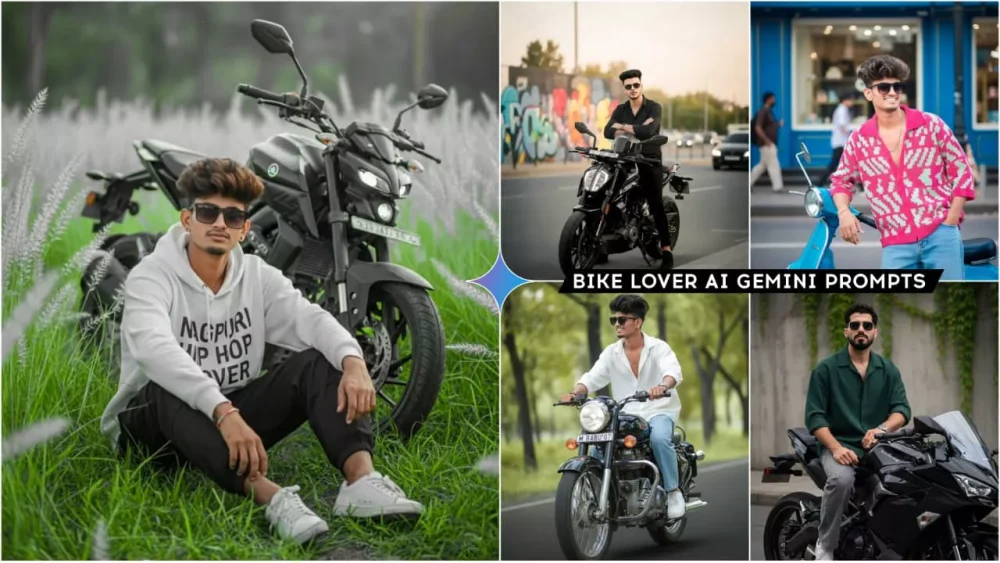
A slim-fit 5'9 young man riding his black Royal Enfield Bullet 350, glancing confidently to the side, hands on the handlebars, leaning naturally into the ride. He's wearing an Oversized white linen shirt with the top buttons open, light blue baggy jeans, and clean white Nike Air Force 1 sneakers. A silver wristwatch shines subtly on his wrist, and narrow-frame rectangular classy sunglasses complete his look. His face is fully visible preserve 100% face. Number plate editingprompt

A hyper-realistic cinematic 9:16 portrait based on the uploaded image, keeping the same face and hairstyle of A stylish young man standing confidently beside a sleek black street motorcycle on an urban roadside during golden hour. He wears an all-black outfit-fitted black t-shirt, black jeans, black sneakers -and dark sunglasses, exuding a bold, modern vibe. The motorcycle is detailed and polished, with visible license plate and chrome accents. Behind him, a vibrant graffiti-covered wall adds an edgy, artistic backdrop. The road curves gently, with blurred cars and trees, in the distance, suggesting motion and depth. Lighting is warm and dramatic, casting soft shadows and enhancing textures. The mood is cinematic and rebellious, with a touch of street fashion. Shot in 8K resolution, shallow depth of field, realistic skin texture, dynamic contrast, urban color grading.

Indian young man (followed by given picture face is 100% unchanged) with wavy, hair style volume, wearing a loose-fitting, vibrant knit shirt with pink and mint green patterns and rolled-up sleeves.
The shirt is unbuttoned at the chest, paired with relaxed blue jeans. He poses stylishly leaning against a bright blue Vespa Scooter, one hand on the handle, sitting casually in an urban street Scene with a blue shop exterior and large windows in background daylight lively street ambiance
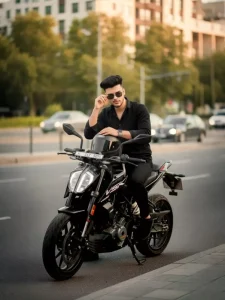
A hyper-realistic cinematic 9:16 portrait based on the uploaded image, keeping the same face and hairstyle of A confident young man sitting stylishly on a black KTM Duke motorcycle parked on the side of an urban road during golden hour. He wears an all-black outfit-black t-shirt, black jeans, black sneakers-and dark sunglasses, adjusting them with one hand while the other rests on the handlebar. The motorcycle is sleek and modern, with visible KTM Duke branding and a clear license plate (PB 65 5535). The background features a blurred cityscape with trees, buildings, and moving vehicles, adding depth and motion. Lighting is warm and cinematic, casting soft shadows and highlighting textures. The mood is bold, fashionable, and urban, with a touch of street attitude. Shot in 8K resolution, shallow depth of field, realistic skin texture, dynamic contrast, urban color grading.

Ultra Realistic 4k cinematic portrait of handsome young boy. seated in a long height lush green field, wearing white color oversized printed hoodie loose black colour cargo pant. and puma vwhite shoes, and relaxed, he gazes thoughtfully into the distance, give a instagram poss .he looking on camera with cutness His face and hair match the reference image 100%. Soft white feathery grass and blurred trees create a shallow depth of field. The boy is looking at the camera. And a mt15 4 in

Creat a 8k hyper-realistic dark green portrait cinematic image with dramatic bold attitude and confidence actions (uploaded photo 100% face match) of a 21 year young asian man curly hair style with wearing an oversized mjenda black shirt with the top buttons undone.stylish lose grey wash baggy pants, watch is left hand and white shoes (no breslet on other hand), slightly curly dark hair, sharp jawline, direct gaze. Sitting black ninja Z900. againsta grey wall with green foliage

Hyper-realistic full body shot: me A 16 year old cool young boy black khelo india tracksuit prent (45) jacket red tshit, sky blue baggy Jean's, and withe sliper, and slightly messy dark hair, sharp jawline, direct gaze, his height, he sitting on a customnized orange and orange ktm Duke 160 motorcycle, He is looking in camera, He has of the bike and he has placed his hands on it, The scene is Outdoors keep my face same 100% same as in the reference.gopro set kr do.remove mirror.bike sidha hona chahiye.aur bike ke side me khada hu hand me helmet hai, mera hight 4,5" fit

100% my face same to same and high quality regulations A stylish young man in image) is sitting on a Yamaha R15 bike in a lush, sun-drenched forest.
He a black checked shit. The young man is smiling naturally while gently touching a green leaf from a nearby branch.
The background is softly blurred with green trees, foliage, and sunlight creating a warm, golden-hour glow with subtle lens flare. The foreground has vibrant green ferns, giving the Scene a serene and cinematic atmosphere
How To Change Your Bike In Gemini?
As we explained to you, this is a photo of bike lovers, so you can create it easily. That’s absolutely correct. You can easily create your own photo. You just need to know the basics. I mentioned that you can change your photo here. Most importantly, you can also change your bike here. To change your bike, you need to pay attention to the prompt. For example, in the prompt I’m using here, you’ll need to remove something from it and replace it. For example, now you’ll see the bike labeled “This Bike.” It will have this element. You just need to remove it and replace it with your brother’s name. For example, if you want to add “Bullet,” write the full bike name or the Royal Enfield model. This will generate a perfect photo. Now, if you write half the name, it won’t produce the correct result. You know this because I tried it.
How To Use Google Gemini Bike Lover Ai Photo Editing Prompts
Now, as for creating a photo, that’s also quite simple. You just learn how to create a photo. I’ll explain it to you. Look, different people will explain different methods for creating a photo. But my job is to teach you editing in the most unique style. Here, you’ve been given prompts in different styles. You’ll find many photos, and you’ll find the prompt below them. Now, select the photo you like and decide that you want it in this style. The pose of our photo should be this. So, what you need to do is copy that prompt. After copying, you’ll need to go to Google Gemini. To do that, you’ll first need to paste the from. There, go to the Plus option and then upload the photo. After uploading the photo, you’ll get the Generate option. Then, do that, and your photo will be ready with your best bike.
How To Use Auto-edit Feature In Gemini?
How can you use the auto-edit feature in Gemini? Look, Gemini is basically a website where you can get anything written. You can write articles, prompts, or create your own photos and select the auto-edit option. After that, you need to detail your photo and share it there. For example, what kind of element you want in it. You write that element there. Then click on the generate option. It will get your photo ready for you today with good results.