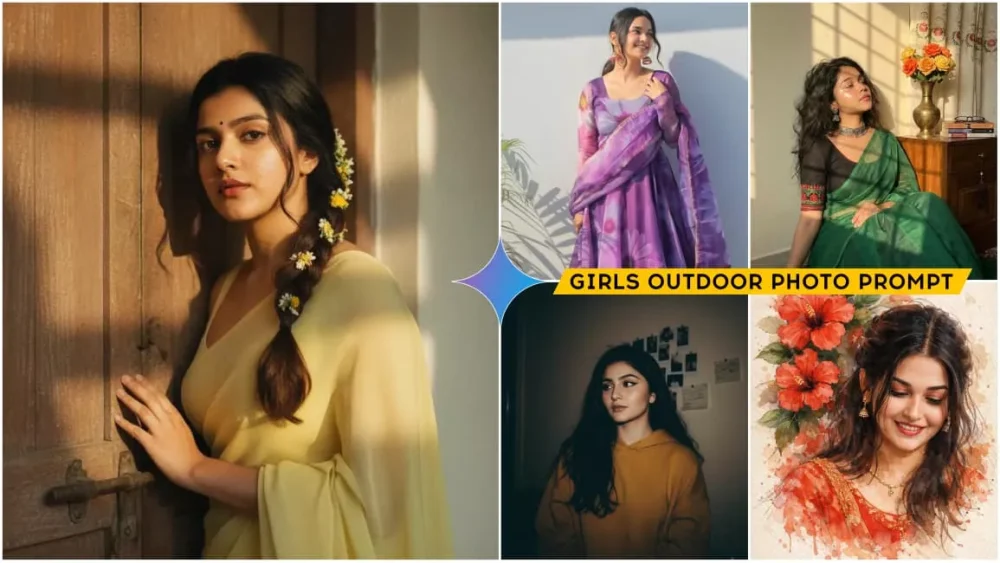
Girls Natural Ai Photo Editing Prompts – On social media, you’ll see many photos going viral, especially those featuring girls. You’ll notice that they look completely different, and you might even wonder if they’re real. But yes, they are real photos. They’re simply generated using specific techniques. I’ve provided many prompts for boys’ photos, but it’s been a while since I showed you how to create similar edits for girls’ photos. So I thought I’d explain in this article how you can create different types of photos of girls in just a few simple steps, and you’ll get amazing results. For those who are interested, this article will guide you step-by-step on how to learn this type of editing, how to customize it, and how to create these kinds of images.
Complete Breakdown Of This Editing
Now let’s understand the complete breakdown of what will happen and how everything will work. I’ll explain everything. You’ll see that girls post photos in many different styles. Now you have many options here. You’ll see that when you use a selfie, it generates photos that are so realistic you won’t believe your eyes. You’ll see that you can transform your normal photos into images with an Indian style, like those wearing salwar suits. You’ll also be shown how to create photos with modern outfits. The background of your photos will change from a normal one to a completely professional look. And we will be using Gemini for this. We’ll also show you how you can create this yourself.
Some Mistakes You Should Always Avoid
There are some mistakes you should always avoid while editing, or even when posting. For example, when you go to do this editing, you’ll need to use a selfie. Now, you need to use a selfie where your face is clearly visible, with a simple expression. Don’t use photos where you’re laughing, wearing a mask, or have your hair covering your face. Take a completely normal photo. Don’t even wear a hat. A completely normal, simple photo is needed.
Just select the part of your face; a selfie of your face will suffice. The best thing is to point the camera forward and then click the picture. After that, another mistake happens: you tap to save it, which is wrong. This completely ruins the quality of your photo. You need to open the photo and you’ll find a save button there. Then, when you go to post it on social media, another mistake is that you don’t use relevant hashtags. This reduces the reach of your video or photo. You should definitely use hashtags.
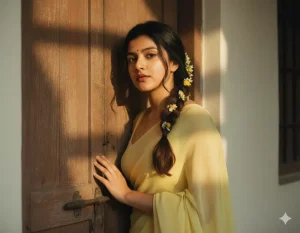
 "prompt": "A perfect plain chiffon saree pastel coral pink, dreamy Pinterest retro aesthetic. Hair open wavy with scarf tied loosely. Girl sitting by window, soft golden sunlight falling on face, lost in thought. Cinematic pastel grading with glowing highlights.",
 "ratio": "9:16",
 "style": "Ultra HD, Pastel Glow, Dreamy Retro"
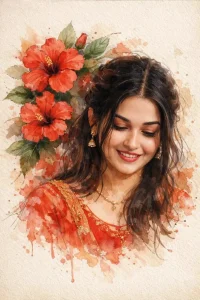
A stylized digital watercolor illustration of a young woman with soft, realistic facial features and expressive eyes, black hair loosely tied back with strands falling around her face. She wears a red traditional dress with subtle gold detailing and delicate jewelry. Large red hibiscus flowers and green leaves surround her head and shoulders, blending into the background like ink and watercolor splashes. The composition is slightly tilted, giving a dreamy, poetic feel. Fine sketch lines, paint
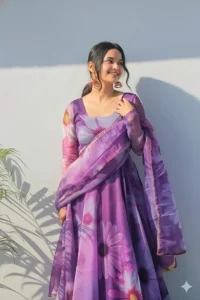
A vibrant, eye-level outdoor shot features a beautiful young Indian woman with dark hair tied back, posing confidently against a sunlit, textured white wall. She's dressed in a stunning purple floral Anarkali suit with a long, flowing skirt and matching dupatta, both adorned with large, expressive flower patterns in various shades of purple, pink, and white. Her attire is complemented by ornate, dangling earrings. The sunlight creates interesting shadows on the wall to the left, and a hint of green foliage is visible at the bottom left. The woman's expression is joyful and serene, with a slight smile and her gaze directed towards the upper right.
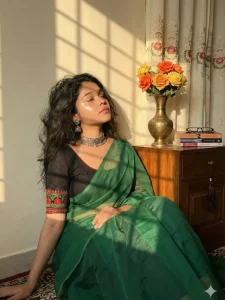
using my face Subject: Young Indian/South Asian woman, "soft girl" aesthetic.
Skin: Warm undertone, "glass skin" makeup, high-gloss highlighter on cheekbones and nose, soft pink lips. Hair: Dark brown/black, loose waves, voluminous, messy but styled. Attire: Green saree (looks like organza or chiffon tissue fabric), black blouse with red/green embroidery on the hem, silver oxidized choker, silver jhumka earrings. 2. Pose & Expression:bPose: Sitting on the floor, relaxed, leaning back, hand resting gently on the knee/saree. Head position: Chin tilted up, face turned slightly away from the camera toward the light source. Expression: Serene, peaceful, "main character energy," eyes half-closed or looking down/away. 3. Environment & Props: Background: White/Cream wall, curtains with vertical floral vine embroidery. Furniture: Wooden cabinet/side table with a warm varnish finish. Props: Antique brass/metal narrow-neck vase, bouquet of orange and yellow roses (fake/fabric flowers), stack of books (blue, white, grey spines), reading glasses, dark hanging tassel ornament on the drawer knob. 4. Lighting & Atmosphere (Crucial): Type: Direct sunlight, Golden Hour, Sunset light. Effect: Chiaroscuro (strong contrast between light and dark). Shadows: The light is casting a "gobo" effect (shadow of a window grid or blinds) onto the wall and the subject.Vibe: Warm, nostalgic, cozy, aesthetic, vintage. 5. Camera Settings & Tech: Angle: Eye-level or slightly low angle. Focal Length: 35mm or 50mm (portrait but including environment). Aperture: f/2.8 or f/4 (Subject is sharp, background is slightly softened but readable).Style: Kodak Portra 400 film emulation (for that warm, grainy look).
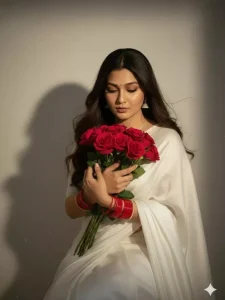
Create a retro vintage grainy but bright image of the reference picture but draped in a perfect white colour.
Pinteresty aesthetic retro saree and red bangles. It must feel like a 90s movie straight wavy hair with a bouquet of red roses and romanticising windy environment. The girl is looking down sitting against a solid wall deep shadows and contrast drama, creating a mysterious and artistic. Keep the face and body size same as I uploaded no alternation.
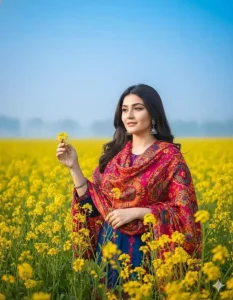
A vibrant portrait of a young Bangladeshi
woman standing in the middle of a blooming yellow mustard flower field. She is gently touching the flowers with one hand. The sky is clear blue with a hint of soft white mist near the horizon.She is wearing a colorful winter outfit that contrasts beautifully with the yellow flowers.The image is bright, colorful, and highly saturated. Professional photography,shallow depth of field. The face must strictly match the attached reference image
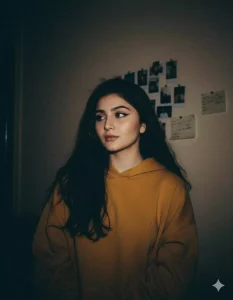
A low-light 90s disposable-camera photo of a young woman with the same unchanged face and pale complexion. Dim ambient lighting barely outlines her features. Loose black hair blends into the shadows.

She wears a dark yellow hoodie. The background is a barely visible beige wall with taped polaroids and scribbled notes, softly swallowed by darkness. Heavy grain, muted contrast, moody realism. The face expression should 100% same With 4k resolution ..
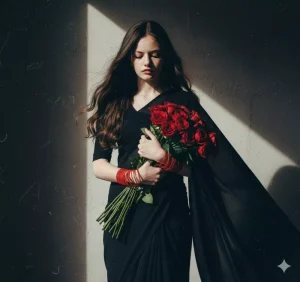
Create a retro vintage grainy but bright image of the reference picture but draped in a perfect black colour. Pinterest aesthetic retro saree and red bangles. The girl is looking down standing against a solid wall deep shadows and contrast drama, creating a mysterious and artistic same face.
How To Create Image With Girls Natural Ai Photo Editing Prompts
Now, using the prompt we’ve provided, you can create a great photo and see which styles suit you and which don’t. Many people like to create photos with modern-style dresses, while others prefer traditional attire. Here, we’ve shown you several types of photos, and the corresponding prompt is provided below each one. Copy the prompt you like best. Then, you’ll see a “Create Image” option below. Click on it, and it will open the Google Gemini website. You’ll need to sign up with your email ID. This will only happen the first time. If you’re using Chrome, it will log in automatically.
After that, you need to select the “Create Image” option again. This will give you a perfect result. Also, in the model section, select the “Pro Model.” This will ensure it creates a perfect photo based on whatever you write in the prompt. Then, go to the plus (+) option below and upload your photo – the selfie I mentioned earlier. After that, click “Generate” and wait a few seconds. It will create a fantastic photo for you.
Alternative Prompts
Look, sometimes when you’re doing editing, you feel like what you have isn’t enough, and you definitely need an alternative. It’s exactly the same here. After seeing all these editing options, if you feel that you don’t like any of them and you need an alternative, then I’ll tell you about an alternative as well. No problem. You just need to search for “girls prompt” on our website. This will show you all the prompts related to girls. I’ve never provided only one prompt at a time; I’ve always provided several prompts. Another option is that if you feel that what you’re looking for isn’t available on our website, you can simply go to ChatGPT. Upload the photo there and ask it to share the prompt for that photo. It will give you the prompt, and then you can use it to generate your photo.