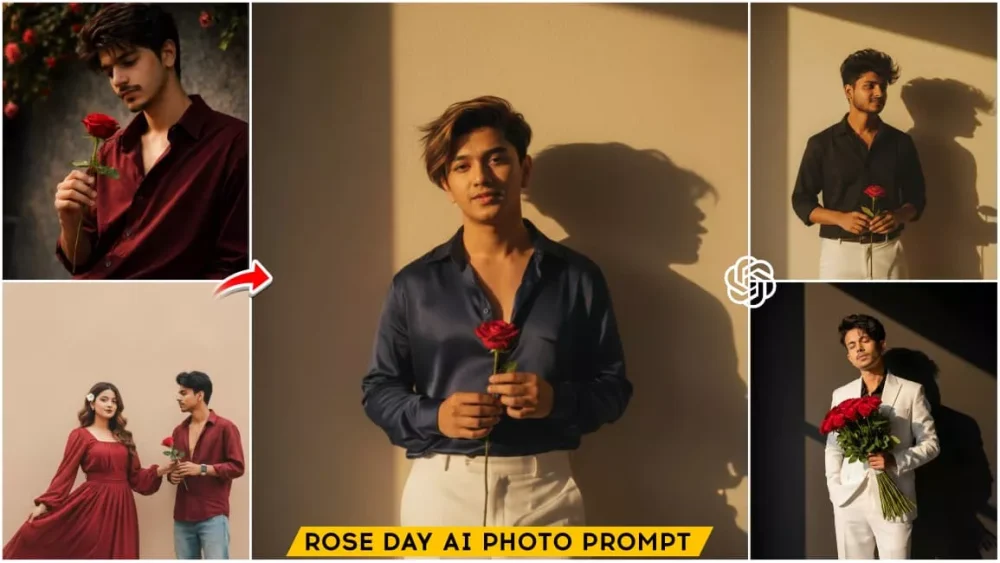
Rose Day Ai Photo Prompts – Rose Day is the first day of Valentine’s Week, which consists of seven different days. The first day is Rose Day, and many people create and post various types of Rose Day-themed photos on their social media. You’ll see them holding a rose in their hand, dressed nicely, with a carefully chosen background location. Creating these photos requires a lot of effort. But in today’s world, the age of AI, people are using AI to create these things. And I’m going to tell you how you can easily create such photos using AI tools like Gemini or ChatGPT. We have already shared the prompts with you. Learn how to use them.
Full Breakdown Of This Editing
What elements do we see in these Rose Day-themed photos that are being created? How are they created? First, understand that to create this type of photo, we use a sample photo. This sample photo is then transformed into this kind of image. We also use prompts for this. I have provided several prompts here; you can check them out. This works by using Gemini or ChatGPT. You get excellent results with both. As you can see, I have provided prompts. Using these prompts, you can create different types of photos. The special thing about this is that your photo will have a retro aesthetic. Some photos will have that style, and others will look more realistic. In all of them, you will see roses – a Rose Day special – either in your hands or next to you. You can use these photos on Rose Day or even normally.
Tutorial : How To Use Rose Day Ai Photo Prompts
Now I’ll share a tutorial on how to use it. I’ll explain how you can use it. It’s very simple to use. Different styles are provided, and you can copy any of them to create a photo in the same style as the images shown there. Look at the photos there, select the prompt that matches the style you want, and copy it. Then, you’ll find a “Create Image” option below. Click on it. You’ll then be taken directly to Google Gemini. Sign in with your email ID, just like you would the first time you use it. If you’re already using it in Chrome, it will happen automatically. After that, select the “Create Image” option, then go to the plus icon and upload your photo. Once you’ve uploaded the photo, paste the prompt you copied, and then click “Generate.” After waiting a few seconds, you’ll see that your photo is ready, in the same style as the prompt you selected.
Customization Of Prompts
Now, I’ll show you how to customize it. Many of you might find that you need to customize the prompts. You might not like the color, the background, or even the style. You can customize it according to your preferences. I can give you the options. Let me explain how to do it. First, whenever you use a prompt, as I mentioned, you’ll paste it into Gemini. If you want to change the color of the clothes, you’ll go to the colors section and change the color, adding the color you want. You can also change any details in the background, for example, if you want a cinematic background. Adding cinematic background details is up to you. If you want to completely change the style, you can do that too. But first, look at the details carefully. For example, do you want a realistic image or a normal, manipulated type of image? You can change the word “realistic” to “manipulation” and create that type of photo.

Create a retro vintage grainy but bright image of the reference picture but draped in a perfect navy blue color Pinteresty aesthetic retro shirt with white pant and holding a rose flower in hands. It must feel like a 90s movie and romanticising windy environment. The boy is standing against a solid wall deep shadows and contrast drama, creating a mysterious and artistic atmosphere where the lighting is warm with a golden tones of evoking a sunset or golden hour glow. The background is minimalist and slightly textured the expressi on her face is moody, calm yet happy and introspective.

A cinematic, ultra-realistic portrait of a young woman (based on uploaded image) in an off-shoulder black outfit, holding a single red rose. She gazes slightly upward with a dreamy, thoughtful expression. Soft circular spotlight on the wall behind her creates dramatic shadows and a stylish editorial mood. Ultra HD, sharp details, cinematic fashion photography aesthetic. Aspect ratio: 9:16 (vertical).
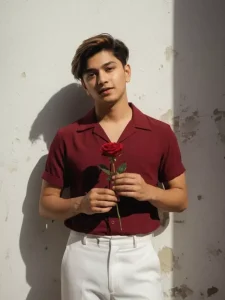
Retro vintage grainy yet bright cinematic portrait of a young man (Uploaded photo Reference) dressed in a perfect deep red wine-colored retro shirt paired with crisp white pants, holding a single rose flower delicately in his hands. He stands against a solid textured wall, surrounded by deep dramatic shadows.
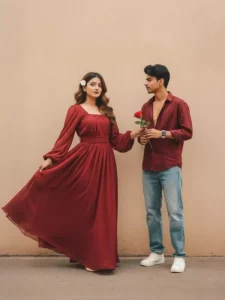
Create a retro Vintage-inspired image, grainy yet bright - based on the reference picture. The girl should be draped in a perfect red, Pinterest-style aesthetic retro saree and boy should standing beside her in maroon shirt smiling at her, having a rose in his hand, The vibe must capture the essence of a 90s movie brown -haired baddie, with shiny hair and a small white flower tucked visibly into her hair, enhanced by a windy, romantic atmosphere. Both are standing against a solid wall
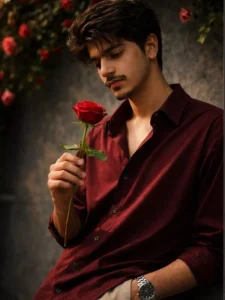
Create a realistic dark green portrait cinematic image with dramatic bold attitude and confidence actions of a young man (refrence image given) with wearing an oversized dark red shirt with the top buttons and white baggy pants, watch is left hand, curly hair, sharp jawline, bright light. Standing confidently with cool pose, side angle photo against a grey walll with green foliage and Red&rose flowers overhead. Face match 100%.

"Ultra-realistic cinematic portrait of a stylish young man stand-ing against a dark minimal background with a soft golden sunlight beam cast-ing dramatic shadows. He is wearing a crisp, elegant white suit (blazer and wide-leg trousers) with one hand ca-sually in his pocket and the other holding a bouquet of red roses close to his chest. His hair is voluminous and slightly tousled, styled naturally with texture. His expression is serene and confident, eyes closed, basking in the warm sunlight. The composition high-lights the play of light and shadow, with a strong shadow silhouette falling on the wall behind him. The mood is romantic, artistic, and editorial - cap-turing both sophistication and vulner-ability. Shot in high resolution, with cinematic tones, sharp details, and soft contrast. exactly the same facial features."
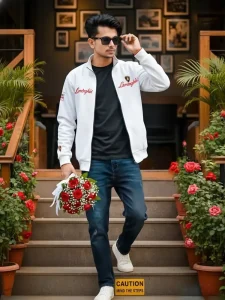
Ultra-realistic full-body cinematic photograph of a stylish young man walking down outdoor cafe steps. He is wearing a white Lamborghini zip-up jacket with red text logo on the chest and sleeves, black inner t-shirt, dark blue loose-fit jeans with distressed patches, and clean white sneakers, man looking slightly left side.

Accessories: black rectangular sunglasses, a rose bouquet in right hand

Pose: confidently stepping down stairs, left hand adjusting sunglasses, natural walking motion.

Face:

same to same face as reference image, realistic skin texture, sharp jawline, styled voluminous black hair.

Background: aesthetic café entrance with green plants in pots on both sides and flowering red rose plants, wooden railings, warm ambient daylight, framed pictures on wall.

Floor: concrete steps with a small "Caution Mind The Steps" sign visible.

Lighting: soft natural daylight, cinematic color grading.

Camera: DSLR, full-body shot, eye-level angle, shallow depth of field, ultra-sharp focus.

Style: hyper-realistic, Instagram fashion photography, 8K quality, natural colors. Exactly same facial features.

NEGATIVE PROMPT (Short):

cartoon, anime, illustration, painting, blur, low quality, extra fingers, distorted face, watermark, logo change, text change, unreal skin.
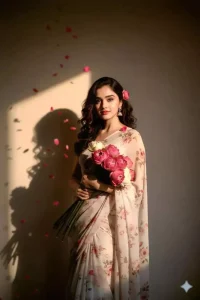
A perfect flower chiffon white color. pinteresty aesthetic retro saree It must feel like a 90s movie dark brown wavy curly hair with a small flower tucked visibly into her curls the girl is standing against a solid wall deep shadows and contrast drama lotus flower bookay in her hand while rose petals are showering on her and creating a mysterious and artistic atmosphere where the lighting is worm a golden tones of evoking a sunset or golden hour glow please do not change the face
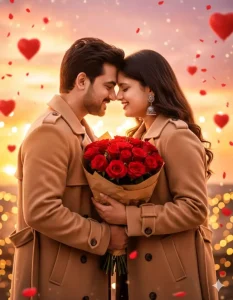
A PHOTOREALISTIC, CINEMATIC SHOT OF A ROMANTIC YOUNG COUPLE STANDING VERY CLOSE WITH THEIR FOREHEADS TOUCHING, SMILING INTIMATELY AT EACH OTHER. THEY ARE HOLDING A LARGE, LUSH BOUQUET OF RED ROSES WRAPPED IN BROWN PAPER BETWEEN THEM. BOTH ARE WEARING STYLISH BEIGE WOOL TRENCH COATS. THE BACKGROUND IS A MAGICAL SUNSET WITH SOFT PINK AND ORANGE HUES, FILLED WITH FLOATING RED HEART-SHAPED BALLOONS AND FALLING ROSE PETALS. THE LIGHTING IS WARM AND GLOWING (GOLDEN HOUR), WITH SPARKLING BOKEH STRING LIGHTS IN THE BACKGROUND, HIGHLY DETAILED, 8K RESOLUTION, ROMANTIC ATMOSPHERE. --AR 2:3
Comparison Between 1st And 2nd Prompts
Now I’ll share a comparison of the first and second prompts with you. As you’ll see, this comparison is going to be quite different. What do we get in the first one? From the first prompt, we can generate a photo of a boy, while our second prompt generates a photo of a girl. Similarly, we used the third prompt for a couple’s photo, and then another one for a boy’s photo. We’ve used different styles. Since I’ve talked about the first and second prompts, let me tell you about the differences in details between the two. For example, in the boy’s photo, you’ll see that the boy is holding a rose, but the background is cinematic. It feels a bit more realistic. But if we talk about the girl’s background, it feels completely like a studio setting. It looks like the girl had a photoshoot in a studio. This also looks quite realistic. Both photos have their own set of admirers; some people prefer the studio look, while others prefer the realistic, cinematic type of photo.
Alternative Prompts:
I’ll also tell you about an alternative. For example, you’ll find many different prompts for Rose Day. But if you want to create different types of Rose Day photos specifically for boys, this will be very easy. I’ve shared articles on my own website with Rose Day photos for boys, where I showed how to create many different types of photos, including pictures of boys holding roses. You can check that out as well. This could be a great alternative for you. If you like some of the photos there, you can create them. If you like some of the others, you can create those too.