Underwater AI Photo Editing Prompts – If you are still creating generic photos using AI, you are going to fall far behind. My friend, in today’s times, you need to engage in creative editing that aligns with current trends. Take, for instance, this “underwater” trend—it is going absolutely viral right now. People are eager to capture photos like this, but creating such images is not something everyone can easily pull off. Nowadays, however, you can generate photos like this with great ease. Not only do they look fantastic, but since this is also a trending style on Instagram, creating photos in this genre will prove highly beneficial for you. I can assure you that if you move beyond standard editing and attempt creative styles like this, your photos are 100% guaranteed to go viral. We are constantly bringing you unique ideas and techniques to ensure your photos look absolutely stunning and captivating. In this article, we will walk you through exactly how to create these types of photos, covering all the necessary steps involved.
Details Of Underwater AI Photo Editing Prompts
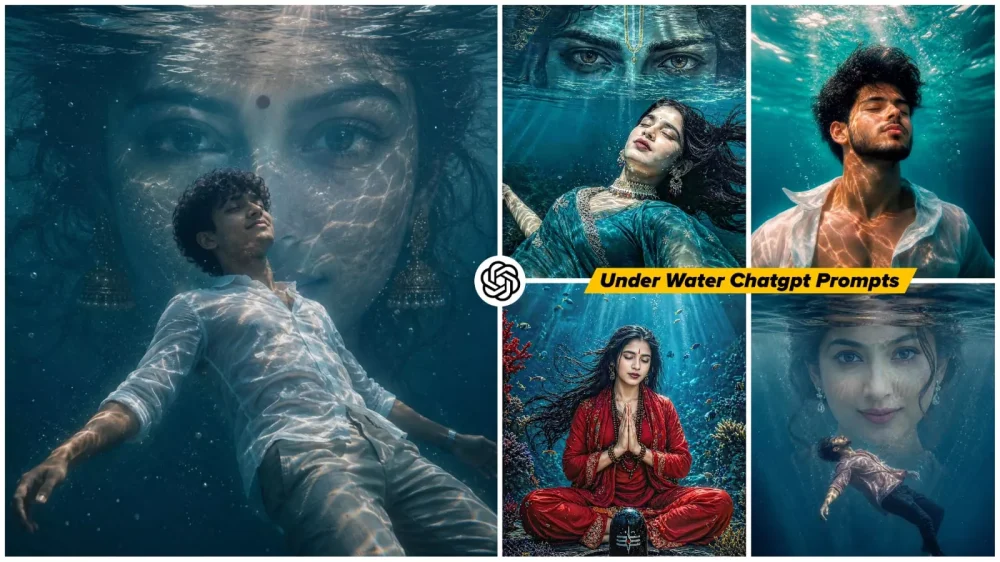
Now, let me explain what you can expect from this editing style. First and foremost, it features underwater editing. Here, you will experience a cinematic fantasy aesthetic—one that utilizes AI technology to transport you into an underwater realm. The imagery will depict you seated within this world, in a state of absolute tranquility—eyes closed, appearing as if you are deep in meditation. The visuals feature a deep-ocean backdrop that feels incredibly realistic. Furthermore, the water reflections, the floating bubbles, and the lighting effects are all rendered with such meticulous attention to detail that the final photograph turns out absolutely flawless. All of this work is executed entirely by our AI system. However, the objective here goes beyond merely creating a beautiful photograph; it aims to evoke the sensation of inhabiting an imaginary world—ensuring that any viewer who sees it immediately recognizes it as something truly unique.
Why Is This Concept Being Dubbed “Viral Editing”?
While underwater editing has become quite commonplace, a new element has now been introduced to it. You will notice that—specifically in the section of the underwater scene where the sky would typically appear—instead of a sky, you will see an eye positioned directly above your head. If the subject is a girl, a female eye will appear; conversely, if the subject is a boy, a male eye will be added. This happens automatically, requiring no manual intervention on your part. It serves to infuse your photograph with a deeper emotional resonance. Furthermore, alongside this feature, you also have the option to replace that eye with the “Eye of God”—a truly remarkable trick. I will make every effort to include the necessary prompts for this effect here as well.
Why Do Things Go Viral On Instagram?
It isn’t just ordinary photos that go viral on the platform. People are looking for images that possess strong visual appeal—photos that are unique and instantly eye-catching. They want the kind of image that compels them to stop scrolling and simply gaze at it. If your photograph is of this caliber—if it feels cinematic, evokes emotional vibes, or conveys a sense of fantasy—people will naturally gravitate toward it. They will linger on it, thereby boosting your photo’s impressions. Consequently, your image will appear in the feeds of a wider audience, significantly increasing your chances of going viral.
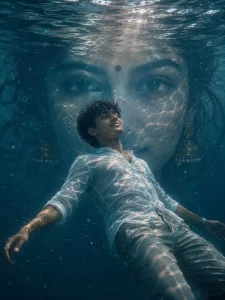
A surreal yet realistic underwater scene of a young man floating calmly, body slightly arched backward, viewed from a low angle. The water surface above shows soft natural ripples with gentle sunlight rays entering the water, creating subtle caustic light patterns. In the background, a large realistic Indian woman's face fills the frame symmetrically, partially blended with water reflections
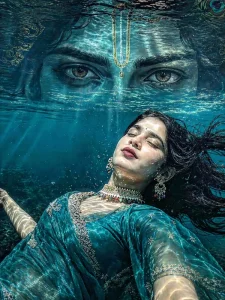
A surreal yet realistic underwater scene of a young woman fioating calmly, body slightly arched backward, viewed from a low angle. The water surface above shows soft natural ripples with gentle sunlight rays entering the water, creating subtle
caustic light patterns.
In the background, krishna eye
frame symmetrically, partially blended with water reflections.
He
has natural brown eyes
Lighting is soft and cinematic, natural sunlight, no
overexposed glow, no heavy particles. Colors are balanced
with mild teal water tones and warm skin tones, not
oversaturated
Style: ultra-realistic digital art, clean details, sharp focus,
minimal noise, natural textures, no excessive effects, no
fantasy glow, no sparkles.
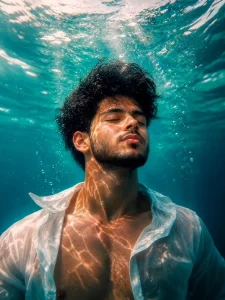
Hyper-realistic submerged portrait of a young male beneath crystal-clear aqua water, framed chest-up in ultra-cinematic underwater photography style. Camera slightly below eye level, angled upward as he floats vertically in stillness, head tilted toward the glowing surface. Eyes closed, calm meditative expression, dark short hair drifting naturally underwater. Loose white button-up shirt partially open, fabric weightless and softly flowing. Bright sunlight pierces from above, creating intricate caustic light refractions across skin and clothing. Rich turquoise surroundings with underwater haze, depth fade, delicate rising bubbles, reflective ripples, teal-and-amber cinematic grading, warm skin tones, muted ocean blues, realistic water distortion, ultra-detailed facial texture, HDR lighting, crisp focus, serene minimal atmosphere, ultra-realistic 8K underwater photography.
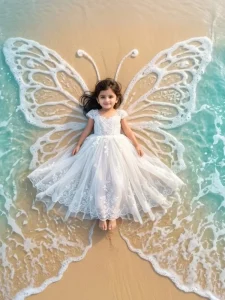
USING THIS REFERENCE IMAGE USE SAME FACE NO ALTERNATIVE "CREATE A MAGICAL CINEMATIC HIGH QUALITY AERIAL PORTRAIT OF AN ADORABLE BABY GIRL SITTING ON A BEACH SHORELINE DURING GOLDEN HOUR.
THE BABY HAS EXPRESSIVE EYES, TINY BLACK BINDI, AND A SWEET INNOCENT EXPRESSION WHILE LOOKING DIRECTLY UP AT THE CAMERA. SHE IS WEARING A DELICATE WHITE FAIRY-STYLE LACE DRESS SPREAD BEAUTIFULLY AROUND HER LIKE BUTTERFLY WINGS. GENTLE OCEAN WAVES AND WHITE SEA FOAM NATURALLY FORM LARGE SYMMETRICAL BUTTERFLY WINGS AROUND HER ON THE WET GOLDEN SAND. TRANSPARENT TURQUOISE WATER, SOFT FOAM TEXTURES, GLOWING SUNLIGHT, DREAMY BEACH ATMOSPHERE, FANTASY STORYTELLING VIBE, ULTRA REALISTIC DSLR PHOTOGRAPHY, HIGHLY DETAILED LACE FABRIC, SOFT PASTEL COLOR GRADING, SHALLOW DEPTH OF FIELD, ETHEREAL ANGELIC, DRONE PERSPECTIVE, PINTEREST AESTHETIC, ULTRA HD 8K QUALITY."
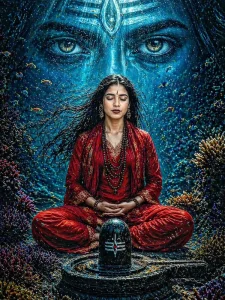
A serene underwater spiritua scene featuring a young Hindu woman meditating in a lotus position beneath the ocean. Red kurta He has long fiowing black hair drifting in the water, eyes closed in deep meditation, and hands joined in a Namaste gesture. He wears red traditional dhoti pants with golden borders, sacred rudraksha beads around his neck and wrists, and a red devotional scarf draped over his shoulders. A sacred tilak mark is visible on his forehead. In front of him stands a black Shiva Lingam placed on a stone base. Sunlight rays pierce through the ocean surface above, creating divine beams of light illuminating the yogi. Small colorful fish swim around
him in a circular formation, with coral reefs and vibrant underwater plants in red, purple, and gold surrounding the scene. Air bubbles rise gently through the clear turquoise
water.
The atmosphere is mystical, divine, and peaceful, highly
detailed, ultra-realistic, cinematic lighting, volumetric light
rays, high resolution, 8K
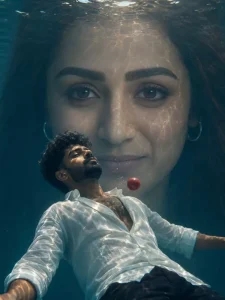
A SURREAL YET REALISTIC UNDERWATER SCENE OF A YOUNG MAN FLOATING CALMLY, BODY SLIGHTLY ARCHED BACKWARD, VIEWED FROM A LOW ANGLE. THE WATER SURFACE ABOVE SHOWS SOFT NATURAL RIPPLES WITH GENTLE SUNLIGHTRAYSENTERING THE WATER, CREATING SUBTLE CAUSTIC LIGHT PATTERNS.

IN THE BACKGROUND, A LARGE REALISTIC INDIAN WOMAN'S FACE FILLS THE FRAME SYMMETRICALLY, PARTIALLY BLENDED WITH WATER REFLECTIONS. SHE HASNATURAL BROWNEYES WITH SOFT KAJAL (NOTEXAGGERATED), EXPRESSIONIS CALM AND MINIMAL.

A SMALL RED SPHERE FLOATS NEAR THE MAN'S CHEST, SIMPLE AND CLEAN. LIGHTING IS SOFT AND CINEMATIC, NATURAL SUNLIGHT, NO OVEREXPOSED GLOW, NO HEAVY PARTICLES. COLORS ARE BALANCED WITH MILD TEAL WATER TONES AND WARM SKIN TONES, NOT OVERSATURATED.

STYLE:ULTRA-REALISTIC DIGITAL ART, CLEANDETAILS, SHARP FOCUS, MINIMAL NOISE, NATURAL TEXTURES, NO EXCESSIVE EFFECTS, NOFANTASY GLOW, NO SPARKLES.
How To Create This Image Using Chatgpt?
Let me show you the correct method for creating a photo right now. If you wish to generate a photo, the first step is to copy the prompt. Next, open the ChatGPT application from the Play Store; a direct link has also been provided here. Alternatively, you may use a web browser. Once there, paste the prompt into the chat box, and then click the “plus” icon to upload a photo. Ensure that the photo you select clearly displays your face; the lighting should be adequate, and the image must not be blurry. Finally, click “Generate.” You will then see that your photo is ready, delivering truly excellent results.
How Can This Editing Be So Realistic?
Well, in today’s world, AI image generation tools have become incredibly advanced. They automatically generate realistic shadows, water reflections, skin details, and depth—handling all these elements for you. You simply need to include those specific details in your prompt, and the tools will perfect your photo. That is precisely why the resulting images turn out to be absolutely realistic.