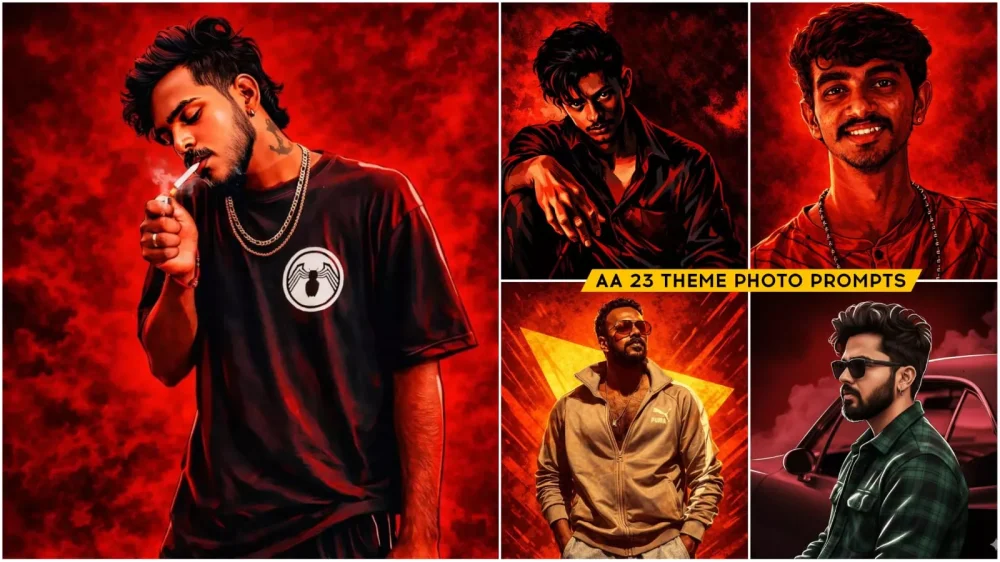
AA 23 Theme Photo Prompts – You’ll notice that photos with a red color scheme are currently going viral on social media. This is a unique trend. Videos related to this trend are also becoming very popular. We’ve already shared some with you. You might have even created your own videos using them. We’re going to teach you how to edit photos in this style because these are also going viral. This trend is specifically based on a song by Allu Arjun. If you create and post photos with this red color scheme, giving them a painted look, they’re likely to go viral. We’ve shared this so you can create different types of viral photos. There are some simple steps to create these, which I’ll be sharing with you here. I’ll show you how to create them and how to get a good result without distorting your face.
Details Of AA 23 Theme Photo Prompts
Let’s understand what kind of concept this is going to be. Let’s understand its editing style. For example, this photo will be entirely in red. The screen settings and everything else will blend with the red color in your photo. The overall structure will have a painting-like appearance. The entire photo will look like a painting, and you’ll also see a dark red color in the background, which will also be present on your face. The contrast has been kept relatively light. This is why you can see how a normal photo can be transformed into this kind of image. This is what we will learn, because creating this type of photo normally would require a lot of effort, but when we use AI, it becomes very easy. And I will show you how it can be done.
Editing Process Of AA 23 Theme Photo Prompts
Let’s understand the editing process. It will take your normal photo and, by adjusting the color balance, convert it into a portrait like this, where red will be the dominant color. To create this, we use Gemini. You can copy any prompt from here; there are different styles of prompts available. Choose the one you like and copy it. Then, you’ll find a Gemini button below. Click on it. You will then be redirected to the Google Gemini website. First, paste the prompt there. Then, go to the plus icon and upload your photo. After that, click on “Generate.” Wait a few seconds. It will prepare your photo with amazing results, which will make you very happy.

illustration of the person in the reference photo Maintain the exact face identity hairstyle, expression skin tone and pose with zero distortion Transform the entire scene into a deep red high contrast Tamil gangster movie poster style. Replace the background with red gradients smoky atmosphere and subtle textures. Add bold comic book shading thick outlines, strong black shadows and glossy highlights on the skin and clothes. Stylize the outfit with richer tones clean folds and dynamic lighting.

 A dramatic cinematic digital illustration,
The art style is bold and graphic-novel inspired, with strong shadows, sharp linework, and high contrast.
The background is vivid red with diagonal streaks and a large yellow triangular shape behind him, creating a heroic poster composition. Warm color palette, moody lighting, stylized realism, movie poster quality, ultra-detailed, high resolution.

A hyper-detailed digital illustration of a rugged man with medium-length messy black hair and light stubble, staring intensely at the viewer. Dramatic red lighting and color grading dominate the scene, with a smoky, textured red background creating a cinematic, action-movie poster vibe. The style is graphic novel / comic book realism with sharp linework, high contrast shadows, and glowing rim light along the face and shoulders.
The man wears a sleeveless dark red shirt. Ultra high resolution, 4k, dramatic chiaroscuro lighting, bold brush strokes, realistic skin texture, intense mood, symmetrical portrait composition, centered framing.

"Create a cinematic digital illustration of the person in the reference photo. Maintain the exact face, identity, hairstyle, expression, skin tone, and pose with zero distortion. Transform the entire scene into a deep red high-contrast Tamil gangster movie poster style. Replace the background with red gradients, smoky atmosphere, and subtle textures. Add bold comic-book shading, thick outlines, strong black shadows, and glossy highlights on the skin and clothes. Stylize the outfit with richer tones, clean folds, and dynamic lighting while keeping the original clothing design. Add intense highlights to the jawline, cheekbones, and edges of the body. Maintain the original pose and attitude. Create a gritty, powerful, cinematic mood with dramatic lighting and high contrast. Ultra-detailed, sharp lines, vibrant red atmosphere, action-movie poster energy, 4K illustration."

:"Create a cinematic digital illustration of the person in the reference

photo. Maintain the exact face, identity, hairstyle, expression, skin

tone, and pose with zero distortion. Transform the entire scene into

a deep red high-contrast Tamil gangster movie poster style. Replace

the background with red gradients, smoky atmosphere, and subtle

textures. Add bold comic-book shading, thick outlines, strong black

shadows, and glossy highlights on the skin and clothes. Stylize the

outfit…
In Terms Of Safety And Creative Responsibility
In terms of safety and creative responsibility, you must respect your skin tone. Do not use any harmful substances. Always avoid them. Do not try to add anything extra, because the content we have provided has been created by a professional editor using specific prompts and then given to you. You should not create misleading identity changes here. You need to create your own identity, that is, your own photo. You should use this only for artistic purposes. Do not use it for any other purpose. This red color theme is currently trending and going viral. People are loving it. Create it as soon as possible so it goes viral on social media.
Conclusion
In short, this will convert your normal photo into a red-colored, painted portrait. This is a completely unique type of editing. It’s going viral on social media. Even if you don’t particularly like it, if you want to go viral, you should definitely create it. Creating it is also very simple. Just learn to use the prompt correctly, and you’ll always get the best results. I’ve already explained all the details here – how to do it and how you can create it. Now it’s up to you how much you use your creative mind and how good a result you can achieve.