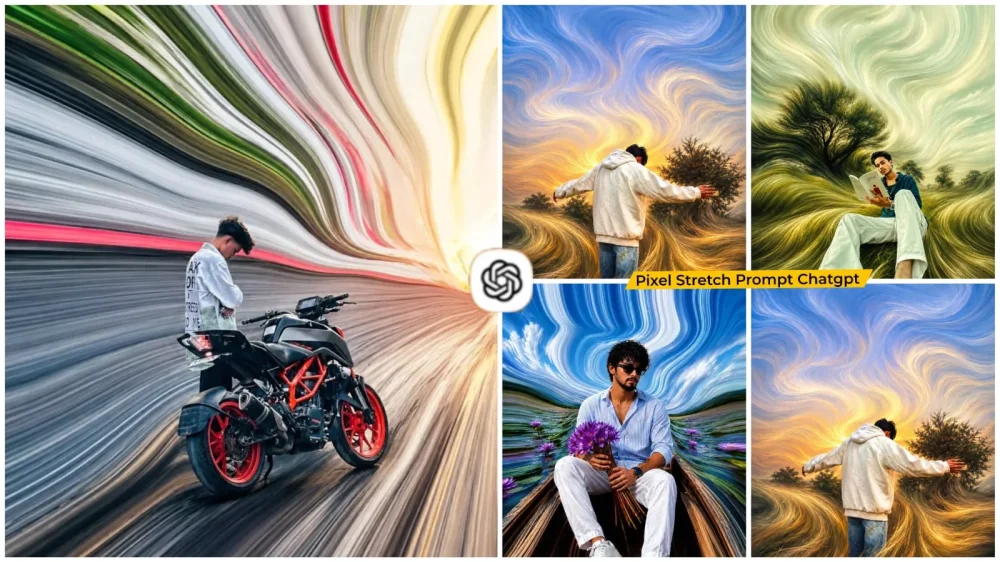
Pixel Stretch Effect Ai Photo Editing Prompt – If you have scrolled through Instagram or Facebook recently, you might have noticed a viral editing trend involving “pixel stretching.” In these images, the subject remains completely still, while the background elements appear to flow outward, transforming into long, streaking lines. This is a major trending style right now; while such images used to require specific editing tools, you can now create them easily using prompts for ChatGPT. We will discuss this trend and explain exactly how you can create these edits yourself.
Why Is The ‘Pixel stretch’ Editing Style Going So Viral?
Thousands of photos are posted on social media every day, but very few actually make people stop scrolling; however, when people come across pixel stretch edits, they immediately pause. It creates the illusion that the colors within the image are slowly flowing out of the frame. This unique visual style is gaining immense popularity among Instagram creators and artists. Since so many people are creating it. I am sharing the prompt that will allow you to easily create this viral edit yourself.
How Does The Pixel Stretch Editing Effect Work?
The editing principle is quite simple. The subject is positioned prominently, while the facial features remain unaltered. Colors from the clothing and background are elongated, transforming into pixelated lines or streaks that extend outward—either in a straight line or with a fluid, flowing motion—creating a completely smooth look. The natural lighting and shading of the background are preserved. The resulting image appears truly unique.
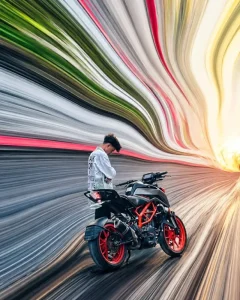
Transform the uploaded image into a premium pixel stretch artwork while keeping the main subject perfectly sharp, detailed, and recognizable. Extract colors and textures from the subject and extend them into smooth, flowing pixel-stretch ribbons that follow elegant curves and dynamic motion.Create seamless transitions between the original image and stretched areas, avoiding glitches or harsh edges. The stretched pixels should appear silky, fluid, and organic, like streams of color, light, paint, or energy. Maintain realistic lighting, depth, shadows, and color harmony. Use cinematic contrast, vibrant colors, HDR quality, ultra-sharp details, modern minimalist composition, luxury digital art styling, Adobe Photoshop pixel stretch effect, gallery-quality finishing, and ultra-high-resolution 8K for a visually captivating, social-media-ready masterpiece.
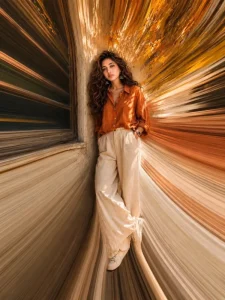
pixel stretch artwork while keeping the main subject perfectly sharp, detailed, and recognizable. Extract colors and textures from the subject and extend them into smooth, flowing pixel-stretch ribbons that follow elegant curves and dynamic motion. Create seamless transitions between the original image and stretched areas, avoiding glitches or harsh edges. The stretched pixels should appear silky, fluid, and organic, like streams of color, light, paint, or energy. Maintain realistic lighting, depth, shadows, and color harmony. Use cinematic contrast,vibrant colors, HDR quality, ultra-sharp details, modern minimalist composition, luxury digital art styling, Adobe Photoshop pixel stretch effect, gallery-quality finishing, and ultra-high-resolution 8K for a visually captivating, social-media-ready masterpiece.
How Do You Create This “Pixel stretch” Style Edit Using ChatGPT?
To create this kind of edit, using the right prompt is crucial. I have shared the prompt in this article, but first, let me explain what a proper prompt entails: your subject must be clearly positioned (ideally centered), and there should be no alterations to the face or identity—these are the key things to keep in mind. If you use the prompt correctly, your photo will turn out perfectly. First, copy the prompt and paste it into ChatGPT. Then, click the plus (+) icon to upload your photo—you can upload any image you like. Finally, hit “Generate,” and it will create an amazing photo for you.
How to Choose the Best Image for Pixel Stretch
If you want to create the best “pixel stretch” edit, you must first select a high-quality photo. The subject should be clearly distinguishable from the background, and the face must be in sharp focus. The lighting in the photo should look natural. Avoid using photos that have already been edited or those with a cluttered background, as a busy background makes it difficult to clearly identify the subject.