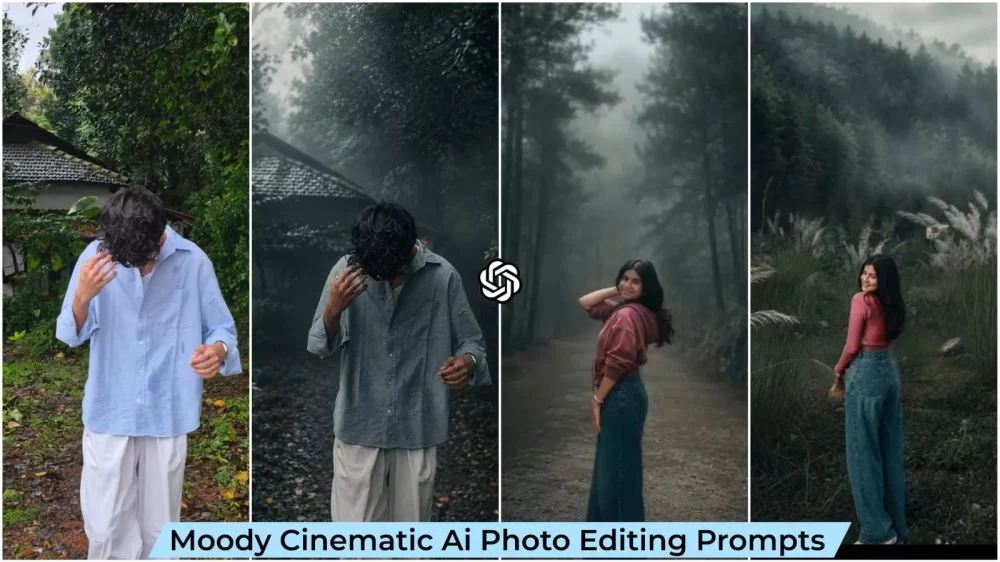
Moody Aesthetic Ai Photo Editing Prompt – How does an ordinary photo end up looking so cinematic? Let me tell you. When we first see such an image, we often assume it was created by a high-end camera or a professional editor. But the amazing thing is that you don’t need to visit a specific location to get this result; you simply create it using a prompt. For instance, if you have a standard photo with a green background, the AI processes it to transform that green into darker tones, effectively adding a cinematic look to your image.
Details Of Moody Aesthetic Ai Photo Editing Prompt
So, what exactly does the word “moody” mean? Let me explain. You see, many people focus on the visual effect without considering the underlying mood or atmosphere. A “moody” photo doesn’t simply mean a sad one; it refers to an image that evokes a specific feeling or atmosphere—like the weather just before it rains, when the sky turns dark and the air feels heavy. It could also be the sight of a misty forest at dawn, or the soft, golden light of evening filtering through the trees as a slender beam. Even a standard forest photo that turned out a bit dark can be transformed into a “moody” shot through color grading, increased contrast, and color adjustments. The key is ensuring the photo isn’t over-saturated.
Why This Editing Style Is Going Viral?
There are certain editing styles currently going viral—specifically, those based on Instagram-style color grading. However, many people are unfamiliar with this type of Lightroom editing; it requires specific skills, particularly when it comes to adjusting colors. Without that know-how, creating such a photo might seem impossible—but with my help, it becomes achievable. In this article, I’ll show you how to transform a standard photo into one with a moody, cinematic color tone—specifically a “dark forest” look. You’re going to love it, and I’ll guide you through the entire creation process. Just follow along and create it yourself.
Why are such photos going viral on social media?
The answer is quite simple. People don’t just want photos where they look beautiful; they also want images that capture a serene atmosphere alongside their appearance. Nowadays, people don’t just want to show how they look; they want to convey the feeling of the picture. That is precisely why “moody” style photos are becoming so popular these days.
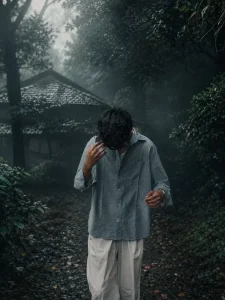
Cinematic moody forest color grading, muted colors, soft matte finish, deep shadows, low saturation, foggy atmosphere, cool green and grey tones, faded blacks, high contrast subject, subtle film grain, dreamy depth, soft natural light, desaturated red hoodie, teal and olive color palette, professional reel look, aesthetic Instagram cinematic edit, ultra realistic, sharp subject, background haze, 4K quality.
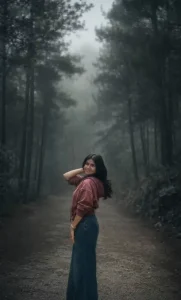
Cinematic moody forest color grading, dark green pine forest background, muted colors, soft matte finish, deep shadows, low saturation, foggy atmosphere, cool green and grey tones, faded blacks, high contrast subject, subtle film grain, dreamy depth, soft natural light, teal and olive color palette, professional reel look, aesthetic Instagram cinematic edit, ultra realistic, sharp subject, background haze, 4K quality.IMPORTANT: Keep the exact same person, face, hairstyle, pose, body shape, and clothing unchanged. The subject must wear the same original outfit/dress as in the reference image. Do not change, replace, redesign, recolor, or generate a new outfit. Preserve all clothing details, fabric, patterns, logos, accessories, and fit exactly as they are. Only apply cinematic color grading and background atmosphere. No wardrobe changes, no costume changes, no fashion alterations.
How To Generate Image Like This?
We have provided the prompt for creating the image; you can find it in the article. Simply copy it, then open ChatGPT and use the prompt there. Paste the prompt and upload a photo—you can upload any photo you like. Then, hit generate, and it will create a fantastic version of your photo. The results will be excellent—just like the examples you’ve seen here. However, don’t expect drastic changes like a completely different background; that’s not what happens. The result will be distinct in a different way—primarily involving changes to the colors.
Conclusion
You can give this edit a try; I think you’ll really like it, especially the way I’ve explained the process. If you enjoy it, let us know in the comments, and we’ll bring you even more amazing editing ideas that you can use to create fantastic photos.