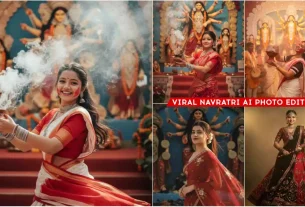
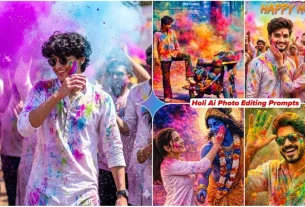
Google Gemini Ai Girlfriend Photo Editing Prompts – What is not possible in today’s time? Nowadays you can do such things in photos which are not possible in real life and I am going to explain one such trick of Kamal to you right now. Now in today’s time I have seen that such photos of girlfriend go viral very much and you can do this thing in your photo also. If you want to add it then how can you add it. With a completely realistic face because here many people feel that it should be generated. We do not want to do the same thing, even if we generate it then we will do it with absolutely perfect result so that we get to see good editing.
Google Gemini Ai Girlfriend Photo Editing Prompts
Let me tell you about the photo, here I will tell you about three-four different types of editing, like there will be a photo of girlfriend which you can add to any of your photos, secondly there are some different options. Like now a photo of school was also created in it. It also went viral a lot. When I saw this thing, I felt that I should not have told you about its editing but I had to add more styles here. It took me some time but I am going to provide you many varieties of it here. So that you can create not just one but many photos here and get good results from it.
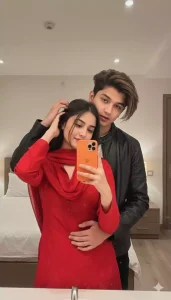
Use a reference photo a boy with the exact same 100% match face and hugging his lover from behind. The girl is slightly shorter than him and has her head resting gently on his chest and wear red suite. One of her hands is placed on his hair, and with the other, she is holding a orange iPhone 17 Pro Max in front of a mirror. The boy's face is half-visible in the mirror reflection, looking at the camera with a confident and seductive gaze
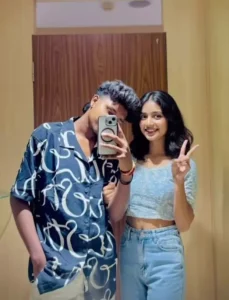
Add a Indian girl in this photo
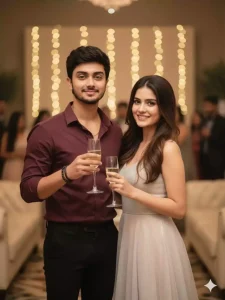
ULTRA-REALISTIC 9:16 CINEMATIC PORTRAIT OF A HANDSOME YOUNG INDIAN MAN (EXACT FACE AND HAIRSTYLE

FROM REFERENCE IMAGE, HAIRSTYLE PERFESTLY STYLED AND SET), HE STANDS CONFIDENTLY IN A LUXURY INDOOR EVENT, HOLDING A SLEEK CHAMPAGNE GLASS SLIGHTLY RAISED IN A CLASSY CHEERS GESTURE, SUBTLE SMILE ON HIS FACE OLIVE MAROON SHIRT WITH TOP BUTTONS OPEN (GOLD CHAIN VISIBLE), SLEEVES ROLLED UP, FITTED BLACK TROUSERS, BLACK WATCH ON LEFT WRIST, TWO BRACELETS (BLACK BEADED + BLUE BEADED) ON RIGHT WRIST. BESIDE HIM STANDS HIS BEAUTIFUL GIRLFRIEND, VERY CLOSE, SMILING WARMLY WITH LONG FLOWING STYLED HAIR. SHE WEARS A GLAMOROUS PASTEL SHIMMER GOWN, ONE HAND RESTS GENTLY ON HIS CHEST, THE OTHER HAND HOLDS A CHAMPAGNE GLASS NEAR HER WAIST.

BACKGROUND: SOFTLY BLURRED ELEGANT INDOOR CELEBRATION, WARM AMBIENT LIGHTS, CREAM SEATING, GUESTS IN THE DISTANCE.
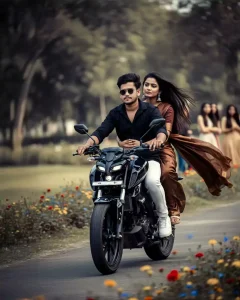
Create a realistic 4K cinematic close-up front shot of a young slim-fit couple riding a sleek black Yamaha MT-15 at high speed on a lush green park pathway. Both faces are perfectly clear and sharp, same face reference image. The boy wears a black shirt, white jeans, white white sneaker, and round black sunglasses, gripping the handlebars confidently. The beautiful girl in a flowing brown saree with brown blouse and wearing silver jhumka (earing) holds him tightly with both hands, her long hair flying in the wind. The glossy black Yamaha MT-15 shows precise detail with subtle motion blur. Background: lush greenery, colorful wildflowers, and a few women standing at a distance watching them. Natural cinematic lighting adds speed, drama, and intensity to the shot."
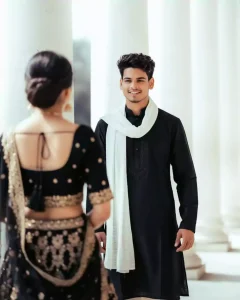
Ultra-realistic cinematic full-frame candid photo of a young stylish man (same face and hairstyle as reference, including matching nose, eyes, cheeks, and eyebrows) outdoors in front of bright white stone pillars. He is wearing a traditional black kurta with subtle embroidery, white scarf (dupatta) draped around his neck, and light trousers. His expression is a natural and chill. looking towards the woman in front. In the foreground, a woman (slightly blurred for depth effect) is seen from behind wearing a black traditional outfit with gold embroidered lehenga. Lighting is bright, festive, and natural daylight, highlighting the man's smile and outfit. Full frame, uncropped, cinematic composition with soft background blur."

Genret Photo
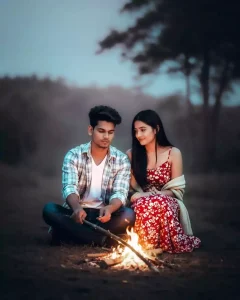
Ultra-realistic cinematic DSLR-style photo of a young couple sitting together outdoors on natural ground, in front of a small campfire. The young man (5'7", slim-fit body, same face and hairstyle as reference, black hair) is wearing a white t-shirt layered with a light checkered shirt and dark pants. The young woman (slim body, long straight black hair) is wearing a floral red-and-white dress with a shawl draped around her shoulders.

Pose & Expression: The man is gently holding a stick near the

fire while looking at it with a calm, focused expression. The woman sits close beside him, slightly leaning towards him, looking at him with a soft affectionate smile. Their expressions exactly match the reference - natural, relaxed, romantic.

Camera Setup: full frame, full body visible, no crop, balanced cinematic framing.
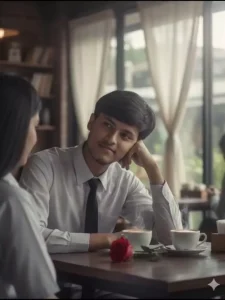
USE FACE ABOVE UPLOADED PHOTO TO MAKE HYPERREALISTIC PORTRAIT.

A SOFT, CINEMATIC PHOTO OF A 21 YEARS OLD YOUNG MAN IS SITTING IN A COFE.

HE IS LEANING ON ONE ELBOW AT A WOODEN DESK, TWO COFFIE IN THE DESK AND A RED ROSE FLOWER PLACED ON THE DESK, GAZING QUIETLY AT A GIRL SITTING NEXT TO HIM WITH A CALM, SMILING IN A NATURAL EXPRESSION. HIS HEAD IS TILTED SLIGHTLY, RESTING ON HIS HAND. AND HE WEARS A SCHOOL UNIFORM WHITE SHIRT & BLACK TIE.

THE LIGHTING IS NATURAL AND MOODY, COMING FROM A WINDOW IN THE BACKGROUND WITH CURTAINS.

THE OVERALL TONE IS NOSTALGIC, ROMANTIC, AND SERENE, WITH A SLIGHTLY FADE & 8K
Ai Girlfriend & Real Girlfriend
Now, if we want to generate it, we will use the prompt. If we use our own photo, can we use a girl’s photo as well? Look, the conditions here are such that you can do it here or you can’t, meaning those who want to add someone’s photo can do it here. Those who don’t have any photo will not add anyone’s photo here. You will just upload a selfie and then generate it because it will generate it from the other photos. What will happen in it is that it will add a perfect Indian type girl. If your editing seems best with that, then see the result yourself and then tell me.
How To Use Google Gemini Ai Girlfriend Photo Editing Prompts
To create a photo, choose whichever style you like. Its prompt is also shared here. A button should also be added so that it can be shared directly and inform you that there is a prompt here. You could copy it, but now there is a problem that you used to select it and copy it. Your editing was not possible. Currently, there is a direct button here. If you click it, it will be copied. After that,
you will have to go to Google Gemini; a button has been added for that, you can go from there. You can go to the Play Store now, it is up to you. Which option you are using, after that, first upload the photo there, go to the plus option and select the photo. After that, once it is uploaded, you have to paste the prompt there. After that, you can generate it and then your photo will be created here and ready.
Overall
You can create these viral photos like this and the way I have explained it. Probably no one else is going to explain it to you in such simple words. You can ask anyone else for the editing that I have explained so easily, but they will not explain it to you with such results and in such simple language. They will tell you so many things that you will get confused about how to create it. What is a prompt and here everything has been explained to you in detail that this is a prompt. You can copy it and use it like this.