Chatgpt Bgmi Ai Photo Editing Prompts – You know that I taught Free Fire editing in which you edited the profile of that Free Fire girl. You liked it very much. The way I taught editing in it, you liked it so much. You have done a lot of good editing in it. When we see this thing. We like it very much because if you do any editing with the things told by us and then post it. And when we see it on Instagram. We get more happiness that brother, people are going viral with the things told by us. Now I am going to tell you that similarly there is an editing based on another game. Which is going very viral. You must have heard the name of BGMI. Right now we are going to do editing about that.
Chatgpt Bgmi Ai Photo Editing Prompts
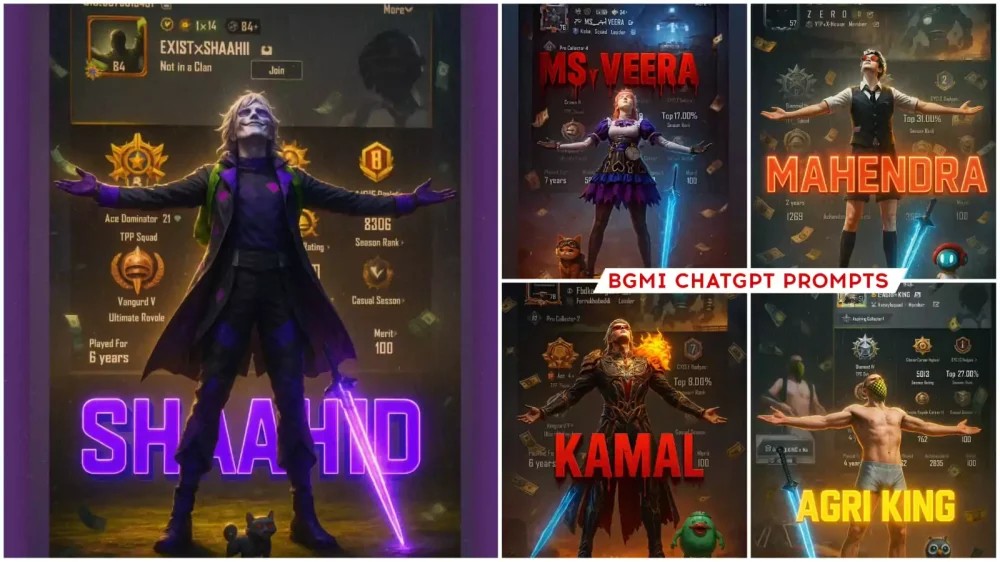
In what ways will the image that is getting ready be seen. First of all, you will be shown a character. Your BGMI character can be your favorite character. After that, your rank etc. will be shown here in the background. Whatever your kd is there. All those things are shown and after that now you will also be shown by writing your name there. So you can write your name there. Whatever your name is, this is the best thing. In this, you can also put your profile, you can also put your character. Because of this editing, people are liking it. I will tell you how to prepare the photo. What to add and how to create it. This article is going to be with full detail, you can read and make it easily.
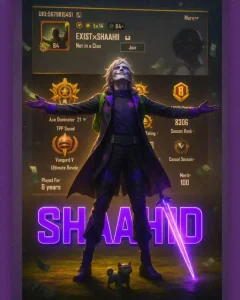
Create a cinematic digital poster for a PUBG player.In the background, clearly display the uploaded profile screenshot without binding or blurring any part. The image should remain sharp and readable, showing every detail that naturally appears in the profile (such as stats, icons, texture, badges, numbers, tags, buttons) and must be fully visible and understand to the viewer. In the foreground, place the upload character image standing in a proud, victories pose--with both arms stretched outward (T-pose) The character's head should be tilted slightly upward, facing the sky with a heroic and thankful experience.
Include a glowing blue sword by his side and his pet standing nearby. Add dramatic rain, flying money, cinematic glow and soft shadows to enhance the character and profile are clearly visible and not overlapping confusingly. In the centres of the poster overlay bold, glowing, 3D gaming tyle text:"YOUR NAME"--using a bleeding black- red blood effect, where blood drips from the text downward in a floating gradient style
What You Need For Editing ?
For that, you have to explain some simple things like what kind of photo you have to make here. First of all, you can do two things here. One, you can use your photo in place of the character in it. If you want to use your character, then you add your character there and want to use your photo. Then you add your photo there, two things will happen. After that, now the profile will be seen here. First of all you have to go to your BGMI. There you will click on the profile option. There you will see all your ranks etc. You have to take a screenshot of it from there and use it from then on. Then after that when you use the prompt. You will have to change the name in it. I will tell about it later. Just get these things ready, after that your editing will be absolutely best.
How To Use Chatgpt Bgmi Ai Photo Editing Prompts
After that, now you have to understand how we can do the editing that is happening here. So first of all we should have Chatgpt. You can use this application or you can use its browser. Whatever you find right. You have to use it and complete the editing with that. What do you have to do after this. Copy the prompt that I have given here. I will also try to add a button for copying. Otherwise you can select and copy. Then open Chatgpt. Upload your profile image and character or your photo there, after that you have to paste it there. Now you have to change the name in it. There will be an option called your text. You have to remove it and write your name there. Then click on generate, your image will be completely created and ready.
At Th End
I think the details I shared will be enough for you for editing because I have shared details of such editing which makes your editing more important and ready to go viral. I don’t think anyone else will explain this kind of editing to you. If someone does it to you, then do tell us, because I also want to know who else explains such editing.