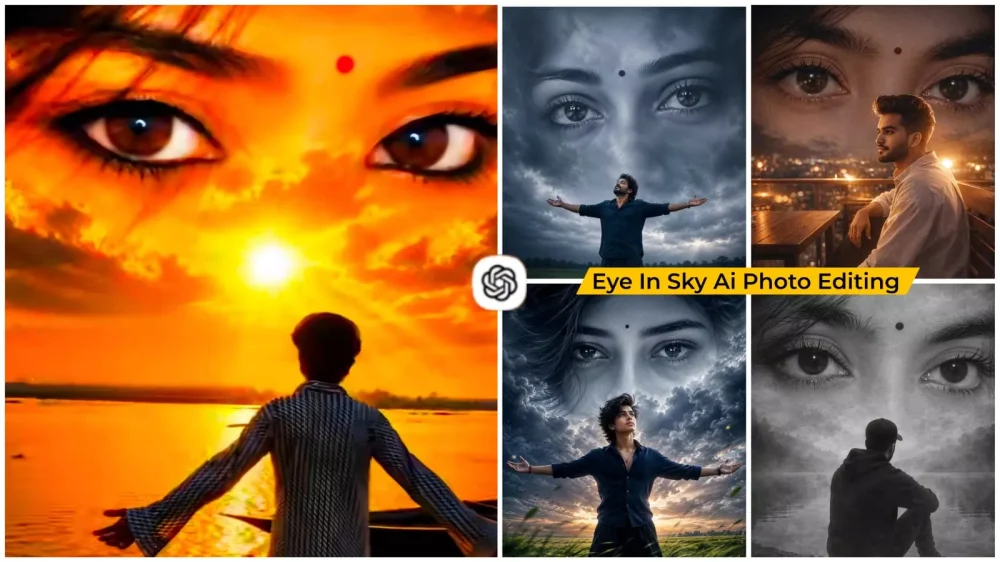
Eye In Sky Ai Photo Editing Prompts – Sometimes, you don’t need to apply a multitude of effects to create a striking image; simple visual elements can be quite effective. Photos featuring “sky editing”—specifically those incorporating eyes into the clouds—are currently going viral. At first glance, these images resemble posters for a movie about friendship. I will explain how you can create such an image yourself, including which tools to use and the step-by-step process involved. If you are interested in creating this kind of photo, you can follow the steps outlined in this article.
Why Does This Trend Feel So Unique?
Think about it: thousands of photos are uploaded to social media every day. People constantly experiment with different editing styles—some showcase their creative output, others display their surroundings or a luxurious lifestyle. While everyone shares their own content, a photo like this offers something more: a story that invites the viewer in. When people see an image like this, they connect it to their own memories. It might evoke a past memory, a vision of a divine presence, a dream, a beloved, or even someone they have parted ways with. Because of this personal connection, everyone wants to create a photo just like it.
Imagine The Editing Process.
Here, you might see a scene where you are shown looking up at the sky with your left arm outstretched. In the background, it is a rainy day—featuring the kind of thick, dark, ominous clouds typical of a downpour—and within those clouds, a pair of eyes appears. They are a girl’s eyes, and you are gazing at them; the entire scene perfectly captures a monsoon atmosphere. It creates the impression that you are missing someone or are lost in memories—a sentiment anyone can relate to their own personal story. When you upload this to social media with the right song, it resonates deeply with people.
Details Of Eye In Sky Ai Photo Editing Prompts
Its popularity within the creator community is evident. Content creators these days aren’t just producing ordinary photos; they are crafting images that tell a story or evoke an emotional connection, allowing the audience to relate to them personally. The “Eye in the Sky” editing style has emerged as a fantastic medium for this. Creators start by showing a standard photo, then—following a transition—reveal the newly created image in the next frame. This transformation is so impressive that viewers are compelled to watch the entire video; they are particularly captivated when they see the final, newly created image.
Update – Viral photos with eyes like this were trending widely, so I added an edit to this article. Since this edit received over 20 million views, I felt compelled to share it. I’m adding a prompt to this article so you can try that edit as well. You can also use the other edits I mentioned earlier.
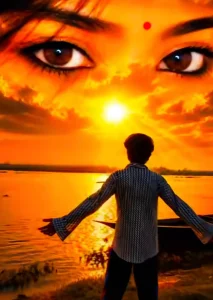
KEEP THE BOY EXACTLY AS IN THE ORIGINAL PHOTO. BACK VIEW ONLY. DO NOT SHOW HIS FACE OR SIDE PROFILE. Maintain the same pose, same body position, same clothing, same hairstyle, and both arms fully open facing the sea. Preserve the original composition and camera angle.
Transform the sky into a divine cinematic sunset filled with gigantic ultra-realistic female eyes using the reference eye image. Use the reference eyes EXACTLY — preserve the same brown iris color, eyeliner, eyelashes, eyebrow shape, black bindi, and beauty mole. Do not redesign, beautify, or alter the eyes in any way.
The eyes must dominate 70–80% of the sky, stretching from left to right edge, appearing naturally formed within glowing golden-orange sunset clouds. Eyes must be crystal clear, razor sharp, ultra detailed, photorealistic, highly realistic cloud blending, with visible eyelashes and eyebrow texture.
Create a dreamy spiritual atmosphere with dramatic sunset clouds, divine heavenly glow, warm golden light reflecting on the ocean, cinematic color grading, volumetric sunlight, HDR lighting, realistic cloud textures, emotional mood, masterpiece quality, ultra-realistic photography, 8K resolution, DSLR quality, sharp focus, high contrast, realistic shadows, 9:16 vertical composition.
Negative Prompt: front face, side face, visible facial features of the boy, character replacement, different pose, different clothes, blurry eyes, small eyes, distorted eyes, extra eyes, cartoon, anime, painting, low quality, oversaturated colors, unrealistic clouds, deformed body, cropped subject, duplicate person, text, watermark, logo, noise, pixelation.
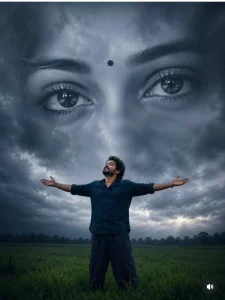
A surreal cinematic digital artwork featuring a lone young man standing in the middle of a vast green grass field under a dramatic overcast sky. He wears a dark navy shirt and loose dark pants, standing with arms fully outstretched and head tilted upward, expressing freedom, longing, and emotional surrender. Behind him, dominating the entire sky, is an enormous monochrome female face blended seamlessly into the clouds. The composition focuses on her ultra-detailed expressive eyes, rendered at colossal scale, staring directly forward with deep emotion and melancholy. A small black bindi sits between her eyebrows. Her eyelashes, eyebrows, skin texture, and eye reflections are highly detailed and realistic. The giant face appears ethereal, dreamlike, and ghostly, emerging from storm clouds with soft atmospheric blending. Moody cinematic lighting, dark blue-gray color grading, emotional fantasy atmosphere, dramatic depth, volumetric clouds, subtle fog, ultra-realistic textures. 4:5 8K
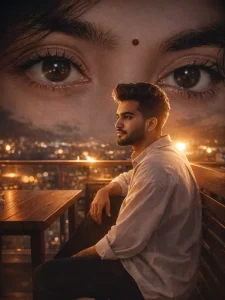
Ultra realistic cinematic night portrait of a young man sitting alone on wooden cafe bench rooftop, side pose looking away, wearing stylish oversized shirt and black pants, warm flash photography effect, giant realistic female eyes in dark background sky, emotional love theme, dreamy atmosphere, soft glowing rim light around hair, realistic bench and table details, romantic heartbreak mood, shallow depth of field, ultra detailed eyes with glossy reflections, aesthetic Instagram reel style, realistic night lighting, emotional storytelling, moody shadows, realistic skin texture, bokeh lights, highly detailed cinematic composition, flash photography look, luxury rooftop cafe vibe, hyper realistic DSLR quality, viral social media edit style, 8k ultra HD, masterpiece, realistic proportions--ar 3:4-v 6-style rawreplace the sitting boy face with my uploaded face while keeping exact facial features and realistic identityultra realistic female eyes close-up, thick eyebrows, glossy deep eyes, soft skin texture, emotional expression, cinematic lighting, dreamy aesthetic, highly detailed eyelashes, realistic reflections in eyes, dark moody vibe, hyper realistic photography, 8k
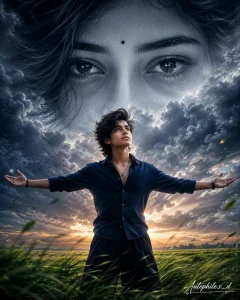
A surreal cinematic digital artwork featuring a lone young man standing in the middle of a vast green grass field under a dramatic overcast sky. He wears a dark navy shirt and loose dark pants, standing with arms fully outstrethed and head tilted upward, expressing freedom, longing, and emotional surrender. Behind him, dominating the entire sky, is an enormous monochrome female face blended seamlessly into the clouds. The composition focuses on her ultra-detailed expressive eyes, rendered at colossal scale, staring directly forward with deep emotion and melancholy. A small black bindi sits between her eyebrows. Her eyelashes, eyebrows, skin texture, and eye reflections are highly detailed and realistic. The giant face appears ethereal, dreamlike, and ghostly, emerging from storm clouds with soft atmospheric blending. Moody cinematic lighting, dark blue-gray color grading, emotional fantasy atmosphere, dramatic depth, volumetric clouds, subtle fog, ultra-realistic textures, shallow depth of field, 8K, AR 4:5.
Elegant handwritten signature "Autophile.s_d" in white at the bottom-right corner.
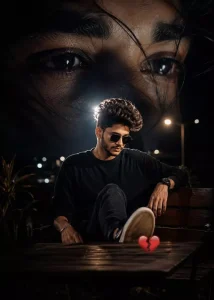
Moody cinematic edit of a young person sitting alone on a wooden outdoor café bench at night, backlit with strong flash lighting, relaxed pose with one leg up, dark background, emotional lonely atmosphere, broken heart emoji on the table, surreal double exposure effect with a giant close-up of expressive eyes covering the sky above, soft strands of hair across the face, dramatic shadows, dreamy aesthetic, melancholic vibe, high contrast, film photography look, night
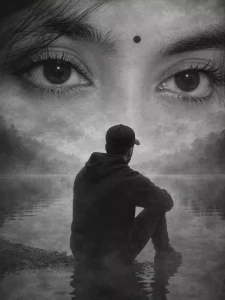
Ultra realistic cinematic portrait of a young man sitting alone near a calm lake shore, back side silhouette pose, wearing black hoodie and cap, emotional lonely vibe, huge dreamy female eyes softly blended in the sky above, double exposure composition, black and white monochrome aesthetic, realistic water reflection, foggy atmosphere, deep emotional mood, soft cinematic lighting, ultra detailed eyes with sharp eyelashes and thick eyebrows, artistic sadness, minimal background, realistic shadow details, DSLR quality, hyper realistic, volumetric light, smooth skin texture in eyes overlay, social media viral reel style, depth of field, highly detailed environment, natural contrast, emotional storytelling composition, 8k ultra HD, realistic photography, masterpiece, moody tones, Instagram aesthetic-ar 3:4 --v 6-style rawreplace the sitting boy face with my uploaded face, keep exact facial identity and realistic skin texture ultra realistic female eyes close-up, thick eyebrows, glossy deep eyes, soft skin texture, emotional expression, cinematic lighting, dreamy aesthetic, highly detailed eyelashes, realistic reflections in eyes, dark moody vibe, hyper realistic photography, 8k
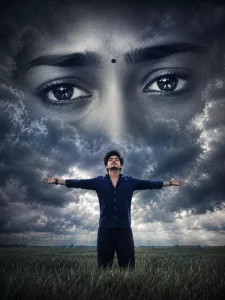
create using my refrence image A surreal cinematic digital artwork featuring a lone young man standing in the middle of a vast green grass field under a dramatic overcast sky. He wears a dark navy shirt and loose dark pants, standing with arms fully outstretched and head tilted upward, expressing freedom, longing, and emotional surrender.
How To Create Image Using Prompt?
Now to make this photo, first of all you have to copy the prompt given in the article. You will get different styles which you like. You can copy them further by following them. After copying, you have to open Chat Secret because we will make these photos inside it. You have to open it there. After that you have to upload your photo by clicking on the plus option there. You can upload any photo which you like. Then after that you have to paste the prompt which you have copied, after that you will generate it and it will make a cool photo of yours and make it ready.
Conclusion
I hope you enjoyed this edit. I’ve explained it all in detail. I’ll tell you everything. If your photos turn out well after I’ve explained it, please share this type of editing with your friends and tell them you’re creating photos from here.