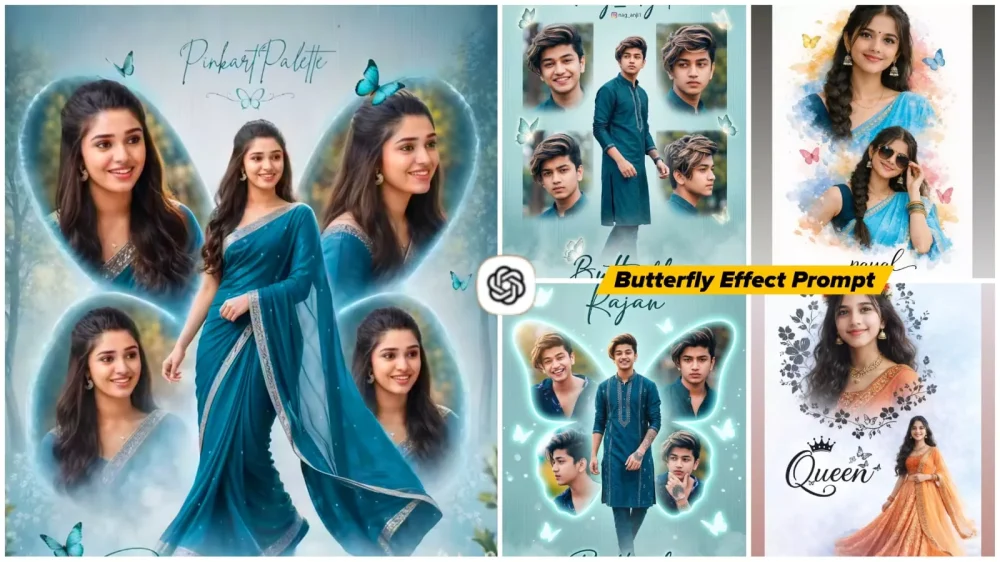
Butterfly Effect Ai Photo Editing Prompts – As you may have recently noticed on Instagram, the “Butterfly Effect” style of photo editing has become incredibly popular. This trend features a person standing in the center of the frame, with a pair of butterfly wings superimposed behind them. Specifically, if you look closely at the wings, you will see that personal photos are embedded within them—meaning that your own images are seamlessly integrated into the shape of the butterfly wings.
This creates a visually stunning effect that is quite appealing. Consequently, we decided to put together a tutorial on how to achieve this edit. In this article, we have provided instructions for both girls and boys, as the male version of this edit has also been going viral on Instagram, and users of both genders have been asking how to recreate it. We have included all the necessary resources within this article so that you can use them to create your own photos. If you are unsure how to go about creating this edit, I have also explained the entire process step-by-step; simply read through the instructions below, and you will be able to create your own stunning photos with ease.
Details Of Butterfly Effect Ai Photo Editing Prompts
It is worth taking a moment to understand the “Butterfly Effect,” as it is a rather unique concept—which is precisely why I am explaining it here. You have likely seen collage-style photographs before; this effect utilizes that very same concept. Essentially, the goal is to create a collage-like image where the wings of a butterfly serve as the backdrop. Within this background—specifically within the shape of the butterfly’s wings—your own photographs are displayed. Just as a butterfly’s wings are naturally structured, four distinct photos are arranged to fill that specific outline. The remarkable feature of this technique is that the entire image is created using just a single source photograph as a reference. Which is then divided and arranged from various angles. This is its true specialty, and you will discover even more editing techniques related to this style that you are sure to enjoy.
How These Effects Are Created
As for how these specific effects are created—they are generated using tools like ChatGPT, Google Gemini, or various other image generation models. You need to understand that someone defines all these elements within a “prompt. Which I have shared in the accompanying article. This prompt contains detailed instructions specifying exactly how the image should be composed—for instance, indicating that your photograph should be placed within the wings of the butterfly. Because everything is described so precisely. You will find that simply by utilizing a reference photo, you too can generate an image just like this one.
What Kind Of Image You Should Select
Now, observe this: the most crucial aspect of generating a photo here is selecting a high-quality source image. This is because the face plays the most significant role in this process. If your face is not captured correctly in the input, the system—which divides the image into four distinct sections—may begin generating distorted or inconsistent facial features, resulting in an output you will not find appealing. Therefore, when selecting an image, opt for a portrait shot that features a clear view of your face and a plain background. Avoid side profiles; instead, center your face and look directly at the camera. That is the ideal type of photo to use. Now, let’s clarify what kind of photos you should not use. Do not select images that feature multiple people, and strictly avoid using low-quality or blurry photographs.
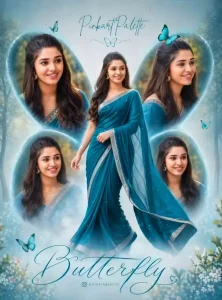
Create a high-resolution, cinematic butterfly-themed collage poster of a young South Indian woman.Name : LoveUse the uploaded image as the exact face reference (strict face preservation - 100% identical facial features, skin tone, hairstyle, expression, no changes at all). The design should feature:A large central full-body image of the woman wearing a traditional saree (deep teal/blue tone with silver border), standing gracefully and slightly twirling theSurrounding her, include 4 smaller portrait shots (close-up angles, smiling, side poses) arranged symmetrically in a butterfly wing shape.Add soft feathered edges around the smaller images to blend into the background. Background:Soft pastel teal/blue gradient background with subtle vertical texture lines. Light mist/fog effect at the bottom.Slight nature touch (blurred trees or greenery in background for depth).Styling:Elegant, dreamy, and feminine aesthetic. Soft natural lighting with smooth skin tones.Add subtle glow and depth of field.Typography:Add a stylish cursive title text at the bottom: "Butterfly" Add a name at the top in elegant handwritten font.Include a small Instagram-style username below.Quality:Ultra HD, 4K resolutionSharp focus, professional photo manipulation Poster design, studio-quality finish--ar 3:4 --v 6 --style raw Create a high-resolution, cinematic butterfly-themed collage poster of a young South Indian woman.Name : nag_anji1Use the uploaded image as the exact face reference (strict face preservation - 100% identical facial features, skin tone, hairstyle, expression, no changes at all). The design should feature:A large central full-body image of the woman wearing a traditional saree (deep teal/blue tone with silver border), standing gracefully and slightly twirling theSurrounding her, include 4 smaller portrait shots (close-up angles, smiling, side poses) arranged symmetrically in a butterfly wing shape.Add soft feathered edges around the smaller images to blend into the background. Background:Soft pastel teal/blue gradient background with subtle vertical texture lines. Light mist/fog effect at the bottom.Slight nature touch (blurred trees or greenery in background for depth).Styling:Elegant, dreamy, and feminine aesthetic. Soft natural lighting with smooth skin tones.Add subtle glow and depth of field.Typography:Add a stylish cursive title text at the bottom: "Butterfly" Add a name at the top in elegant handwritten font.Include a small Instagram-style username below.Quality:Ultra HD, 4K resolutionSharp focus, professional photo manipulation Poster design, studio-quality finish--ar 3:4 --v 6 --style raw
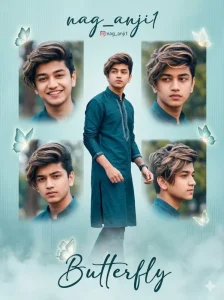
Create a high-resolution, cinematic butterfly-themed collage poster of a young South Indian man.
Use the uploaded image as the exact face reference (strict face preservation - 100% identical facial features, skin tone, hairstyle, expression, no changes at all).
The design should feature:
A large central full-body image of the man wearing a stylish traditional outfit (deep teal/blue kurta or modern ethnic suit with subtle silver detailing), standing confidently and slightly walking or turning pose (natural masculine posture).
Surrounding him, include 4 smaller portrait shots (close-up angles, smiling, serious look, side profile) arranged symmetrically in a butterfly wing shape.
Add soft feathered edges around the smaller images to blend smoothly into the background.

Background:
Soft pastel teal/blue gradient background with subtle vertical texture lines.
Light mist/fog effect at the bottom.
Slight nature touch (blurred trees or greenery in background for depth).

Enhance with subtle glowing butterflies around the composition (not too feminine, keep it elegant and aesthetic).

Styling:
Elegant, cinematic, slightly masculine aesthetic.
Soft natural lighting with realistic skin tones.
Add subtle glow, depth of field, and sharp focus.
Keep overall look stylish and premium (not overly soft/feminine).

Typography:
Add a stylish cursive title text at the bottom: "Butterfly"
Add a name at the top in elegant handwritten font: "nag_anji1"
Include a small Instagram-style username below.

Quality:
Ultra HD, 4K resolution
Sharp focus, professional photo manipulation
Poster design, studio-quality finish
--ar 3:4 --v 6 --style raw
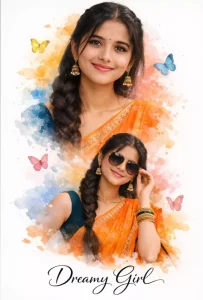
"A beautiful double exposure cinematic portrait of a young Indian woman with a long thick braid, wearing a vibrant orange silk saree with an embroidered border and a dark teal blouse. The image features two poses: one looking directly at the camera with a gentle smile and traditional jhumka earrings, and another smaller silhouette where she is wearing stylish sunglasses. The background is a white canvas with artistic watercolor splashes in shades of orange, blue, and yellow, decorated with colorful 3D butterflies. At the bottom, the text 'Dreamy Girl' is written in an elegant black cursive font. Soft studio lighting, high resolution, 8k, realistic textures."
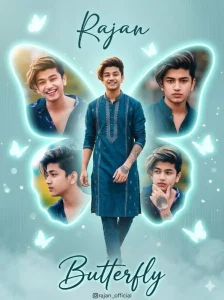
Create a high-resolution, cinematic butterfly-themed collage poster of a young South Indian man.
Use the uploaded image as the exact face reference (strict face preservation - 100% identical facial features, skin tone, hairstyle, expression, no changes at all).

Main Composition:
Create a large glowing butterfly-shaped frame in the background (soft neon teal/blue glow).
The butterfly wings should act like photo frames.
Inside the butterfly wings:
Place 4 smaller portrait images of the same man (close-up, smiling, side profile, serious look).
Each image should fit naturally inside the wing curves.
Edges should be soft, feathered, and slightly glowing to blend smoothly.

Center Subject:
Add a large full-body image of the man in front of the butterfly shape.
He should be wearing a stylish traditional outfit (deep teal/blue kurta or ethnic suit with silver detailing).
Pose: confident, slightly walking or turning pose with natural masculine posture.

Background:
Soft pastel teal/blue gradient background.
Subtle vertical texture lines.
Light fog/mist at the bottom.
Add slight blurred greenery or outdoor bokeh for depth.

Effects:
Add soft glowing butterflies around the composition.
Use light particles, dreamy glow, and depth of field.
Keep the look cinematic and slightly masculine (not overly soft).

Lighting:
Soft natural lighting with slight golden highlights.
High contrast with smooth skin tones.

Typography:
Top: elegant handwritten font → "Rajan"
Bottom: stylish cursive text → "Butterfly"
Add small Instagram-style username below.

Quality:
Ultra HD, 4K resolution
Sharp focus, professional photo manipulation
Poster design, studio-quality finish
--ar 3:4 --v 6 --style raw
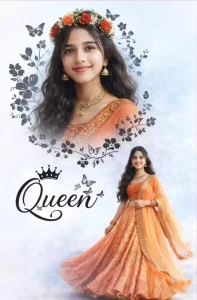
A beautifuldouble exposure portrait of a vounS Indian sirl with long wavy hair. In the top half, a close-up profile of her face smiling, wearing a floralcrown of red and oranse flowers and traditional éold iewelry (ihumkas and necklace). In the bottom half, a full-body shot of her wearing a vibrant orange embroidered lehenga choli, standing gracefully. The background is a soft, dreamy light blue and white textured sky. Eledant black floral vines and butterfly silhouettes frame the top portrait. Between the two images, stylish black cursive text reads "Queen" with a smallcrownicon on top. Cinematic lighting, highresolution, 8k, ethnic desi aesthetic.
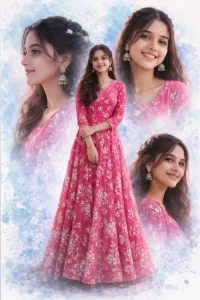
A high-quality digital collage of a beautiful Indian girl featuring one full-length center shot and three different close-up facial portraits in the background. She is wearing a vibrant pink floral embroidered Anarkali gown. Her hair is styled in soft waves with small floral accessories. She is wearing traditional silver jhumka earrings. The background is a dreamy, artistic watercolor splash in shades of light blue and white with subtle floral patterns. The lighting is soft and cinematic, with an ultra-realistic 8K finish and a professional photography look.
How To Create Image With Butterfly Effect Ai Photo Editing Prompts
To create a photo like this, you must first learn how to use prompts—prompts which I have already shared within this article. You are free to use whichever of these you find appealing. Simply click the “Copy” button and then open ChatGPT. Now, keep in mind that once you open ChatGPT, your first step is to paste the prompt. Next, click the “+” icon to upload your own photo as a reference. As soon as you upload it, you will see a “Generate” button (typically represented by an arrow icon). Click on it; the process may take anywhere from a few seconds to a few minutes, after which it will render your photo in a completely professional style. I hope you enjoyed this editing technique, as it is truly impressive and is currently trending significantly.
Conclusion
We hope you’ll like this college edit with the butterfly effect, along with the other different types of edits we’ve shared with you. We always try to teach you the best things in it so you can create a good photo. Whichever photo you like, tell us and we’ll bring you more such unique edits. Or share any concept you have in mind. Our goal is to bring you something new and different.