Babasaheb Ambedkar Jayanti AI Photo Editing Prompts – Every year, Bhimrao Ambedkar’s birth anniversary is celebrated with great enthusiasm and reverence. People frequently share unique and creative posts on social media to mark the occasion. You will observe that in today’s AI-driven era, such photo editing tasks have become significantly easier for everyone. In fact, with the help of these editing tools, you can craft photos for Ambedkar Jayanti that look absolutely professional. What does this involve? You simply need to use the right prompt and select a suitable photograph. By doing so, you can generate a professional-quality image in no time. In this article, we will learn how to create such images—specifically, which prompts work best and how to achieve a realistic editing style. We will also cover how to generate images in various distinct artistic styles; all of this information will be detailed in this article, allowing you to follow the steps and create your own unique visuals.
Who Was Bhimrao Ambedkar?
Well, Bhimrao Ambedkar was a great social reformer and jurist of India. He was the architect of the Indian Constitution. His primary distinction lay in the fact that he was the “Father of the Constitution.” He stood as a symbol of social equality and was a staunch advocate for education and rights. For this very reason, on his birth anniversary, people edit their own photos to display them as a tribute—each person expressing their respect in their own unique way. You, too, can create such photos specifically for social media. If you wish, I can also show you the method for creating videos.
Details Of Babasaheb Ambedkar Jayanti AI Photo Editing Prompts
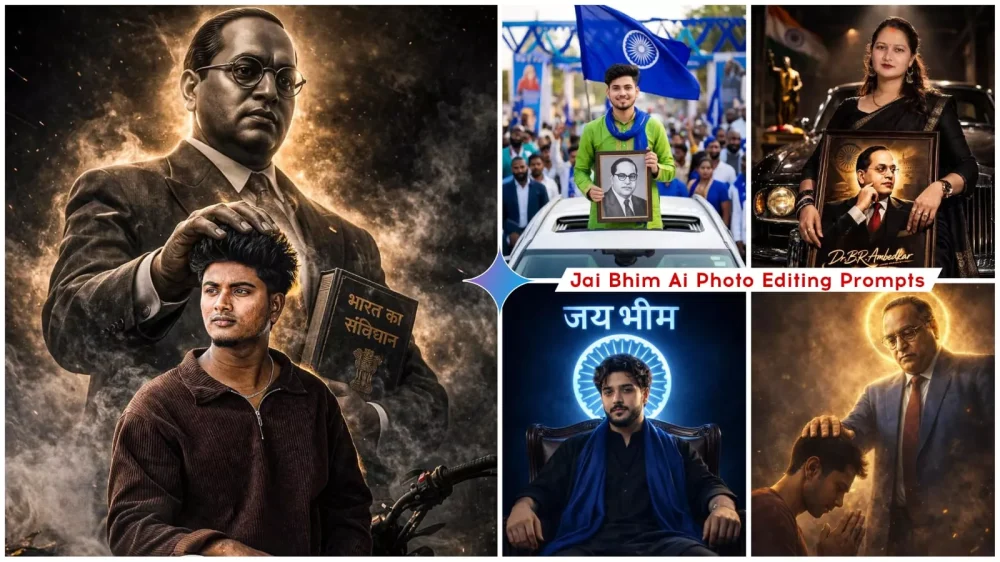
With this editing technique, you can transform a standard photograph into a “royal-style” post featuring yourself alongside Dr. Ambedkar. You can even render these images with a highly realistic look. Some variations will depict him appearing to bestow his blessings upon you, while others will show you standing right beside him. I have also created specific scenarios—for instance, one where you appear to be seated inside your own luxurious home, with a large portrait of him displayed prominently on the wall. Your original, ordinary photograph will be transformed and converted into a stylish image like these. I have provided a few examples here; by viewing the images below, you can get a clear idea of the kind of finished photograph that will be produced.
How To Create Image Using Gemini?
Here is how to create this type of photo using Google Gemini. First, you need to open Google Gemini. Once there, you will need to enter a specific prompt. This prompt has already been provided within this article; simply locate the prompt text, copy it, and then paste it into the input field. Next, you must upload a photo of yourself. You can upload any photo to serve as a reference, provided that your face is clearly visible in it. Once you proceed to generate the image, the tool will create a professional-looking photo for you. You can then save this image. However, it is important to keep in mind that you should not expect the AI to produce a perfect photo—one that exactly matches your preferences—on the very first attempt. If you wish to create a high-quality photo, you may need to try two or three times; you might have to regenerate the image a few times before you finally obtain a professional-grade result.
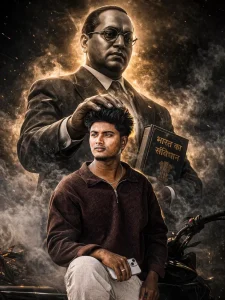
Create a highly dramatic and cinematic Person Behind him, generate a massive, di babasehb Ambedkar The divine figure should appear like a protective guardian emerging from smoke and shadows, placing a gentle, powerful hand over the man's head as if giving him strength. Use dark, moody lighting with strong contrast, smoke effects, rim lights, and hyper-realistic textures. Make the entire image intense, powerful, and motivating. tra-realistic, &KJigh detail dramatic atmosphere
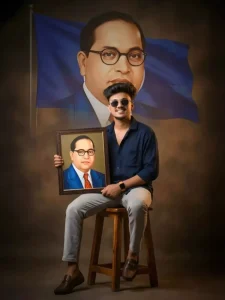
"A young Indian man sitting confidently on a stool, smiling and holding a framed portrait of sant Dr Bhimrao Ambedkar, dramatic studio lighting, large faded background portrait of Saint Dr Bhimrao Ambedkar behind him, warm tones, sharp focus, professional photoshoot, ultra-realistic, 4k, depth of field, moody shadows, inspirational vibe"
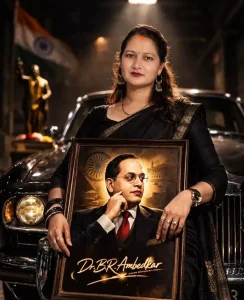
Ultra-realistic 24K RAW cinematic portrait, 8K resolution, shot on 85mm f/1.4 lens. A confident young Indian woman wearing an elegant black saree with golden border stands in front of a glossy vintage black car inside a dim cinematic garage. She holds a large framed portrait of Dr. B. R. Ambedkar with both hands. The frame is detailed with realistic reflections and glass texture.
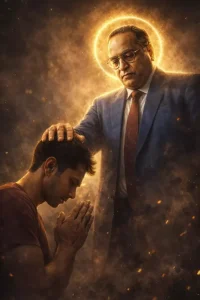
 Ultra-realistic cinematic digital art of B.r
ambedkar (baba sahab) standing behind a me, B.r
ambedkar blessing him by gently placing one hand on
His head and make full photo. B.r ambedkar is wearnig a blue
coat paint glowing golden aura and halo around his
dramatic lighting. dust particles, smoky atmosphere,
golden sparks floating in air. Hyper-detailed muscles
realistic skin texture, sharp focus. Cinematic
composition, low angle shot, 8K ultra HD, high contrast,
volumetric lighting
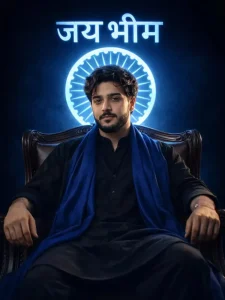
Powerful cinematic full body portrait of a confident indian women seated on a classic armchair, wearing a black kurta payjama with blue stoleDark blue background with a blue glowing circular emblem and जय भीम halo. High -contrast cinematic lighting.
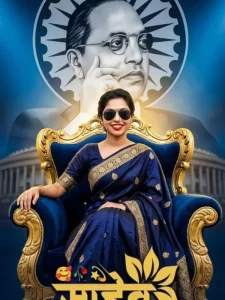
A cinematic digital art poster featuring a young woman sitting confidently on a luxurious, high-back velvet throne in the center foreground. She is wearing an elegant traditional Indian saree with gold embroidery and stylish sunglasses. Behind her, towering majestically like a guardian, is a giant, semi-transparent portrait of Dr. B.R. Ambedkar in a black suit and glasses. The background features the Ashoka Chakra and a blurred architectural silhouette of the Indian Parliament.
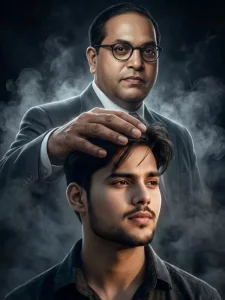
Crate a highly dramatic and cinematic person Behind him, generate a massive, di babasehb Ambedkar The divine figure should like a protective guardian emerging from smoke and shadows, placing a gentle, powerful hand over the man's head as if giving him strength. Use dark, moody lighting with strong contrast, smoke effects, rim lights, and hyper-realistic textures. Make the entire image intense, powerful, and motivating. tra-realistic, &KJigh detail dramatic atmosphere rax rajesh
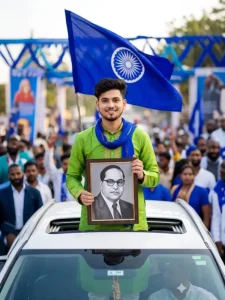
Ultra-realistic 8K DSLR photo of a young Indian man standing through the sunroof of a white car, wearing a bright green kurta and a blue scarf. He is holding a framed black-and-white portrait of Dr. B.R. Ambedkar with both hands properly, looking directly at the camera with a confident expression. Behind him, a large blue flag with the Ashoka Chakra is waving in the wind. Background shows a crowd with blue-themed decorations, slightly blurred.
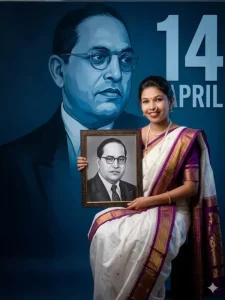
"A high-resolution photorealistic portrait of a young Indian woman smiling warmly, wearing a traditional white and purple silk Nauvari saree with gold borders and a traditional Maharashtrian nath (nose ring). She is sitting and holding a framed black-and-white professional portrait of Dr. B.R. Ambedkar. The background features a large, artistic blue-monochrome mural of Dr. Ambedkar's face with the text '14 APRIL' in bold, modern typography. The lighting is soft studio quality,
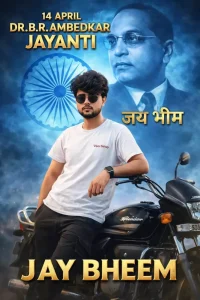
A high-resolution, cinematic poster for Ambedkar Jayanti. In the center a 21-year-old Indian man with a stylish haircut, wearing a white "vijay" branded t-shirt and dark cargo pants, leans confidently against a black Hero Splendor motorcycle.
The background features a massive, ethereal blue-tinted portrait of Dr. B.R. Ambedkar.  the Ashoka Chakra and "जय भीम"  Dr. Ambedkar.
Top text: "14 APRIL DR. B.R. AMBEDKAR JAYANTI" in bold, 3D golden lettering.
Bottom text: "JAY BHEEM" in large golden.
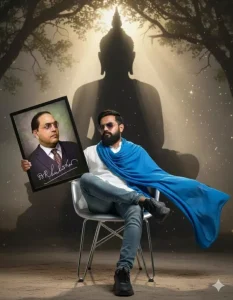
A powerful and spiritual cinematic portrait of a man resembling a fierce ascetic or lord Buddha figure.his wearing white shirt and blue jeans, exuding divine energy and strength. , and his messy hair and soft smile. His back side lord Buddha black shadow blessed him.
A large blue dupatta around his shoulder and neck, holding bhim rao ambedkar large photo
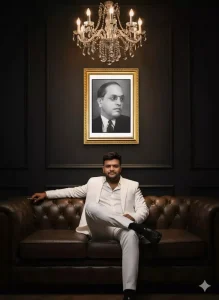
Hyper-realistic cinematic portrait of the man from the reference photo. A confident man sits on a luxurious dark-brown leather sofa in a dark, elegant room with matte black walls and a chandelier hanging above. He is dressed in a white suit with a white shirt, the top buttons casually undone, sitting in a relaxed mafia-boss pose with one leg crossed over the other. His polished black leather shoes are clearly visible. Behind him hangs a large framed black-and-white image ofDr Babasaheb Ambedkar
Some Style You Can Try Out Yourself
There are several distinct styles that you can try out yourself. If you wish to perform custom editing—though I have already demonstrated how to execute some of these edits—I am highlighting these specific styles here so that you can experiment with different variations for your own use. The “Blue Tone” style renders your entire photograph with a predominantly blue aesthetic. The second is the “Constitution” style, featuring a composition that incorporates the Constitution book, with Babasaheb depicted in a poster in the background. Next is the “Royal” style, which I have previously showcased; it portrays you seated inside a luxurious home, with a large portrait displayed prominently in the background. Finally, there is the “Cinematic” style—allowing you to create an image resembling a movie poster—which looks absolutely stunning. While I have already provided templates for some of these styles here, if you desire something truly unique, you will need to create it yourself by carefully following the specific guidelines for each technique.
Conclusion
You can easily create this kind of Bhimrao Ambedkar Jayanti photo, featuring him in various ways. I hope you enjoyed this article, which teaches you how to create different photos in different ways. If you like it, please let us know in the comments. We’ll always bring you more unique articles, where you’ll learn something different.