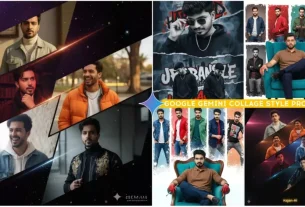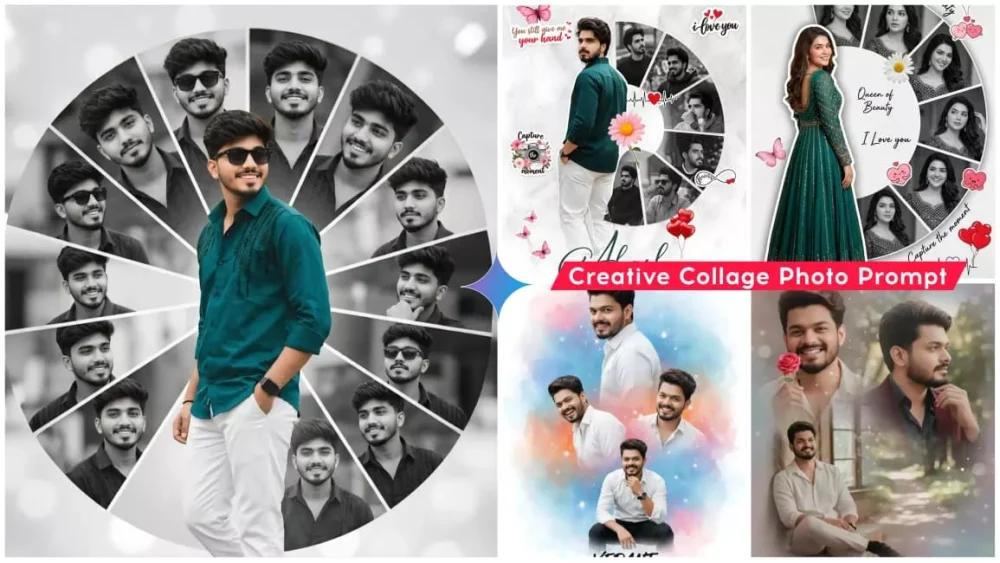
Creative Portrait Collage Ai Photo Editing Prompts Google Gemini – We’re going to tell you about an edit that’s currently trending on Instagram. You can use it anywhere. For example, if you want to edit a birthday party, you can use it there. Or if you want to edit a post, you can use it there too. You’ll love it because here you can generate multiple, stylish photos from a single photo. And that too within a single photo. Just by looking at this photo, you’ll understand that this is a college-style edit. It’s going viral, and people want to create such edits. I already explained this to you in another article. The design was a little different there, but this time we’ve come up with a slightly portrait-like look that you’ll really like.
1000+ Google new gemini prompts
Creative Portrait Collage Ai Photo Editing Prompts Google Gemini
Get a sense of the type of editing involved. For example, here you use a single photo, and it’ll be transformed into multiple styles. You don’t have to upload different types of photos for each style. You don’t have to do anything like that. You simply upload a single photo and generate a photo in which you have different facial reactions. Sometimes you’ll smile, sometimes you’ll stand aside, sometimes you’ll look angrily. The reactions you create are quite amazing. If these things are shown in a single photo, and they’re portrait-like, as you may have noticed. Until recently, there was a wall painting-like design that was popular, even called an oil painting. It went viral. This one has been edited into this design, and I think it’s only going viral because it’s so similar. Let me tell you what process you can use to create a photo like this.
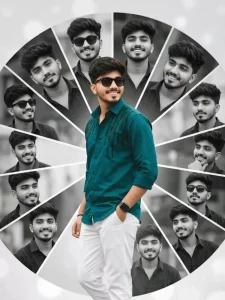
A creative romantic digital photo collage featuring a young handsome man in a black shirt and white trousers. The main subject is a full-body cutout placed slightly left, turned back and smiling over hes shoulder, wearing a peacock black embellished shirt. Behind and around him is a semi-circular collage of multiple black-and-white portrait shots of the same man, each in different expressions and poses, arranged in curved segments. The background is a soft light grey. Wear sunglasses
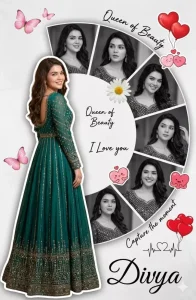
A creative romantic digital photo collage featuring a young handsome woman in a peacock green frock. The main subject is a full-body cutout placed slightly left, turned back and smiling over her shoulder, wearing a peacock green embellished rich frock. Behind and around her is a semi-circular collage of multiple black-and-white portrait shots of the same woman, each in different expressions and poses, arranged in curved segments. The background is a soft light grey textured surface - with a minimal aesthetic.Decorative elements include pink butterflies, a floral daisy near the center, red heart balloons, and cute love-themed stickers Handwritten-style text elements like “Queen of Beauty,” “I Love you,” and “Capture the moment” are scattered around. A small heartbeat line with a heart icon is included. At the bottom, the name “Divya” appears in elegant cursive typography. Soft shadows, smooth cutout blending, high-end Photoshop manipulation, romantic mood, pastel tones, high
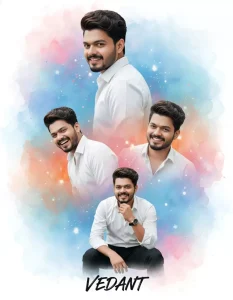
Create a vibrant, cinematic birthday-style collage portrait of a handsome young man instead of the woman. Keep the exact same layout, background, and artistic style as the referencien soft watercolor background blending blue, pisloforange and white tones, glowing dreamy effects, festi Indian celebration be. Include multiple poses of the same male: A large side profile at the top, looking backwards over the shoulder with a calm confident expression (same angle as original top portrait). Two mid-size smiling portraits in the center, natural laughter and traditional celebration mood. One sitting pose at the bottom, restin joyful manner - same position as nd on chin in a thoughtful, e original bottom boy. Outfit: crisp white full-sleeve shirt, black formal trousers, well-groomed hair, subtle traditional accessories like a wristwatch (no heavy jewelry). Natural skin tone, soft shadows, clean facial features. Background remains festive and artistic - watercolor color splash blending orange, blue, pink smoke-style effects. Traditional Indian celebration essence but adapted for a male look. Text at the bottom in stylish handwritten font should display only "VEDANT" (no birthday text). High-resolution, ssy pester style
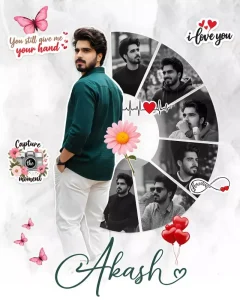
A creative romantic digital photo collage featuring a young handsome man in a peacock green shirt and white trousers. The main subject is a full-body cutout placed slightly left, turned back and smiling over hes shoulder, wearing a peacock green embellished shirt.
Behind and around him is a semi-circular collage of multiple black-and-white portrait shots of the same man, each in different expressions and poses, arranged in curved segments. The background is a soft light grey textured surface with a minimal aesthetic.
Decorative elements include pink butterflies, a floral daisy near the center, red heart balloons, and cute love-themed stickers. Handwritten-style text elements like “#,” “# you,” and “Capture the moment” are scattered around. A small heartbeat line with a heart icon is included. At the bottom, the name “#” appears in elegant cursive typography. Soft shadows, smooth cutout blending, high-end Photoshop manipulation, romantic mood, pastel tones, high resolution, 4k.
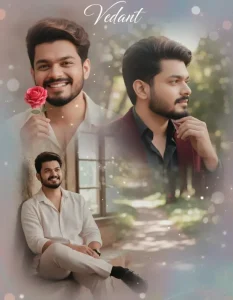
Create a realistic, high-detail 4K collage portrait of me (same face as in the uploaded image, 100% accurate face matching) named "Vedant".

he, glowing skin, and a soft, joyful expression.

he appears in three beautifully blended poses within a dreamy collage composition:

Close-up: he smiles brightly, playfully holding a small pink rose near his face.
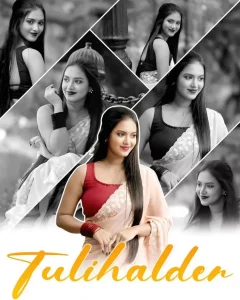
“Create a 4K ultra‑realistic collage of one beautiful young Indian woman wearing a light pastel saree and sleeveless blouse, long straight hair open, soft smile. Arrange 5–6 different poses in diagonal panels like a modern Instagram collage. Background in all side photos should be black and white while the girl remains in full color, giving a color‑splash effect. Central main image should be in full color, front‑facing, waist‑up portrait, with smooth skin, natural makeup and soft bokeh backgroun
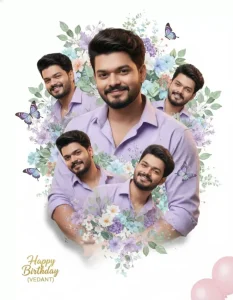
A stylish birthday collage portrait of a handsome young man (use uploaded image as face reference), smiling confidently, wearing a lavender shirt with rolled-up sleeves. Central full-body pose with arms gently crossed. Surrounding hìm in a heart-shaped halo: 5 smaller headshots (same face) at different angles, all smiling. Entire composition framed by lush watercolor-style purple-blue-green florals, leaves, and floating blue butterflies. Behind the central figure: soft double-exposure of his face (eyes closed, serene smile) blended into blooming bougainvillea. Golden sparkling text "Happy Birthday (VEDANT)" at bottom center. Three pink balloons float in lower right. Clean white background, soft shadow under figure, smooth DSLR lighting. 8K photorealistic, Hapartistic collage, bright cheerful theme.
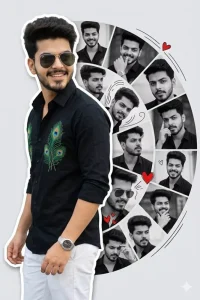
A creative romantic digital photo collage featuring a young handsome man in a black shirt and white trousers. The main subject is a full-body cutout placed slightly left, turned back and smiling over hes shoulder: wearing a peacock black embellished shirt. Behind and around him is a semi-circular collage of multiple black-and-white portrait shots of the same man, each in different expressions and poses, arranged in curved segments. The background is a soft light grey. Wear sunglasses
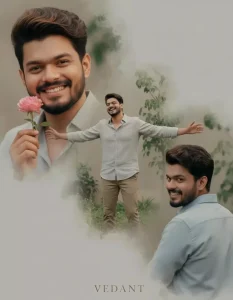
Create a realistic, high-detail 4K collage portrait of me (same face as in the uploaded image, 100% accurate face matching) named "Vedant". he, glowing skin, and a soft, joyful expression. he appears in three beautifully blended poses within a dreamy collage composition: Close-up: he smiles brightly, playfully holding a small pink rose near his face.
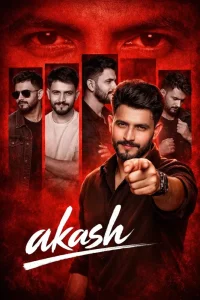
Create a dramatic tribute poster with a bold red monochrome background. ” The background should feature a faint, large close-up of a man’s eyes blended into the red texture for intensity.
In the center, design a collage layout with five vertical rectangular panels showing black-and-white portraits of the same stylish man(reference image), in different poses and expressions (serious, smiling, side profile, casual stance).
Overlaying the panels in the foreground, place a larger,full-color cutout of the actor pointing confidently toward the viewer. He should have styled hair, a trimmed beard, and wear a dark brown shirt with a charismatic expression. At the bottom, add a bold handwritten script-style signature text reading “akash” in large white brush lettering,  Add subtle cinematic lighting, high contrast, sharp details, and a modern fan-made poster aesthetic. The overall mood should be powerful, celebratory, and stylish with a strong red-and-black theme. Only added boy have voluminous hairstyle and fair face
Avoid These Mistake When Creating A Prompt
Look, if you’re using a prompt in Gemini, be careful about what you shouldn’t add. First, decide whether your photo should be cinematic, natural, or aesthetic. I already provide this in the prompt, but if you write it yourself, I’m explaining it for you. You’ll need to write whether you want darkness or lighting in the background. You’ll need to add that. In the style section, you’ll need to specify the style in which your photo will be generated. For example, if you want to generate it in 3D, you’ll need to look for “Create in 3D.” Write “Realistic” and avoid too many keywords. You’ll also need to add this: If you want a DSLR-like photo, write “DSLR portrait” there.
The book effect will be added to your photo. I’ll explain the details if you write your own prompt. You can write all these things. You can generate them, and I’ve provided the prompt. You don’t need to add these things. You’ll find them all already written in it.
How To Use Creative Portrait Collage Ai Photo Editing Prompts Google Gemini
Now, if you want to create a photo, use these simple methods. This will result in a truly stunning photo. Using the right prompt is crucial for creating a truly stunning photo. What you need to do first? Here, you’ll find different prompts for different styles. Whatever style you choose to create, it’s not just a college style. It’ll remain the same style. Different methods are provided for each style. You can create different photos using different methods. What you need to do: First, you’ll find an option to copy the prompt. Copy it, then use the Google Gemini application or a browser.
The browser link is provided directly here. You can go directly there. First, you need to paste the prompt. Paste whatever prompt you have. Then, go to the Plus option and upload a photo. The photo should be a selfie, with your face clearly visible. Now, you’ll find an option called Create Image. Select it and then click Generate. This will create a stunning photo for you.
Conclusion
If you simply want to edit, you can do it by following this method. I think this should make your editing work perfectly without any problems. However, if you still have any problems, you can ask us. We’ll definitely tell you how to solve this problem. You can also edit the video or whatever you’re editing. We’ll continue to share new editing tips and tricks with you in the future, so you can further improve your mobile photography and videography.