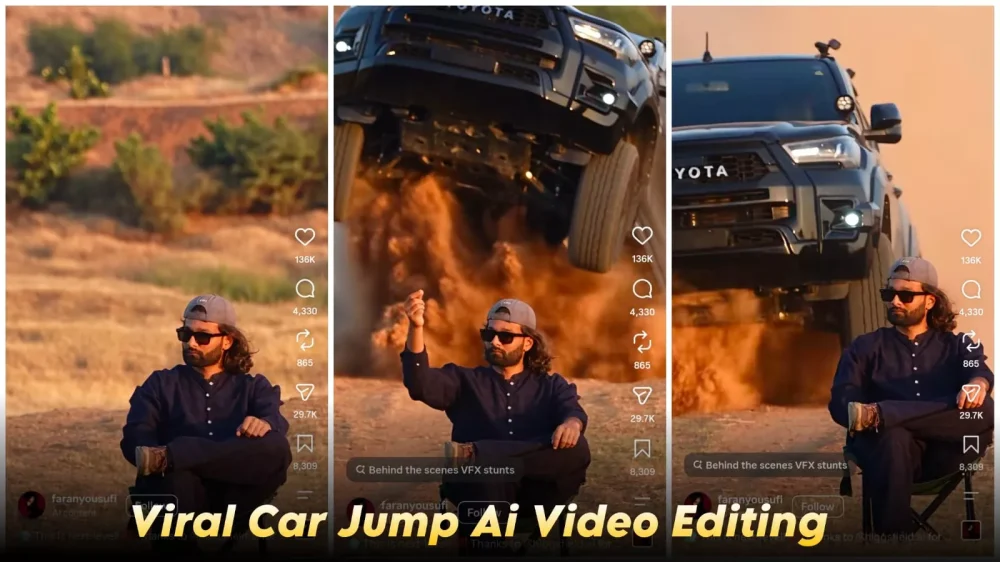
Trending Car Entry Ai Video Editing Prompt – Instagram trends are constantly changing, but I’ve noticed a particular trend: videos featuring this kind of entrance are going viral. I’ll show you how you can create a similar viral video for yourself, step by step. Actually, I should mention that the original video was created and recorded using a camera. However, since we don’t have that equipment, we’ll use a different approach. We’ll create our video using AI, and this will give us excellent results. Let me explain the entire process and how you can follow these steps to create a great video.
Details Of Trending Car Entry Ai Video Editing Prompt
In this editing tutorial, we’ll create a video featuring a car entry. We’ll be sitting on a chair in the desert, and our car will drive in from behind. Now, this is a slightly different scenario because many people don’t own a car, and many want to create a video with their favorite car. I’ve provided both options here. You can create a video with any car you want. It will be very simple. You just need to change the car – simply change the car’s name, and a video with a different car will be ready. I’ll explain everything; just follow the steps. First, we’ll create an image, and then we’ll convert that image into a video. We’ll also explain which tools to use and how to create it.
Update –
In this article, I am sharing an update that will help you create even better videos. The approach here is completely different, so give this method a try as well.
Video Prompt –
Use the uploaded character photo as the exact identity reference for the main character.Create a cinematic video using the reference video as the primary motion and performance guide. Preserve the character's facial identity, facial proportions, hairstyle, skin tone, body proportions, and overall appearance consistently throughout the entire video.The character should perform the same actions, body movements, gestures, timing, posture changes, walking style, and expressions as the person in the reference video. Match the reference video's camera movement, framing, shot composition, perspective, pacing, and transitions as closely as possible.Keep the character's face stable and recognizable in every frame. Do not change the facial structure or make the character look like a different person.Maintain realistic human motion, natural body mechanics, realistic hand and finger movement, natural blinking and facial expressions, and believable interaction with the environment.Preserve the clothing and accessories from the character reference unless the reference video clearly requires a different outfit.Use realistic cinematic lighting, natural shadows, detailed skin texture, realistic hair movement, and high-quality photographic rendering.The final result should look like the character from the uploaded photo was actually filmed performing the reference video's actions, rather than an Al-generated person imitating the character.Priority:1. Character identity consistency2. Accurate motion and acting from the reference video3. Accurate camera movement and composition4. Natural realistic movement5. Cinematic visual qualityAvoid face morphing, identity drift, distorted hands, extra fingers, unnatural limbs, body deformation, flickering, changing clothes, changing hairstyle, inconsistent facial features, or cartoon/anime appearance.
Editing Process
In this process, we will use two AI tools. First, we will use Google Gemini. You should have access to it, and we will create both the photo and video using Google’s website. What happens is, first we generate the photos because we don’t usually have photos of ourselves sitting on a chair in the desert with the desert in the background. If you have such a photo, you can use it. If not, even a photo of you simply sitting on a chair will work. After that, you will have to perform the second step, the video creation process, because we will be converting the image to a video, and that also requires a prompt. I have shared both prompts here and also explained the process. You can follow those instructions.
How To Create Ai Image
Let’s understand how to convert your normal photo into an image using this method. This is important to understand. We will have a prompt. We have an image prompt. And we will copy this prompt here. Then we will click on the Google Gemini button below and go to this website. Here, first you need to paste the prompt. Upload a simple selfie. After uploading, when you generate it, it will create a photo for you where you will be sitting on a chair in the desert. And you can customize it according to your preferences. If you want to change anything in your clothes or anything else, just change that thing in the prompt, and your photo will be generated accordingly. You have to do it this way. Then you will get a 100% perfect result.
How To Generate Your Video
Here are the editing details for creating the video using Google Flow. First, visit the Google Flow website and upload the reference video—I have provided the link here, so you can simply copy it. You will also need to upload your own photo; both items are essential, so make sure to upload them. After that, simply hit ‘generate,’ and it will create a high-quality video for you. You will get excellent results, as I have personally tested this editing process to ensure you achieve the perfect outcome.