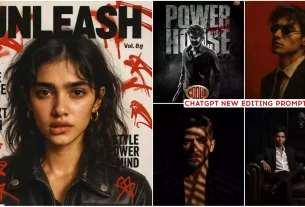
Top 5 Google Gemini Ai Photo Editing Prompts – Now so many images are going viral, so when everyone is creating images, they are getting completely vegetable type images. Now the problem in this is that many people are saying that this image is being copied. We will not create it or our image will not go viral. We need something new, so then I decided that let’s bring something new for you. Here in this article. Some new promises have been provided to you with the help of which you can create a completely different type of your photo. These are going to be edited in a completely different way, so I explain to you in this article. What kind of images are these and how you can create them and how you can also make them viral.
Top 5 Google Gemini Ai Photo Editing Prompts
Why are we going to create this photo? I will explain it to you now. This is an image. It is trending a lot right now. People create a lot of different types of images on it. I will tell you here right now. What happens is that when you start creating an image on one hand, it becomes difficult for it to go viral and in the same train, if you create a slightly different type of image. Your image becomes viral in a different way because you have done something unique, different from others. Now if you want to create such an image. Here different frames have been provided and with their help you can create it very easily. You will also be guided to create it. How do you do it? Follow those steps.

Using the nano-banana model, create a 1/7 scale commercialized figurine of the characters in the picture, in a realistic style, in a real environment.

The figurine is placed on a computer desk.

The figurine has a round transparent acrylic base, with no text on the base. The content on the computer screen is the brush modeling process of this figurine. Next to the computer screen is a BANDAI-style toy packaging box printed with the original artwork., The packaging features two-dimensional flat illustrations.

Please turn this photo into afigure. Behind it, there should be a Model packaging box with the character from this photo printed on it. In front of thebox.on a round plastic baseplace the fiqure version of thephoto I gave you. I'd like the PVC material to be clearlyrepresented.

It would be even better if the background is indoors.

Create a hyper-realistic 1/7 scale figurine of the characters from the reference image, positioned in a believable creative workspace setting. Make sure to keep their faces, eyes, nose exactly same as in the attached image, The figure stands on a clear round acrylic base without text, while a computer monitor nearby shows the 3D sculpting process with wireframes and brush marks. Surrounding the desk are tools, sketches, reference books, and other props that suggest a designer's workspace, subtly blurred but adding depth. The scene is softly lit with teal and white tones, with geometric skylights casting beams across the room. Sweat and fabric textures are sharply defined, and reflections highlight surfaces. Captured in ultra-sharp handheld realism with natural lens distortion and authentic lighting falloff, the scene feels lived-in, creative, and professional an artist's environment where imagination becomes reality.

Create a hyper-realistic 1/7 scale collectible figurine of the character from the reference image in a lifelike style, placed inside a cluttered yet inviting indoor workspace. Make sure to keep their faces, eyes, nose, exactly same as in the attached image. The figure stands on a clear round acrylic base without text, placed on a desk overflowing with tools and personal items. Crumpled sketch papers, scattered pencils, tangled wires, USB drives, paint splashes, and a half-open snack wrapper are strewn across the surface. A computer monitor nearby shows the 3D modeling process, while headphones hang loosely off its edge. The lighting is soft with cool teal tones and harsh white beams cutting through geometric skylights, creating dramatic reflections and shadows that enhance the textures. Motion blur around his pose adds energy while sweat glistens on his skin and fabric stretches naturally. Rendered in ultra-sharp handheld realism with authentic lens distortion, realistic falloff, and tactile surfaces, the scene feels raw, chaotic, and inspiring as if creativity thrives in beautiful disorder.
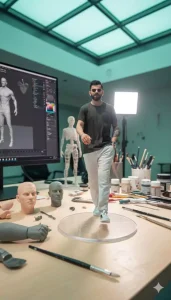
Create a hyper-realistic 1/7 scale collectible figurine of the character from the reference image in a lifelike style, placed on a desk filled with in-progress sculpting materials and tools. Make sure to keep their faces, eyes, nose, beard, turban exactly same as in the attached image. The figure stands on a clear round acrylic base without text, amidst scattered sculpting tools like brushes, carving knives, and paint containers, some open or partially used.

Nearby are unfinished prototype parts - wireframe forms, half-painted limbs, or assembled pieces waiting to be completed. A computer monitor displays the ongoing 3D modeling process with brush details and layered textures visible. The desk is softly lit by cool teal skylights and harsh white spotlights cutting through geometric architecture, creating dramatic reflections on tools and surfaces. Subtle motion blur emphasizes his speed, while sweat beads shimmer across his skin. Rendered in ultra-sharp handheld realism with natural lens distortion and realistic lighting falloff, the scene feels authentic, industrious, and cinematic -a snapshot of craftsmanship mid-creation
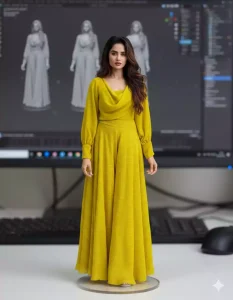
Create a 1/7 scale collectible action figure or figures based on the person(s) in the uploaded image, with exact likeness-same face, eyes, nose, beard, hairstyle, body shape-and wearing the same outfit design and colors exactly as seen in the photo. The figures must have a molded plastic look, like high-quality manufactured action figures, with smooth, slightly glossy surfaces, clearly defined paint sections, and subtle seam lines typical of injection-molded or 3D printed toys..

The figures should not have realistic skin textures, pores, or imperfections. Instead, use clean, stylized surfaces with painted details and sharp edges, showing slight gloss where light reflects on the plastic. Include small articulation joints at shoulders, elbows, knees, and other natural points, blending them subtly into the design.

Each figure stands on a clear round acrylic base without text or logos. If more than one person is in the image, create multiple figures with correct proportions and poses, arranged together naturally.

Place the figures on a neat desk environment with a computer monitor in the background displaying a gray sculpt or 3D modeling process of the same figures, giving a toy design workshop vibe. Include minimal props like a keyboard or mouse in soft focus, without distracting from the figures.

Use soft, neutral lighting that accentuates the plastic surfaces and painted details with subtle reflections, without adding skin-like realism. Render the scene in sharp, handheld style with realistic depth of field and soft lens distortion, emphasizing the manufactured plastic feel seen in premium action figures
Create Different Images
With the help of these different promises provided, you can easily generate such images from the one I have provided. You simply copy it and use it, then where to use it. Let me tell you first. For this we will use Google Gemini application. With this, our image is easily generated. We can do it in the browser but there we have a problem that it is not generated properly or it gets crushed but in this you will get to see everything perfectly.
How To Use Top 5 Google Gemini Ai Photo Editing Prompts
As soon as you open the application, your name will appear written there. Whatever will be on your Gmail. After that, you will see an image written below. You have to click on it because with the help of that you can generate such a best image. Now whatever prompt you have copied from here. Like, whatever you find right, paste it there. After that, now you have to go to the plus option and upload a photo. The photo which you want to convert into 3D. You will upload it there and then click on the generate option. Here it takes a few seconds for your photo to be generated, like in Chatgpt it used to take more time, at least 5 minutes, but here your entire photo is easily generated in 30 seconds. That too in full HD.
Conclusion
In this way, you can create this viral image in different styles and the style that I just explained to you, I think you will definitely like it because the editing style here is quite different and with this, editing can be done very easily, so comment and tell me how you like this method and if you have created it with this, then do tag us on our Instagram ID.