

Creating photos with AI has become so easy today. We never thought that we can create such photos with AI. You must have seen such doodle art images. It goes viral. You must have seen it in videos. Some time ago, people used to see it using VN editor. What kind of videos can you create and they are also very viral, so we thought that we should tell you about its editing, because many people are telling you. You can create such images with Doodle Art Chatgpt Ai Photo Editing Prompts, but no one is explaining its correct way. You can create like this. You can add such things. Then I thought that let’s explain it to you in detail. How does it work and how can you generate it?
What Is Doodle Art ?
Now see, as I told you, you can generate it here with AI. Now what is this doodle art? What kind of images are there in it? First of all, let’s take a photo of our own. There is no requirement in it. You can use any kind of photo. You have to use a photo there and what is there in that photo. On the side, there is a dotted line on the side of your whole body. Then some text is written, somewhere there is an image, somewhere there is a butterfly. All the things are shown to you only by drawing. This drawing on your photo. We count it in doodle art. We will make this with AI. Normally it takes a lot of hard work to make it. We should have an idea. Then we can make such an image.
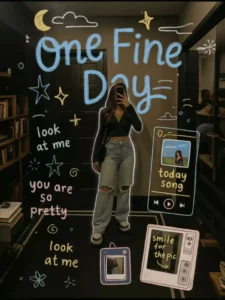
Create a cinematic HD doodle overlay using soft pastel chalk textures. At the top center, write “One Fine Day” in large baby blue crayon letters, with a yellow crescent moon, fluffy cloud, and gold sparkle doodles beside it. Scatter stars in navy, white, and gold around the sides. On the left, add handwritten-style text: “look at me” (twice), and “you are so pretty” in pink and soft blue. On the right, draw a doodle music player with a photo and “today song” in yellow. Below, draw mini photo frame doodles—one pink-blue polaroid, and one beige TV with “smile for the pic” in yellow. Keep spacing natural and dreamy.
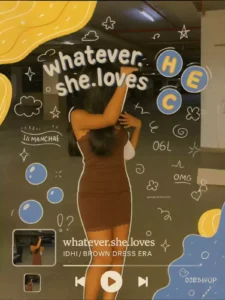
Apply a whimsical, pastel-themed hand-drawn doodle style featuring clean white chalk-like outlines with a dreamy crayon texture. The doodles include puffy stars, clouds, sparkles, hearts, question marks, tiny flowers, and swirl motifs—each drawn with soft, rounded, imperfect strokes to maintain a playful handmade feel. Bubble-like circles in muted blue contain bold, uppercase letters like "H", "E", "C" outlined in soft yellow-orange, with slight shadowing to give a sticker effect. Text elements are in 3D pastel bubble fonts, soft lavender or white, spaced in wavy arcs and surrounded by glowing outlines. Words like “whatever.she.loves”, “OMG”, “06L”, and “MANCHAE” appear randomly in scribbled all-caps, matching the rest of the dreamy pastel pop vibe. Doodles float organically around the subject, keeping balance and depth in a scrapbook-meets-K-pop aesthetic, made to look like HD digital film with a Canon cinematic lens effect.

"Add white hand-drawn doodles around the subject like books, laptop, sparkles, coffee mug, planner, etc. Place text like ‘Romanticizing my study era ✨📖’ in a handwritten style. Keep subject (the girl) fully visible. Use 9:16 ratio. Clean, Instagrammable look."
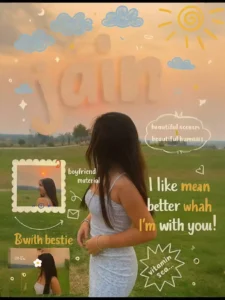
Create an HD cinematic scrapbook-style doodle overlay in Korean aesthetic with Canon lens clarity. Add pastel chalk-textured doodles: puffy clouds, yellow sun swirls, baby blue stars, sparkles, pink and white hearts. Place large beige hand-drawn text “name” at the top with 3D shading. Add spiky white bubble saying “beautiful scenery & beautiful human” top right. Overlay quote: “I like me better when I’m with you” in white, yellow, soft orange. Add text bubbles: “NATURE time”, “with bestie”, “cute”. Include Polaroid frames, red paperclips, arrows, envelopes, glow dots.
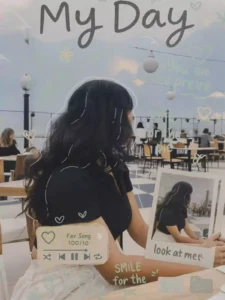
Large handwritten title text at the top: "My Day" in soft black chalk Hand drawn doodles in pastel colors (pink, mint green, light yellow, baby blue) Elements: sparkles, hearts, stars, clouds, swirts, flowers around the girl Retro style music player widget with a heart icon and "Fav Song 100/10" caption Mini polaroid style photo frame placed near the subject with caption "look at me" Additional handwritten text: "you are so pretty", "Tashion", "smile for the pic" in deep pink colour Add white sketch style glowing outline around the subject for pop effect Color match all doodle elements with the image tones (background, outfit) -Use a dreamy, solt, Pinterest aesthetic layout Frame should be 9:16 ratio, perfect for Instagram Reels Keep the vibe youthful, fun, feminine, and trendy. Do not cover the subject's face or e or main features.
How To Use Doodle Art Chatgpt Ai Photo Editing Prompts
- Ok, so let me tell you how you can generate these images. By the way, I will also try to tell you the custom method. But it takes a lot of hard work. Because of that, people do not go towards it. People go a lot to create images. But when they see how much hard work is required, then anyone goes to create such an image. Seeing the viral image, they want us to make it easily. For this, we have this trick. You follow it. With this, many of your images will be generated for free within 1 minute.
- For that, you have to follow this step, first of all you have to open chatgpt. Where you have to create an ID, login to your Gmail ID, only after logging in, you will get the option to upload the image here. Now look on the side. You will get the option to upload an image. On that, you have to select your photo. Here, do not use selfie type photos at all. Whatever you want to use, it should be a full photo and a little clear HD photo. If you want you can do it in HD also, I will provide you a prompt. If you say so, you have to upload the image there. You just have to paste a prompt. Then after that you have to generate. Your image will be created and ready. In this way you can generate a great top level image.
Overall Tips
I don’t know how many people will like this doodle art. How many people will not like it. But I have provided the viral image here because it is good. Now whether you like it or not, you must tell us, because your review matters a lot to us. We provide content to you here according to your review. According to your opinion, we provide you most of the content here according to that. Like if you want to do cinematic or photo studio type editing. I have provided prompts for that too. Visit our website once. You will find all your prompts in the photo editing category.


