Top 10 Chat Gpt Cinematic Ai Photo Editing Prompts – You must have created many images from Chat Gpt. As you must have seen that at one time this Ghibli trend came and such images became very viral. Even after that people were creating different types of images. But they were not able to find a right trend or were not able to go in the same direction. They could create their image. You should know that you can easily create a good image of yours. To create that, you will have to follow this simple method of ours. With this, you will be able to generate such an image that you yourself will not believe after seeing it. We can also create such an image by ourselves. I will tell you how to do it. You can follow it step by step.
Top 10 Chat Gpt Cinematic Ai Photo Editing Prompts
This image that I am going to tell you about is totally created from Chat Gpt. You will not need any other application for that. I will also tell you to correct the flaws in it. Look, if you generate an image from any platform, you get to see a little bit of the image in it. But you will not get to see some of those things in it. In this, your face will be slightly mismatched. We will fix this thing by following this triangle told by us, our editing will be done in this way. How can you get such a realistic thing. Anyway, I will give you some details of the image here. You can understand by looking at them that our image is going to be ready in this way. In a completely professional way and that is why it is being liked.
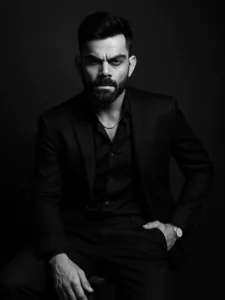
PROMPT – Use this image to create A dramatic black and white portrait of a confident looking man. sitting on a wooden stool against a dark studio background. He is wearing a well-fitted, all-black suit with a black shirt, and black pant small silver chain at naki and small silver watch slightly unbuttoned at the top, exuding a moody and powerful aura. His posture is relaxed yet dominant, with one arm resting on his leg and the other one in his pant pocket The lighting is soft but directional creating
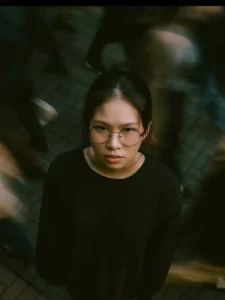
Cinematic overhead shot of me standing still on a brick city sidewalk, wearing a dark oversize sweater. Motion-blured crowd rushes past around me. Moody lightning, 35mm film look, shallow depth of field, sharp focus on me. Ration portrait 4:3
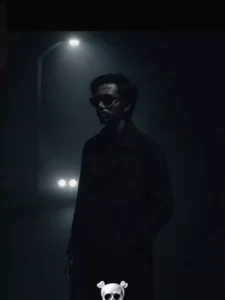
Cinematic night-time shot of a man standing in the middle of a dark, empty street under a streetlight. He is wearing a long, dark trench coat, looking serious and mysterious. Fog surrounds the background, with soft light illuminating parts of his face. A pair of car headlights are visible far behind him in the background. Moody blue color grading, film noir style, 35mm film grain, dramatic shadows and contrast. Ratio 9:16, ultra-realistic style.

Cinematic shot of me walking against a rushing cyber city crowd, all others are blurred with motion trails, slow-shutter, i'm in focus, side profile- serious looking at a far distance, it's raininv and I am soaked. Wearing a long trench coat. Neon cyberpunk tones, 35mm film look, ambient lighting from neon signs ratio: 4:3
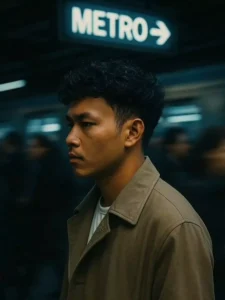
SLOW-MOTION CINEMATIC SIDE PROFILE SHOT OF ME WALKING AGAINST A RUSHING METRO STATION CROWD, ALL OTHERS ARE BLURRED WITH MOTION TRAILS, I'M IN FOCUS WITH A SERIOUS FACE, WEARING A LONG TRENCH COAT. COOL BLUE TONES, 35MM FILM LOOK, AMBIENT LIGHTING FROM TRAIN SIGNS. RATIO: PORTRAIT 4:3
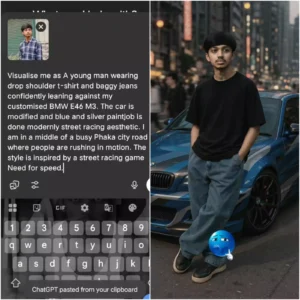
Visualise me as A young man wearing drop shoulder t-shirt and baggy jeans confidently leaning against my customised BMW E46 M3. The car is modified and blue and silver paintjob is done modernly street racing aesthetic. I am in a middle of a busy Phaka city road where people are rushing in motion. The style is inspired by a street racing game Need for speed.
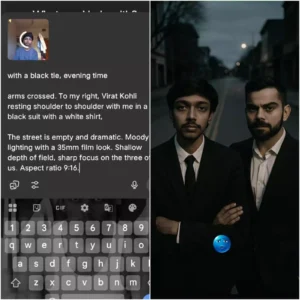
with a black tie, evening time arms crossed. To my right, Virat Kohli resting shoulder to shoulder with me in a black suit with a white shirt, The street is empty and dramatic. Moody lighting with a 35mm film look. Shallow depth of field, sharp focus on the three of us. Aspect ratio 9:16.
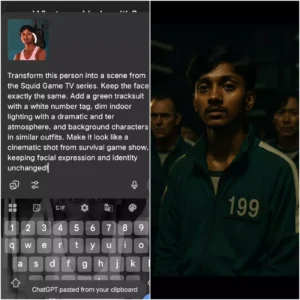
Transform this person into a scene from the Squid Game TV series. Keep the face exactly the same. Add a green tracksuit with a white number tag, dim indoor lighting with a dramatic and ter atmosphere, and background characters in similar outfits. Make it look like a cinematic shot from survival game show, keeping facial expression and identity unchanged!
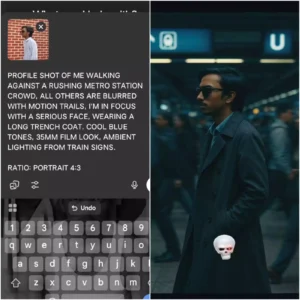
SLOW-MOTION CINEMATIC SIDE PROFILE SHOT OF ME WALKING AGAINST A RUSHING METRO STATION CROWD, ALL OTHERS ARE BLURRED WITH MOTION TRAILS, I'M IN FOCUS WITH A SERIOUS FACE, WEARING A LONG TRENCH COAT. COOL BLUE TONES, 35MM FILM LOOK, AMBIENT LIGHTING FROM TRAIN SIGNS. RATIO: PORTRAIT 4:3
Generate Image With Chat Gpt
For this, I will share a rough idea with you about how the image is created. Look, first of all you have to take a normal image of yours in which your face is visible because your body is not concerned. In this, it automatically generates the body and it is happening exactly like that in all the images. You can also see any image on Instagram, which has gone viral. It is also happening exactly like that. What is done in it. Just an image with a normal face is used. No matter how your image is, your face should be visible properly in it. Then after that, this image is generated using that image and using a prompt. We will explain this in full detail. In the following, you will be able to understand its steps and after that you will not be able to create.
Create Image With Top 10 Chat Gpt Cinematic Ai Photo Editing Prompts
Now let’s learn how we can create these images. Look, what will you need to create the image? You will need a prompt and you can have an image which I told you about earlier. If you have an image, then you will be able to generate it easily. What you have to do is open the chat secret. You can open the application, you can open it in the browser, wherever you find it convenient. You open it there. There you have to go to the writing option from where you can text. Look in it, the option to upload an image has just come. You have to go to the simple option and from there you should select your image. Any type of image and just your face should be visible in it.
After that, you have to write there. Now whichever image you find right from this. The type of image you want to create, paste it there. You will get the option to generate. After that your image will be generated and ready. Now you can see that your face will change a little in it. I will share a prompt in the end to fix this as well. Although it creates 100% but still if there is a problem. I will tell you later, you can fix it.
Adjust Your Face
As I said, sometimes your face gets problematic. We have a solution to fix this as well. For that, you can use the face swap tool. You will find many of these on the internet. Like if you search on Google, there is a website called Face Swap called Remaker. Go to it and select the category of face swap. In that, first upload your AI image and secondly, you have to upload the real image and swipe and your absolutely realistic image is ready.