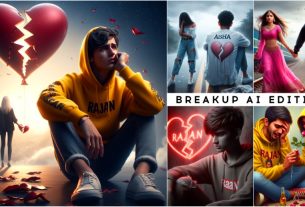
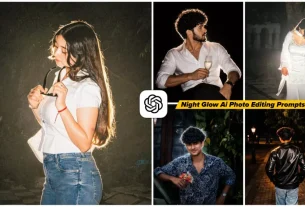
New Top Chatgpt Ai Photo Editing Prompts – Friends, we have already told you about AI photo editing. Let’s use it and you must have created your AI photos very well and in this article I have found a new way for you. To tell about this type of editing, this time we are going to do something different and share something new with you. With which you can create completely different types of photos, so let’s understand step by step. While talking to you, let us tell you that if you want to create a good video of it or if you want to create good photos. How can you do it. How can we create our videos using Chatgpt. If you want to know about it, then all those things will be told to you in this article. Along with this, editing of such creative photos will be told.
New Top Chatgpt Ai Photo Editing Prompts
This editing of photos which I have just explained, probably someone else told you and maybe you will be able to do this kind of editing. In this, you can shift your own photo from Chatgpt to a different location in a very realistic way or you can do this. It will generate in a very realistic way, after seeing which you will understand that this is a completely real photo generated. We will talk about exactly this in this article and will tell you too. If you want to make such a thing, then how can you make it because you will not find many people who can tell you about making such a thing. Who will explain to you about this kind of editing, but I will tell you. You understand it step by step and complete your editing.
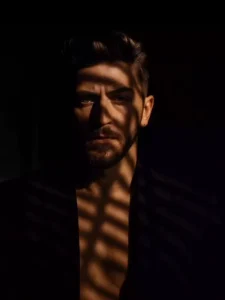
A moody portrait of a handsome man in a dark blazer with no shirt underneath, standing in dramatic lighting. Harsh shadows from window blinds fall across his face and chest, creating a cinematic, mysterious atmosphere. His hair is styled and voluminous, and he gazes intensely into the camera with a serious expression. The background is dark and blurred, adding depth and contrast. Editorial fashion photography style, high contrast, shallow depth of field.
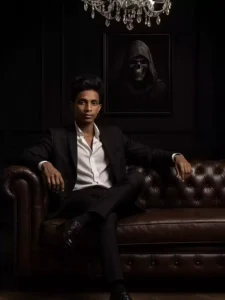
A confident, handsome man
with slicked hair, sitting on a luxurious dark brown leather sofa in a dark, elegant room with black walls and a chandelier above. He is wearing a black tailored suit with an open white shirt, sitting in a relaxed mafia boss pose with one leg crossed. His black leather shoes are visible and polished. Behind him is a framed picture of a hooded figure with a skull face, in black and white.
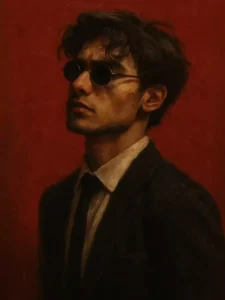
"A gritty, painterly digital portrait of a man with a confident, emotionless expression, wearing small round black sunglasses and a fitted black suit with a white dress shirt and thin black tie. His short dark hair is slightly tousled, and he has light stubble on his face. The lighting is dramatic, emphasizing the contours of his jawline and cheekbones, with deep shadows across one side of his face. The background is a solid, bold dark red, giving a striking, minimalist contrast. The art style is textured, semi-realistic digital painting with visible brushstrokes, evoking a modern noir aesthetic."
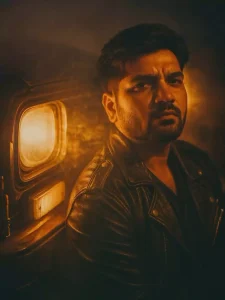
A cinematic portrait of me leaning against an old car with headlights turned on. The scene is filled with warm golden light and dramatic smoke, creating a moody, nostalgic atmosphere. He wears a black leather jacket with metal buttons and stitching details, and has a sharp jawline with styled hair swept to the side. The lighting creates deep shadows and warm highlights on his face, enhancing the emotional intensity. The background is dim and out of focus, emphasizing the subject and headlight glow. Styled like a retro movie frame, with a soft film grain effect and dramatic backlighting.
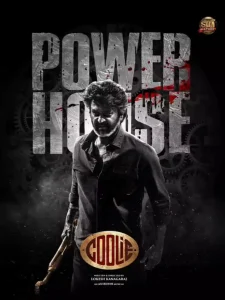
Save This Image & Use In Chatgpt
Make me look like in the first image. keep my face, facial features, hairstyle exactly the same.
Create Ai Photo & Video
Like you are being told about editing this chat gpt, then the style in it is becoming completely different from ours. This is the thing that people like, those who want to do editing. They like to do a completely different type of editing. They like to create a different type of video. Many things are told to you on this website. With which you can create a good video. Like look, I had told you many different styles earlier, but they have become old now. Now there is a need to do something new and there is a need to do this. So that the audience likes it as soon as they see it, so this article told you exactly what you want to see. And if you want to animate them. Want to convert the video into video. I will also tell you about that, which tools will be best for you.
How to Use New Top Chatgpt Ai Photo Editing Prompts
If we want to create this edit, what things will we need? First of all, we will need a prompt. I will provide the prompt here, so you can use it. If you need chat gpt, I will also provide the link of chat gpt. First of all, copy whatever image you like from here. Whatever kind of photo you want to make, copy it. Below that you will find a prompt. You have to copy it. After copying, you will find below. Create Your Image, on which you can click and go to chat gpt. There you have to upload an image. Your image should be with your own face. If you want to generate your image or if you want to generate someone else’s. You can upload that too there. Then after that you have to paste the prompt and then click on generate and wait for some time. Your image will be created and ready here. Then you can save it.
Create Your Video ?
If you want to convert an image to a video, then you get very simple tools for that and you can do it with those tools. What do you have to do? First of all, you have to go to a calling website. Where you get some free credits when you sign up. See, you get some new credits from home. You have to click on the video option there. Upload your image there. And write whatever you require in the prompt. Whatever you want to do with the photo, do that and then click on generate there. Even if you don’t write the prompt, just click on generate. It will add movement to your video. It will make your video perfect. You can save the video from there. This way you can convert your image into a video.