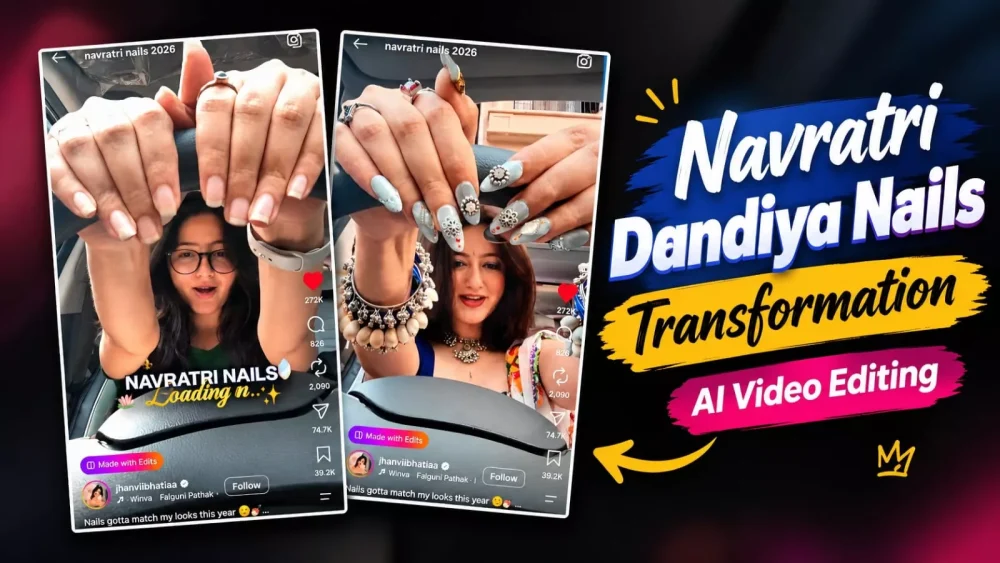
Navratri Dandiya Nails Transformation AI Video Editing Prompt – Navratri is coming, and if you don’t do some good editing, create some good videos, or post good photos, you won’t be able to get good engagement on social media. The way to go viral on social media is to do good work there. Share your videos with good results, and people will like your videos. Similar videos are also going viral on social media, and many people are liking them. This is an editing especially for girls, so if you’re a girl, read this article, which will explain all the details of how you can create this viral editing on social media. The creation process will be explained in a completely free method, and your video will be ready in a 100% perfect, genuine way.
Process Of This Video Editing
You do not need to do anything complex for this type of AI video editing; you can simply use applications like Google Vids, Google Gemini, and YT Create. The process is largely the same across these tools, so explaining one should give you a clear understanding of how it works. It is very simple: you just need to provide a reference photo and a prompt, and your video will be ready. If you want to know the exact steps, this article outlines the entire process. I will also explain in the next paragraph what kind of videos are created, as understanding this is essential for you to successfully create them.
Details Of Navratri Dandiya Nails Transformation AI Video Editing Prompt
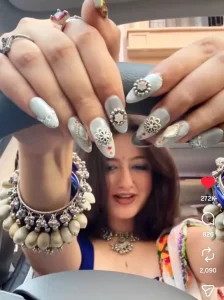
Let me explain the video concept to you. Here’s how it works: a camera placed on the car’s dashboard shoots the footage, capturing the view through the center of the steering wheel. This means that as you turn the steering wheel, your appearance shifts—transforming into a ‘Navratri’ look. It involves some interesting editing, but you can actually create this manually if you wish. To do it yourself, simply record a video where you turn the steering wheel while in your normal look, then turn it back to the straight position while revealing your new look. You could edit it yourself, but there’s an easier way: just use the editing template. You only need to provide a photo, and the system will generate the video automatically.
Video Prompt –
"A direct front-facing showcase video of a young Indian woman sitting in the driver's seat of a parked, stationary car. The camera is placed directly in front of her on the dashboard, looking straight at her face with the steering wheel in the foreground. The car is not moving. She starts in a casual pink patterned shirt. She grabs the steering wheel and abruptly spins it, creating a seamless dynamic motion-blur spin transition effect. After the spin, she is instantly transformed into a festive Navratri look, wearing a vibrant red traditional outfit with a heavy oxidized silver choker, large earrings, nose pin, and a bindi. She does not speak or sing; her mouth is closed. She silently smiles and reacts with pure visual excitement. She brings her hands into the extreme foreground to proudly show off her elaborate heavy oxidized silver hand jewelry (hathphool) and her stunning nails. The nails are the main highlight: extremely long, painted in red and white, and physically pierced with real dangling miniature silver charms, ghungroos, and small chains attached directly to the tips. She playfully poses and moves her intricately styled hands near the lens to flaunt the nail art, while her silently smiling, beautifully expressive face remains sharp and clearly visible in the midground. Bright daylight, vivid colors, completely text-free."
How To Generate The Ai Video?
Now, let’s understand the creation process, as this is the core step. First, copy the prompt—I will provide it in the article. Next, open a tool like Google’s AI platform or ChatGPT; for this example, let’s use Google’s tool. You will need to sign up first, then start a new project. Click the ‘plus’ icon at the top to upload a reference photo. Then, click the ‘plus’ icon again to select that photo for editing, paste the prompt, set the aspect ratio to 9:16, and hit generate. You will see that your video is created perfectly and easily.
Conclusion
The editing process I’ve explained here follows the proper steps; you don’t need to do anything else—you just have to follow the method correctly. I’ll keep bringing you more amazing editing techniques like this in the future. Also, whenever you use these tools, keep in mind that you might not get the best result on the very first try; you may encounter some minor issues. Since it won’t generate a perfect result immediately, simply retry two or three times, and you’ll get a great outcome.