Nagpuri Shayari AI Video Editing Prompts – If you have been browsing social media lately, you have likely come across those viral videos featuring shayari (poetry) in the Nagpuri style. In this article, we will discuss this trend in detail and explain how you can create this type of viral video yourself. I will cover every step of the process—from generating the image and turning it into a video to crafting a compelling dialogue. I will explain everything here so that you can learn how to create a high-quality video. Additionally, I will be uploading a tutorial to my YouTube channel, which you can also use to learn the process.
Details Of Nagpuri Shayari AI Video Editing Prompts
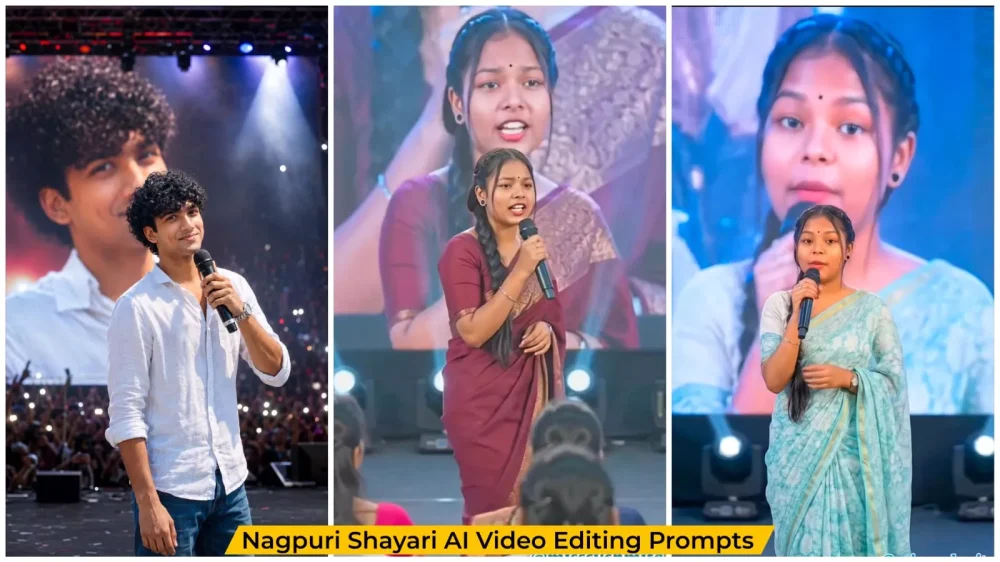
Let’s talk about the editing—specifically, what the process involves and what the final result will look like. I’ll walk you through all the details. To start, here is what you’ll see: a girl standing on stage reciting poetry. There is a large screen in the background, and the key feature here is that the movements made by the model in the foreground are mirrored on the screen. It’s fascinating how this works, so let’s break it down. First, we will create a photo, and then we will generate a video from that photo. I’ll also explain the steps involved in creating it.
What You Need To Create This Editing?
First, you need to create the photo; note that I have shared two separate prompts in the article—one for boys and one for girls. Copy the one you prefer. You can use either ChatGPT or Google Gemini to generate the content; both are excellent options. First, paste the prompt there, then click the ‘plus’ icon to upload a reference photo. After that, hit ‘generate.’ It will create a ready-made image featuring a stage setting where you appear to be standing with a microphone, speaking. For now, this results in a still image; I will explain the video generation process later.
How To Generate Video?
To create the video, you first need to understand the process. We will use a tool—which you can find via Google—that allows you to create videos easily and for free; it also provides video prompts. You can copy the prompt and use it. I will explain the process of adding dialogues later, so make sure you understand that part. First, open the website (I have provided the link below) and sign up. Look for the “New Project” option and click on it; then, select the “Start” frame option. Upload the reference photo you just generated, paste the prompt, and hit generate. Your video will then be ready. I will provide details about the prompt shortly.
Image Prompts :-
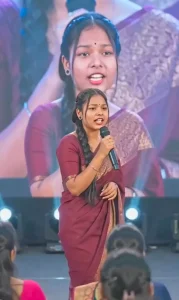
Use the provided image as reference and keep the person exactly unchanged — same face, hair, skin tone, expression, pose, body proportions, gaze, and full outfit with all details intact. Place the person at the center of a grand live concert stage, holding a premium microphone while performing or addressing the audience. Behind them, a huge LED screen shows a softly blurred close-up of the same person. Add cinematic spotlights, volumetric beams, light haze, vibrant stage lighting, realistic crowd ambiance, bokeh, shallow depth of field, and natural shadows. Ultra-realistic DSLR shot, 85mm lens, sharp facial focus, detailed skin texture, natural colors, 4K, vertical 9:16, professional concert photography style.
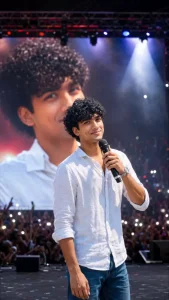
Use the provided image as reference and keep the person exactly unchanged — same face, hairstyle, skin tone, expression, body proportions, gaze direction, pose, and all clothing details intact. Place him at the center of a massive live concert stage, confidently holding a premium wireless microphone while performing or addressing a huge audience. Behind him, an enormous LED screen displays a softly blurred close-up portrait of the same person. Add cinematic stage spotlights, colorful concert lighting, volumetric light beams, atmospheric haze, realistic crowd silhouettes, raised hands, smartphone lights, bokeh effects, shallow depth of field, and natural shadows. Grand arena concert environment with professional stage equipment and immersive audience energy.

Ultra-realistic DSLR concert photography, 85mm lens, f/1.8, razor-sharp focus on the face, highly detailed skin texture, natural color grading, realistic lighting, professional event photography, cinematic depth, HDR quality, 4K resolution, vertical 9:16 composition, magazine-cover quality, extremely realistic and authentic appearance, no face alteration, no outfit changes, no body modifications, preserve identity perfectly.
How To Create Dialogue In Chatgpt?
Here’s how it works: when creating a video, you need dialogue and prompts, and you can get these written by ChatGPT. You simply need to tell ChatGPT the style you want—for instance, Nagpuri-style shayari or a motivational quote. Once you have the text, use it as your prompt: just type “Sing” followed by the text you generated, and then hit generate. Your perfect video will be ready.
Conclusion
You can easily create this Instagram trending edit. I’ve explained all the details. Now all you have to do is create it and share it on social media.