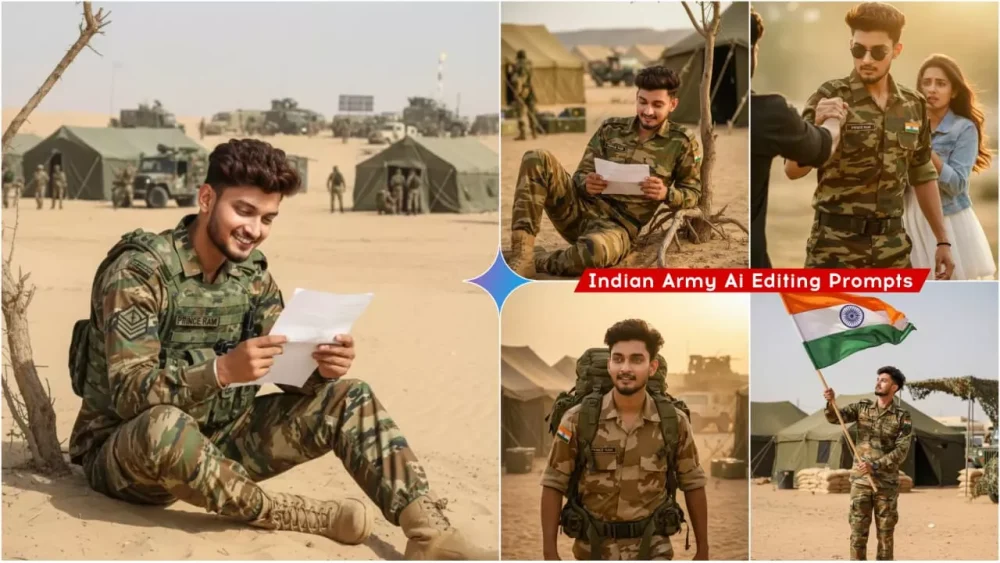
Google Gemini Indian Army Ai Photo Editing Prompts – Hello friends, how are you all? Welcome to our website. As you all must be seeing on Instagram or any other social media, you must have seen that photos of people in such Indian Army style are becoming very viral. Everyone wants to create such photos of their Indian Army style. It looks amazing to see. It has a sharp look, a daring face and along with that, your photo is in the Indian Army dress. Because of this, it has become more and more popular among the people. If you want to create it with Google Gemini, I am going to give you its prompt and also explain how you can generate it.
Details Of Google Gemini Indian Army Ai Photo Editing Prompts
And in this you have been shown not just one but many photos of different types. Which you can create, if you want to create any of them, that photo will be generated with your face exactly. With the same expression, with the same result and you will also get to see the background etc. uniform there. If you want the look of an Indian soldier, this is your photo. First of all, in the photo which you will use, you have to keep your facial expressions absolutely correct. As if your facial expressions are correct in that, then the photo which will be created here, it matches and creates accordingly. You need to be careful in that.
How To Click Photo And Avoid These Mistake
Now, when you create a photo, I’ll explain facial expressions. Understand them. There are some big mistakes you need to avoid. When creating a photo, first look at your expression, smile a little, and act in a good mood. You need to click a photo, just like you would a half-body photo. You must have seen passport-size photos. Similarly, you need to click a photo on your phone, and then use that. I also mentioned some mistakes you shouldn’t make when creating a photo. For example, you shouldn’t make the prompt as long as it’s given. You should keep it as long as you want. If you make it too long, your face will be distorted. Your face won’t match what’s provided here. This has been created with absolute perfection for you. Your face won’t be a complete mismatch. The biggest problem is that people start adding their name, rank, etc. You start losing the quality of your photos. You absolutely do not want to do this.
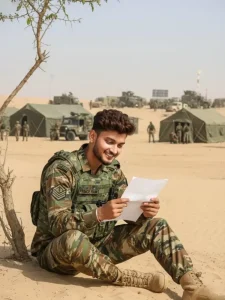
A young male soldier in camouflage military uniform sitting on sandy desert ground under a small tree, smiling while reading a letter. The name tag on his uniform reads "PRINCE RAM." Behind him, there are green military tents, army trucks, and several other soldiers in similar uniforms preparing for duty or walking around the camp. The scene is bright and sunny with a clear blue sky, creating a warm, desert military camp atmosphere. The mood is positive and heartfelt, showing a soldier enjoying a personal moment amid duty.
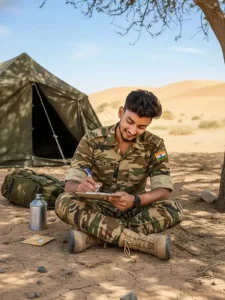
There is a young man who is wearing the uniform of the Indian Army in the desert and Prince Ram is written on his badge and there is an Indian flag badge on his dress and wearing boots on his feet, he is sitting under the shade of a tree and writing a letter and there is a tent etc. behind him and this is the atmosphere of an army camp, this photo is a close-up, it is a completely realistic photo.
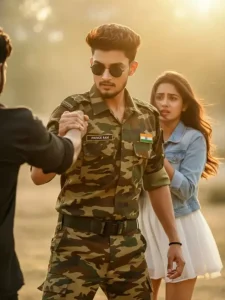
A dramatic cinematic scene at golden hour featuring a young Indian soldier wearing modern camouflage uniform with a name tag reading "PRINCE RAM" and an Indian flag badge. He stands confidently with sunglasses on, gripping another man's arm as if stopping a confrontation. Behind him, a worried young woman in a white dress and denim jacket looks on. The background is softly blurred with warm sunlight, creating a heroic, emotional atmosphere. High-detail portrait, shallow depth of field, warm tones, cinematic lighting, dramatic moment.
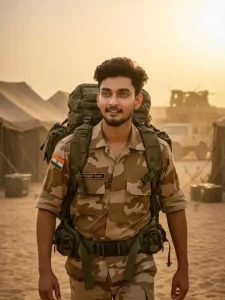
There is a young man who is wearing the uniform of the Indian Army in the desert and Prince Ram is written on his badge and there is an Indian flag badge on his dress and wearing boots on his feet, he is going home carrying his backpack etc. and behind him there is a tent etc. and this is the atmosphere of an army camp, this photo is a close-up, it is a completely realistic photo.
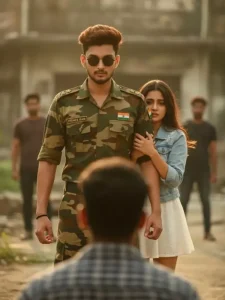
A dramatic cinematic scene at sunset featuring a young Indian soldier in modern camouflage uniform with a name tag reading "PRINCE RAM" and an Indian flag badge. He stands confidently at the center, wearing dark round sunglasses. A worried young woman in a white dress and denim jacket clings to his arm from behind, seeking protection. In the foreground, the blurred silhouette of a man is seen from behind, facing the soldier, creating tension. Several blurred figures stand in the background near an old, worn-down building. Warm golden-hour lighting, soft background blur, emotional and heroic atmosphere, high-detail, cinematic look.
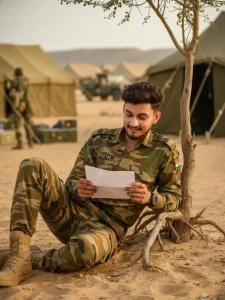
A young male soldier in camouflage military uniform sitting on sandy desert ground under a small tree, smiling while reading a letter. The name tag on his uniform reads "PRINCE RAM." Behind him, there are green military tents, army trucks, and several other soldiers in similar uniforms preparing for duty or walking around the camp. The scene is bright and sunny with a clear blue sky, creating a warm, desert military camp atmosphere. The mood is positive and heartfelt, showing a soldier enjoying a personal moment amid duty.
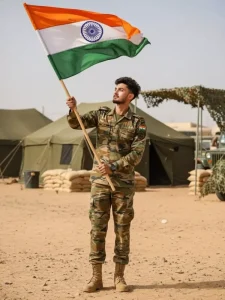
There is a young man who is wearing the Indian Army uniform in the desert and Prince Ram is written on his badge and there is an Indian flag badge on his dress and wearing boots, he is holding the Indian flag in his hands and waving it and there are tents etc. behind him and this is the atmosphere of an army camp, this photo is a close-up and is completely realistic.
How To Use Google Gemini Indian Army Ai Photo Editing Prompts
So let’s explain how to create this photo. To create this photo, you’ll first need a prompt, which we’ve provided here. You just need to learn how to use it. Select and copy any prompt that suits your style. After copying, you’ll need to go to Google Gemini. I’ve also added a button for Google Gemini, which you can click there. If you want to use the website, don’t. If you want to use the app, you’ll find it on the Play Store. The exact same process applies to both. Now, once you’re here, you’ll see an option called “Create Image.” You must select it. This gives you the option to create a nano. It generates your perfect image. You’ll need to paste the prompt there. Paste the prompt you’ve copied. Then, click the “Plus” option and upload the photo details I just described. Then click Generate and your photo will be ready exactly as you used the prompt.
Conclusion
So, these Indian soldier style photos are very much in trend and I have created them very easily with the help of Google Gemini. Now I have given you the prompts. I told you everything through which you can create such realistic photos. Otherwise, if you are not able to understand anything in this, like you face any problem in using the prompts, then for that you can contact us on our Instagram ID. There we will definitely explain to you how you can fix it and how you can get good results in it. We will keep sharing such details with you and you should keep doing good editing.