
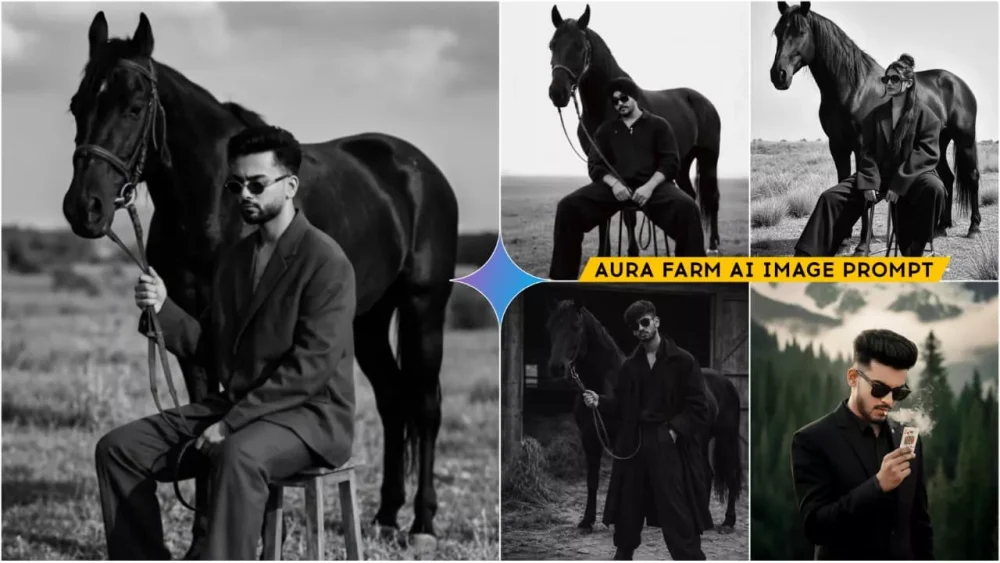
Google Gemini Aura Farm Ai Photo Prompts – In today’s world, if you’re still uploading regular photos, stop doing that. High-quality photos are no longer just a hobby; they’ve become a necessity. If you don’t upload high-quality photos, no one will like them. And with AI readily available, you don’t need to do this manually anymore. You can create such photos using AI. You’ve probably seen that aura farming photos are going viral on the internet, and creating them is very easy these days. It looks very complicated, and you’ll see people demonstrating it in Reels, but you won’t understand it there. But I’m going to explain here how you can create this kind of viral photo editing.
What Is Google Gemini AI Photo Editing?
It’s a best-in-class AI photo editing tool that analyzes your photos using text prompts. Here, you can create photos using text prompts. You can also create photos using a reference image. How does it work? If you paste a text prompt and generate an image, the resulting photo will reflect the details you provided in your prompt. However, if you want your own photo included in the image generated from the prompt, simply paste the prompt and then, using the plus option, upload a selfie. You’ll then get excellent results that match the prompt you used. If you didn’t understand this in detail, I’ll explain further how you can create such photos using our product.
Google Gemini New Image Prompts
How Does The Magic Of Prompt-Based Image Generation Work?
Think of it like this: you’ve probably seen how writing a prompt generates an image. Let’s understand this in three steps. First, the system understands what you write, meaning it comprehends what you want in your photo. For example, we want a photo where we are sitting, surrounded by lush green trees and plants. We’ll describe it as sitting in a field with tall trees all around us, and cows and buffaloes grazing nearby. We’ll provide these details. Then, we need to provide a reference image. Since the system doesn’t recognize your face (unless you’re a famous celebrity), you’ll need to go to the plus option and upload your own reference photo. It should be a normal photo. After that, you’ll need to adjust the settings and specify the type of lighting you want. The system will then generate the image based on your normal photo and the prompt you used. The result will be very realistic, very fast, and completely professional.
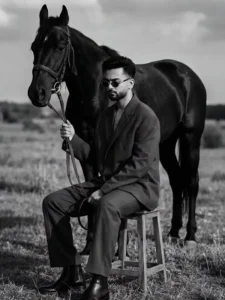
A cinematic monochrome fashion portrait in 1080p. A person sits low on a minimal metal stool, legs extended and relaxed on rough outdoor ground. One hand rests loosely between the knees holding thin leather reins, shoulders slightly slouched, head gently lowered with a calm, introspective mood. Dressed in dark oversized layered clothing, wide-leg trousers, leather boots, and dark sunglasses. A powerful black horse stands closely behind, protectively aligned and partially overlapping the subject’s silhouette. Open natural landscape with uneven terrain and wild grass, an overexposed bright sky creating strong negative space. High-contrast lighting with deep blacks, soft highlights, matte texture. Medium-format film aesthetic, subtle grain, timeless avant-garde luxury fine-art editorial look. Keep face exact same as reference image.
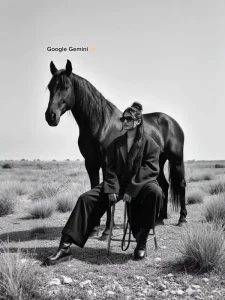
Photograph me sitting low on a minimalist metal stool, leg spread forward, and in a relaxed grounded face fleet planted on eventer, one hand loosely resting between the knees, holding thin leather rains, shoulder slightly slouched, Head tilted downward in a calm intro, prospective expression, the subject wear, dark oversized layer, clothing, wild leg trousers, leather boots, and dark sunglasses. A strong Black horse stand closely behind the seated, figure, aligned, protectively, and partially overlapping. The subjects chillout open natural landscape with rare round and wild grass, bright overexposed sky, creating strong negative space high contrast, lighting, diplex, soft highlights, Matt texture, timeless cinematic mood, medium format, film, look, stubborn, grain, mono Chrome, fine art, fashion, editorial, great luxury photography, don't harm the quality of the picture. Give me in 1080p quality.
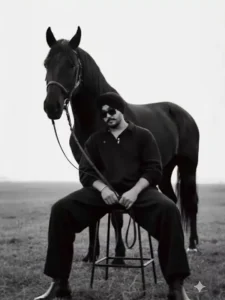
Photograph me sitting low on a

minimalist metal stool, legs spread forward in a relaxed. a grounded pose, feet planted on uneven outdoor terrain. One

hand loosely resting between the knees holding thin leather reins, shoulders slightly slouched, head tilted downward in a calm. introspective expression. The subject wears dark oversized layered clothing, wide-leg trousers, leather boots, and dark sunglasses. A strong black horse stands closely behind the seated figure, aligned protectively and partially overlapping the subject's silhouette. Open natural landscape with rough ground and wild grass, bright overexposed sky creating strong negative space. High contrast lighting, deep blacks, soft highlights, matte texture. Timeless, cinematic mood. Medium-format film look, subtle grain, monochrome fine-art fashion editorial, avant-garde luxury photography. don't harm the quality of the picture give me

in 1080p quality.
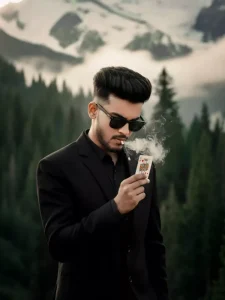
A hyper-realistic cinematic 9:16 portrait based on the uploaded image, keeping the same face and hairstyle of A mysterious man stands confidently outdoors in a dramatic alpine setting. He wears a sleek black suit with a matching black shirt, exuding a sharp, enigmatic aura. His face is partially obscured by dark sunglasses, adding to his secretive persona. A lit cigarette dangles from his lips, with wisps of smoke curling upward into the crisp mountain air. He holds up a playing card-the King of Hearts-with deliberate focus, as if revealing a hidden truth or executing a masterful-trick. Behind him, towering pine trees and snow-covered mountains stretch into the distance under a pale sky, creating a stark contrast between his formal attire and the rugged natural landscape. The overall mood is cinematic, intense, and slightly surreal, blending noir aesthetics with a touch of mysticism.
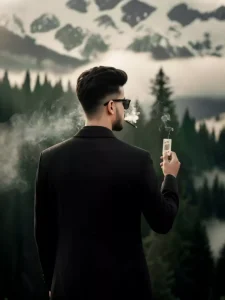
A hyper-realistic cinematic 9:16 portrait based on the uploaded image, keeping the same face and hairstyle of A cinematic portrait of a stylish man in a black tailored suit standing outdoors with his back to the camera, holding a King of Hearts playing card in one hand and smoking a cigarette. He wears dark sunglasses and has neatly styled hair, exuding a mysterious and confident aura. The background features a dramatic natural landscape with towering snow-covered mountain peaks and dense pine forests under a cloudy sky. Wisps of smoke curl around his head, adding a noir atmosphere. The contrast between the formal attire and the rugged wilderness creates a surreal, high-fashion-meets-nature aesthetic. The lighting is moody and soft, emphasizing the textures of the suit and the misty ambiance.
What Kind Of Editing Is Possible In Gemini?
Well, a lot of editing is possible here. Whatever you want, it’s possible, let me explain. For example, if you want a normal, retouched photo, you can simply upload your photo and add details like, “Smooth my skin texture,” or “Whiten my skin.” You can give it details like that, and it will make those changes to your photo. Then you’ll also get color grading options. You can define the kind of color you want in your photo. For example, you can specify things like Bollywood warm tones, retro film colors, dark and moody, and so on. After that, you have background transformation options, where you can specify what you want in the background and what kind of background you want. Then, if you want some VFX-like effects, or social media vibes, like 3D anime or something completely unexpected, you can add those too. If you want to take product showcase photos for your business, you can do that as well. You can create ready-made images for e-commerce websites. I’ve explained some of the basic features here. If I started listing everything, it would be a very long list, and you might have trouble understanding it all.
Conclusion
We have already shared the prompts for creating photos like this. Different prompts are provided in the article. Copy the ones you like. After copying, you will find a “Create Image” or Google Gemini button below. Click on it. Alternatively, you can use the Google Gemini application. The process is exactly the same in both. Once you’re there, paste the prompt you copied from our website. Then, click on the plus icon to upload your photo. After that, click on “Generate,” and it will only take a few seconds. It will create an amazing photo for you, and you’ll be surprised by the result.


