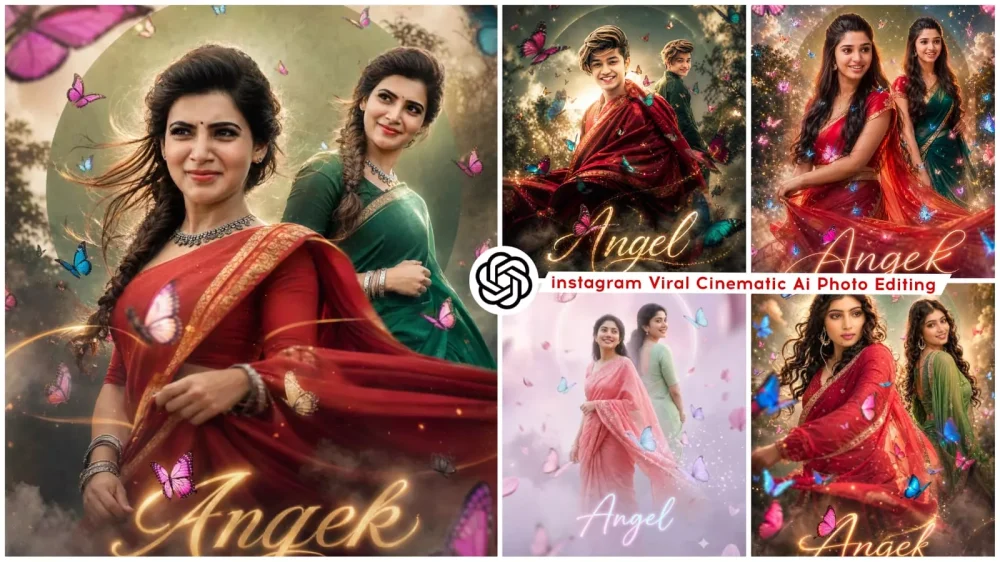
Dual Pose Butterfly Effect AI Photo Editing Prompts – Previously, AI photo editing was limited to applying filters; however, in the current landscape, you can introduce realistic lighting controls and create images that resemble full-fledged movie posters. You can even completely transform the setting of a scene—all of this is now possible. In other words, you aren’t merely editing a photo; you are crafting an entire cinematic scene. This capability is made possible through ChatGPT. In this article, we will guide you on how to recreate the viral edit we showcased here; creating such edits is not a daunting task at all. You simply need to follow a straightforward process to achieve truly exceptional results.
Details Of Dual Pose Butterfly Effect AI Photo Editing Prompts
Let’s take a look at the various effects included here. You will find a “Double Layer” effect, which creates two copies of the subject—effectively converting a single photograph into a dual-image composition, each rendered in a distinct style. There is also a “Butterfly Motion” effect, featuring glowing butterflies fluttering around the subject. Additionally, you will find a “Particle Glow” effect that casts a radiant glow across the entire photograph. It also features a “Cinematic Background” style, characterized by soft focus and atmospheric lighting. Finally, you will see a “Post Style” text element, which you can fully customize at the bottom of the image—allowing you to add your own name or any other text you wish to include.
Tips Of Proper Photo Selection:
If you wish to create a high-quality image, you must carefully select the reference photo you intend to use. Ideally, you should choose either a full-body shot or a medium shot in which your face is clearly visible and sharply defined. Furthermore, the outfit you are wearing should be relatively simple and standard; avoid wearing complex or intricate attire that might pose difficulties during the conversion process. Ensure the image features clear lighting and a clean background, as this will prevent any issues during the detection and processing stages. If you follow the guidelines and examples outlined here, you are guaranteed to achieve excellent results.
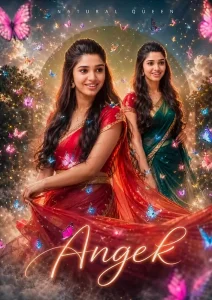
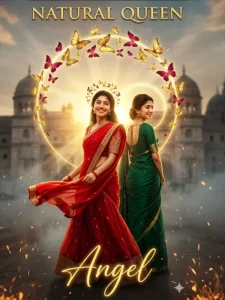
Create a hyper-realistic, ultra-detailed worm’s-eye cinematic portrait of the same young South Indian woman from the reference image (strict 100% face preservation — identical facial features, skin tone, hairstyle, expression, no changes at all). Scene Composition: Two overlapping opposite-direction poses: 1. Primary Pose (Front): Twirl motion, wearing red half saree with gold border, long black hair flowing, cute wince expression, saree slightly motion-blurred. 2. Secondary Pose (Back/Side): S-curve pose, wearing green half saree, facing forward with a bright smile. Camera & Lighting: Worm’s-eye low angle cinematic shot Strong backlight + golden rim light glow Soft skin tones, HDR finish Shallow depth of field (bokeh background) 🦋 Butterfly Effects (MAIN FOCUS): Lots of butterflies (aga aga feel) flying all around Different sizes (small + medium + large for depth) Colors: magenta, blue, cyan, soft pink, golden glow Some butterflies: Flying near face (slight motion blur) Resting on saree folds One sitting on letter "Angel" Add butterfly light trails + glowing wing particles Subtle butterfly wing shadow overlays on background Create a butterfly swirl spiral around the subject Background & Atmosphere: Misty dreamy environment Thick cinematic fog/smoke at bottom (rolling effect) Large sage-green circular graphic halo behind subject Soft clouds floating Slight blurred trees for depth Floating dust + spark particles Typography: Top: "NATURAL QUEEN" (clean spaced sans-serif) Bottom: "Angel" (big glowing cursive) Add magenta butterfly sitting on "A" Style & Quality: Hyper-realistic, cinematic, editorial photoshoot 4K Ultra HD Soft glow + dreamy feminine tone Studio-quality photo manipulation Realistic saree fabric physics Extra Enhancements: Butterfly glow reflections on skin Light bloom + lens flare Soft vignette edges Depth layering (foreground butterflies blurred) --ar 3:4 --v 6 --style raw --quality 2 --uplight
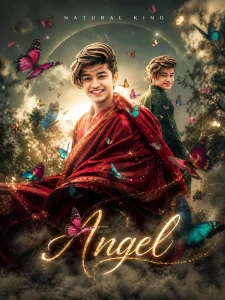
Create a hyper-realistic, ultra-detailed worm’s-eye cinematic portrait of the same young South Indian man (strict 100% face preservation — identical facial features, skin tone, hairstyle, expression, no changes at all).

Scene Composition:
Two overlapping opposite-direction poses:

1. Primary Pose (Front):
The man in a traditional outfit (deep red kurta or red draped shawl with gold border), slight motion as if turning, confident soft expression, fabric flowing with cinematic motion blur.

2. Secondary Pose (Back/Side):
Wearing deep green traditional outfit (kurta or ethnic drape), S-curve stance, looking slightly sideways with a calm smile, elegant posture.

Camera & Lighting:
Worm’s-eye low angle cinematic shot
Strong backlight + golden rim light glow
Soft natural skin tones, HDR finish
Shallow depth of field (cinematic bokeh)

🦋 Butterfly Effects (MAIN FOCUS):
Lots of butterflies flying around (rich cinematic density)
Different sizes for depth (foreground blur + background sharp)
Colors: magenta, blue, cyan, soft pink, golden glow

Details:
Some butterflies flying close to face (slight motion blur)
Some resting on shoulder / fabric folds
One butterfly near typography
Butterfly swirl spiral around subject
Glowing light trails + wing particles
Subtle butterfly shadow overlays

Background & Atmosphere:
Misty dreamy cinematic background
Soft clouds + blurred trees
Large sage-green circular halo behind subject
Thick fog/smoke at bottom (rolling effect)
Floating dust + spark particles

Typography:
Top: "NATURAL KING" (clean spaced sans-serif)
Bottom: "Angel" (big glowing cursive)
Add a butterfly sitting on letter "A"

Style & Quality:
Hyper-realistic, cinematic, editorial photoshoot
4K Ultra HD
Soft glow + dramatic masculine tone
Studio-quality photo manipulation
Realistic fabric physics

Extra Enhancements:
Butterfly glow reflections on skin
Light bloom + lens flare
Soft vignette edges
Depth layering (foreground butterflies blurred)

--ar 3:4 --v 6 --style raw --quality 2 --uplight
Create a hyper-realistic, ultra-detailed worm’s-eye cinematic portrait of the same young South Indian man (strict 100% face preservation — identical facial features, skin tone, hairstyle, expression, no changes at all).

Scene Composition:
Two overlapping opposite-direction poses:

1. Primary Pose (Front):
The man in a traditional outfit (deep red kurta or red draped shawl with gold border), slight motion as if turning, confident soft expression, fabric flowing with cinematic motion blur.

2. Secondary Pose (Back/Side):
Wearing deep green traditional outfit (kurta or ethnic drape), S-curve stance, looking slightly sideways with a calm smile, elegant posture.

Camera & Lighting:
Worm’s-eye low angle cinematic shot
Strong backlight + golden rim light glow
Soft natural skin tones, HDR finish
Shallow depth of field (cinematic bokeh)

🦋 Butterfly Effects (MAIN FOCUS):
Lots of butterflies flying around (rich cinematic density)
Different sizes for depth (foreground blur + background sharp)
Colors: magenta, blue, cyan, soft pink, golden glow

Details:
Some butterflies flying close to face (slight motion blur)
Some resting on shoulder / fabric folds
One butterfly near typography
Butterfly swirl spiral around subject
Glowing light trails + wing particles
Subtle butterfly shadow overlays

Background & Atmosphere:
Misty dreamy cinematic background
Soft clouds + blurred trees
Large sage-green circular halo behind subject
Thick fog/smoke at bottom (rolling effect)
Floating dust + spark particles

Typography:
Top: "NATURAL KING" (clean spaced sans-serif)
Bottom: "Angel" (big glowing cursive)
Add a butterfly sitting on letter "A"

Style & Quality:
Hyper-realistic, cinematic, editorial photoshoot
4K Ultra HD
Soft glow + dramatic masculine tone
Studio-quality photo manipulation
Realistic fabric physics

Extra Enhancements:
Butterfly glow reflections on skin
Light bloom + lens flare
Soft vignette edges
Depth layering (foreground butterflies blurred)
--ar 3:4 --v 6 --style raw --quality 2 --uplight
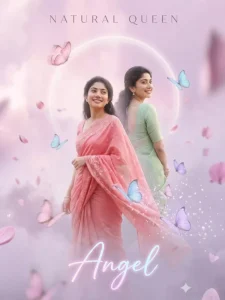
Create a soft dreamy fantasy portrait of the same woman (strict face preservation, identical features).

Scene:
Dual pose:
- Front: light red-pink saree, soft twirl, gentle expression
- Back: pastel green saree, calm smile

Camera:
Low angle but softer perspective, slightly tilted

Lighting:
Diffused pastel lighting, soft glow, no harsh shadows
Pink + lavender ambient tones

Butterflies:
Pastel butterflies (baby pink, lavender, sky blue)
Floating slowly, dreamy motion blur
Some dissolving into sparkles

Background:
Cloudy sky + soft bokeh + floating petals
Faded circular halo

Atmosphere:
Light mist, dreamy haze, glowing particles

Typography:
Top: NATURAL QUEEN (thin elegant font)
Bottom: "Angel" in soft glowing pastel script

Style:
Ethereal, dreamy, feminine, soft-focus, cinematic fantasy
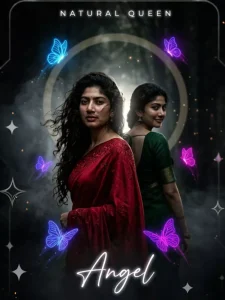
Create a dark cinematic portrait (strict face preservation).

Scene:
Dual pose:
- Front: deep red saree, intense expression, wind-blown
- Back: dark green saree, mysterious smile

Camera:
Worm’s-eye dramatic angle, strong depth

Lighting:
Low-key lighting, strong contrast
Single backlight + subtle side light
Deep shadows, cinematic noir tone

Butterflies:
Neon butterflies (electric blue, purple, magenta)
Glowing in darkness
Light trails like energy streaks

Background:
Dark forest blur + fog
Muted circular halo

Atmosphere:
Heavy smoke, cinematic haze, glowing particles

Typography:
Top: NATURAL QUEEN (minimal, white glow)
Bottom: "Angel" neon glow typography

Style:
Moody, dramatic, cinematic, high contrast, ultra-realistic
How Do You Use Prompts In ChatGPT?
How do you create images? Well, it’s quite simple. You just need to open ChatGPT. The very first step is to upload an image. Let me explain how to do that: as I mentioned earlier, select one of your own photos to serve as a reference. Next, paste the prompt—which is already provided in the article. Then, simply hit “Generate” and wait for just a few seconds. Your cinematic-style image will be ready in no time. You can expect truly excellent results.
How AI Creates a Collage Effect
With AI-powered editing via ChatGPT, you can easily transform a simple photograph into a cinematic-style image. It can effortlessly convert your ordinary photos into sophisticated works of art. The key is to ensure that you utilize a strong prompt—one that you have carefully read and thoroughly understood before applying. For instance, whenever we provide you with a prompt, we make sure to test it rigorously ourselves before sharing it with you. Similarly, whenever you source or create a prompt on your own—regardless of the time or place—take the time to read through its details carefully before proceeding to generate the image.
Conclusion
If you’d like articles on all the Instagram trends, please let me know in the comments. I’ll share them with you, and our job is to keep you updated on the latest trends.