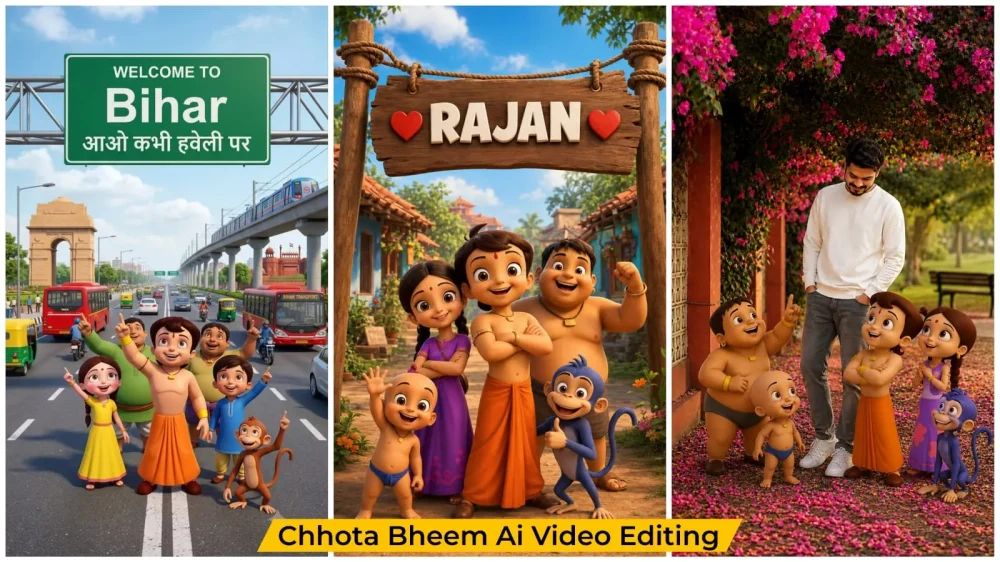
Chhota Bheem Ai Video Editing Prompt – You might have noticed a recent trend where people were creating videos featuring the characters Motu and Patlu. Now, a similar trend has emerged involving Chhota Bheem—a popular animated character you have likely seen on TV. If you are familiar with the show, you can create similar photos and videos yourself. In this article, we will discuss this trend and share how you can transform a regular photo into an image featuring the Chhota Bheem character and turn it into a video. I will provide a complete, step-by-step guide that you can follow to create your own.
Details Of Chhota Bheem Ai Video Editing Prompt
You must have seen this trend in trend where you used to see characters there. You used to stand with them or they used to call your name. It will be exactly the same way. You will be able to do exactly the same activities there. I will tell you the process of this. First of all, we will have to create a photo and then we will convert that photo into a video. Here the process of creating photos of different styles will also be explained and you will also be given different video prompts, so you just follow them and create, you will see that you will get very good results.
Editing Process Of This Ai Video:
As I mentioned, the first step is to create photos and videos; there are two ways to go about this. In the first method, a photo is generated featuring characters like Chhota Bheem alongside a board where your name will be displayed. The second method involves creating an image that includes you; you simply use a full-body reference photo of yourself, and the characters are automatically added to the image. You can choose whichever method you prefer. The video prompt remains the same for both; all you need to do is modify the dialogue and then generate the video. Your video will be ready and perfect.
How To Create Ai Image?
First, understand the process of creating the photo. Here are the steps involved: First, copy the prompt; you will need to understand the style associated with the prompt you choose. In some cases, you will need to upload your own photo, while in others, you might just need to change a name—so read the prompt carefully to clear up any confusion. Next, open ChatGPT, paste the prompt, insert your name where indicated, and hit generate; your photo, featuring the specific character, will be ready. To do this, start by uploading your photo—make sure to upload a full-body shot. Then, paste the prompt and generate the image to incorporate that character into your photo.
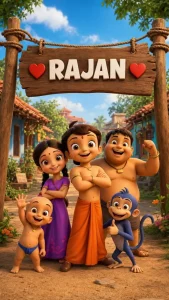
Image Prompt –
Create a high-quality 3D cartoon-style scene inspired by classic Indian animation. A cheerful group of adventurous village kids stands under a rustic wooden hanging signboard in the middle of a beautiful Indian village street. The group includes a brave young boy in an orange dhoti, a girl in a purple dress, a chubby boy, a small playful child, and a mischievous blue monkey. All are smiling happily, facing the camera, and posing joyfully with friendly expressions.

The wooden signboard is suspended with thick ropes between two rustic wooden poles. On the signboard, display the text:

❤️ [RAJAN] ❤️

Replace only [YOUR NAME] with any custom name while keeping the same bold white 3D font, centered alignment, red heart icons on both sides, identical size, spacing, perspective, lighting, shadows, and wooden texture. Keep everything else exactly the same.

Background: A traditional Indian village with tiled-roof houses on both sides, lush green trees, colorful flowers, a dirt pathway, warm golden sunlight, blue sky with soft white clouds, cinematic composition, vibrant colors, ultra-detailed textures, realistic lighting, shallow depth of field, HDR, Pixar-quality 3D animation, Ultra HD, 8K.

Style: Premium 3D cartoon render inspired by classic Indian animated adventures, smooth textures, expressive faces, cinematic lighting, highly detailed environment, professional animation quality.

Vertical composition, 9:16 aspect ratio.
Video Prompt –
Create a 10-second ultra-realistic 3D animated Video using the uploaded image as the exact reference. Keep Chhota Bheem and his group, their clothes, expressions, and the highway background unchanged. Add natural lip-sync, blinking, facial expressions, hand gestures, and slight handheld camera movement. Chhota Bheem smiles, waves, and says: "दोस्तों, अब हमें राजन भाई से मिलने जाना है। Now Chutki speaks." "तो जल्दी से इस वीडियो को चार लोगों के पास शेयर कर दो!" Now Chhota Bheem speaks. "अगर अपने नाम की वीडियो बनवाना चाहते हो तो इस वीडियो को लाइक करके comment में अपना नाम लिख दो!" Add realistic highway ambience, passing vehicles, birds, light wind, cinematic lighting, smooth animation, 4K, vertical 9:16.
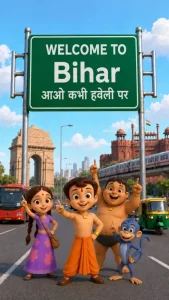
Image Prompt –
Add Chhota Bheem group character in this place Ratio 9:16
Video Prompt –
[4:36 pm, 14/7/2026] Raj: Create a high-quality 3D cartoon-style scene inspired by classic Indian animation. Chhota Bheem and his friends stand in the middle of a wide modern Indian city road, smiling and pointing upward. Place Chhota Bheem confidently in the center, with Chutki on the left, Raju on the right, Jaggu the monkey near the front, and Kalia standing slightly behind. All characters have cheerful expressions and dynamic poses, looking toward the camera while pointing upward.

Behind them is a large green highway signboard supported by two silver poles. The signboard has a white border and bold white text exactly as follows:

WELCOME TO
Bihar
आओ कभी हवेली पर

The text must be perfectly centered, sharp, correctly spelled, and use realistic Indian highway sign typography.

Background: A busy Indian city featuring India Gate on the left, Red Fort on the right, a metro train on an elevated track, red city buses, auto-rickshaws, motorcycles, cars, streetlights, trees, and a bright blue sky with soft white clouds.

Camera angle: Eye-level, wide-angle, centered composition.

Lighting: Bright natural daylight with soft realistic shadows.

Style: Ultra-detailed Pixar-quality 3D cartoon render inspired by classic Indian animation, vibrant colors, smooth textures, cinematic lighting, depth of field, Ultra HD, 8K, highly detailed, professional animation quality.

Vertical composition (9:16), realistic road markings, clean perspective, sharp focus, vibrant colors.
[4:37 pm, 14/7/2026] Raj: Video Prompt - Animate the existing image only. Keep the characters, background, camera angle, road, Bihar signboard, lighting, and overall composition completely unchanged. Do not replace or redesign any character. Preserve the exact appearance, colors, proportions, and positions throughout the animation.

Apply natural facial expressions, realistic eye blinking, subtle breathing, gentle body movement, accurate Hindi lip-sync, and smooth hand gestures. Keep the animation stable with no flickering, morphing, character swapping, or camera movement.

Chhota Bheem (speaking in Hindi):
"अरे दोस्तों, देखो! हम बिहार पहुँच गए!"

Chutki (speaking in Hindi):
"हाँ भीम, चलो सबसे पहले लिट्टी-चोखा खाते हैं!"

Kalia (laughing):
"वाह! आज तो दावत होने वाली है!"

At the end, Chhota Bheem, Chutki, Raju, Jaggu, and Kalia all smile together, point toward the "WELCOME TO Bihar" signboard, laugh naturally, and maintain perfect Hindi lip-sync with synchronized expressions.

Animation style: Smooth cinematic character animation, Pixar-quality 3D, realistic facial acting, natural head movement, accurate hand gestures, high-quality lip-sync, soft secondary motion, 24 fps, Ultra HD 4K, 8 seconds, stable frame-to-frame consistency, no camera shake, no zoom, no cuts, no scene transitions.
How To Generate This Video?
Let’s look at the video creation process. To create the video, search for “Flow AI” or use the direct link I’ve provided. Once you open it and sign up, you will see an option for a “New Project”—click on that. Next, click the plus (+) icon to upload the generated image. Then, paste the video prompt I’ve provided on my site. After pasting it, you will have the option to edit the dialogue; simply add whatever dialogue you prefer. Finally, hit “Generate,” and your video will be ready, fully animated and synced with your dialogue.
Conclusion
You can easily recreate a viral Instagram trend. I have outlined all the editing steps and explained everything; all you need to do is follow them to create it.