
All Trending Ai Video Editing Prompt – Video editing has completely transformed the world of content creation. In the past, creating videos—and the editing process itself—used to be very time-consuming. Nowadays, however, editing doesn’t take much time at all. With the help of simple tools, you can easily edit videos—even if you lack professional editing skills—without needing to put in much effort. You’ve likely noticed that platforms like Instagram and other social media sites are constantly filled with viral, video-based content—much of which is created using “prompts.” In this article, I will compile all the trending prompts currently popular on social media. I will keep the latest, most relevant video-creation prompts updated at the very top of this post.
Details Of All Trending Ai Video Editing Prompt
What is an AI video editing prompt? It is a set of instructions that tells the AI what to display—such as what the characters should look like, the camera’s orientation, the background, and the specific actions that should take place. For example, if you want to transform a standard photo into a cinematic drone shot, you can provide instructions on the camera’s movement—such as having it rise upward and then pan to the left or right. The AI then attempts to generate a video based on your specific instructions. It doesn’t just define what should appear in the video; it also dictates how elements should move and establishes the overall environment. It covers every detail. The prompts we have provided are thoroughly tested and proven to deliver superior results.
Where can AI video editing prompts be used?
You can use them in various ways to create social media content—for instance, to produce Instagram Reels or viral short-form videos. They can also be used for cinematic portrait videos, as well as for photo and video editing. You can create a wide range of trending, cinematic-style videos. The prompts provided here aren’t limited to a single topic; instead, you’ll find a diverse variety. More prompts will be added in the future, which you can then use to create your own videos. While the specific process might vary slightly, the core approach remains the same.
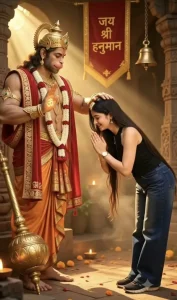
10 seconds, 9:16 vertical, realistic bright phone-camera look, sharp, vivid colors, real-time speed. FORMAT: THE PERSON dances happily in a plain lilac studio; every time they strike a pose, the video HARD-CUTS for a split second into their imagination — the SAME pose in a dream location — then cuts back to the studio. EXACTLY 12 SHOTS with hard cuts at 0.5s, 1.25s, 2.0s, 2.75s, 3.75s, 4.5s, 5.75s, 6.5s, 7.5s, 8.25s and 8.75s. The video OPENS directly on Shot 1 (the studio) — never a close-up portrait of @image1.
@image1 is ONLY a face/outfit reference — never shown as a frame or as a photo in the video. THE PERSON = the person in @image1, the only human. Exact same face, gender, age, skin tone, hairstyle, hair length and body as @image1 in every shot — works the same for a man or a woman; never change the gender or hairstyle. Outfit exactly as in @image1 (if the lower body is not visible: dark blue wide-leg jeans and black sneakers); same outfit in all 12 shots, no jewelry added.
MATCH-CUT RULE: each dream shot starts in EXACTLY the same pose, same body position, same size and same place in the frame as the last studio frame before it — only the background and the object around THE PERSON change. In dream shots THE PERSON holds the pose almost still, with only a small smile or laugh.
CAMERA (all shots): invisible, locked-off, no movement, straight-on at chest height, about 3 m away, full body head to shoes, THE PERSON centered.
THE STUDIO (Shots 1, 3, 5, 7, 9, 11 — always identical): smooth lilac-lavender painted wall; on the left a tall panel of vertical light-brown wooden slats with four thin vertical white LED light lines; glossy white tiled floor; a small white switch plate on the wall at the right; soft bright even light. Nothing else in the room.
THE THAR: a glossy black MAHINDRA THAR (Indian 3-door off-road SUV) — NOT a G-Wagon, NOT a Jeep. Flat clamshell bonnet, black grille with six tall vertical slots, round LED-ring headlights touching the outer ends of the grille, no chrome, chunky black bumper with small square fog lamps, "THAR" in small silver capital letters on the right side of the bumper.
THE LIMOUSINE: a long shiny white stretch limousine, slim LED headlights, chrome grille, many side windows, no logo, no badge.
BOW POSE (used in Shots 1, 2, 3, 11 and 12 — always the same): THE PERSON stands in SIDE PROFILE facing the LEFT side of the frame (never facing the camera), feet on the ground, knees almost straight, bent forward at the hips about 70 degrees so the upper back is nearly horizontal and the head is low, face in profile looking down, eyes closed, both palms pressed together in namaste just in front of the nose, hair exactly as in @image1 (same length and style, never made longer), peaceful smile. A deep respectful bow — never a small nod, never standing upright, never sitting or kneeling.
SHOT 1 — 0.0 to 0.5s — STUDIO: THE PERSON stands at center-left, body turned to the LEFT in side profile, laughing; 0.0–0.25s: claps both hands twice at chest height; 0.25–0.5s: bends forward into the full BOW POSE.
SHOT 2 — 0.5 to 1.25s — HANUMAN TEMPLE (imagination): THE PERSON in the exact BOW POSE, standing at the RIGHT side of the frame, facing LEFT toward Lord Hanuman. CAMERA here a little closer: Hanuman's full figure fills the LEFT 55% of the frame, his crown near the top edge and his feet near the bottom edge; THE PERSON's full body on the right, the same size as in the studio.
LORD HANUMAN: realistic, cinematic, STANDING tall in three-quarter view, body and face turned to the RIGHT toward THE PERSON, head tilted down, looking down at THE PERSON with a gentle, calm face. Tall ornate golden crown, red tilak, golden earrings, short beard, muscular bare chest with gold necklaces, a long garland of white jasmine and red roses, red shawl with ornate golden border over both shoulders hanging to the floor, orange-and-gold dhoti, gold armbands and bangles, bare feet. HIS LEFT ARM (the arm nearer THE PERSON) reaches forward and his LEFT PALM rests flat ON TOP of THE PERSON's bowed head, fingers on their hair — clearly touching, held for the whole shot. HIS RIGHT HAND is raised at chest height, palm facing camera in blessing, with a softly glowing golden "ॐ" on the palm. A large shining golden gada (mace) stands at the lower left foreground: its big round head resting on the floor in front of his feet, its long handle leaning diagonally up against his right side.
SETTING: INDOOR temple sanctum, warm dark golden-orange light, glowing golden haze and strong diagonal sun rays coming from the upper left. Behind them: tall carved golden stone pillars on the right and behind, a narrow vertical red cloth banner hanging between the two figures above head height with golden border and the golden Hindi text "जय श्री हनुमान" written in three stacked lines (जय / श्री / हनुमान), a big brass bell hanging on a chain at the upper right. Floor of warm stone scattered with orange marigold and red rose petals; a row of small lit clay diyas in the lower-left foreground. NO sky, NO open courtyard, NO temple domes, NO daylight outdoors.
SHOT 3 — 1.25 to 2.0s — STUDIO: 1.25–1.5s: THE PERSON is still in the BOW POSE (continuing from Shot 2), smiling, palms joined; 1.5–1.75s: springs upright with a happy bounce, turning to face the camera, both palms flick open outward at chest height; 1.75–2.0s: arms open wide at shoulder height and the right knee lifts up high (standing on the left leg), big smile at camera.
SHOT 4 — 2.0 to 2.75s — THAR (imagination): same arms-wide, right-knee-up pose, now SITTING on the middle of THE THAR's bonnet, Thar parked head-on filling the frame width behind and below THE PERSON; arms stretched wide with hands resting on both edges of the bonnet, right foot raised up on the front bumper, left leg hanging down. Location: a straight road with tall green trees arching over it on both sides, warm golden-hour sunlight through the leaves.
SHOT 5 — 2.75 to 3.75s — STUDIO: THE PERSON puts the foot down, laughs with mouth wide open, swings both arms playfully side to side, sways the hips; then puts the left hand behind the lower back, raises the right hand behind the head, tilts the head to the right and leans slightly to the left with a cute smile.
SHOT 6 — 3.75 to 4.5s — LIMOUSINE (imagination): same pose — right hand behind the head, left hand behind the back — now leaning sideways with the right forearm resting on the front of THE LIMOUSINE, which stretches from the left edge of the frame into the background. Night street lined with trees and many warm yellow street-light bokeh dots, dark asphalt.
SHOT 7 — 4.5 to 5.75s — STUDIO: THE PERSON dances with both hands on the waist, wiggles shoulders and hips, opens arms out, then raises both arms into a proud double biceps flex, fists near the ears, big grin.
SHOT 8 — 5.75 to 6.5s — GYM (imagination): same double biceps flex, but THE PERSON's arms are suddenly VERY muscular with big round biceps and shoulders (if @image1 has sleeves, the sleeves stay on, stretched tight over the muscles), and a defined six-pack outline shows through the top; proud grin. Dark modern gym: black power racks with thin yellow accent lines on both sides, rows of black dumbbells on racks behind, a bench at the back, dark rubber floor, dim warm lights.
SHOT 9 — 6.5 to 7.5s — STUDIO: THE PERSON lowers the arms, does playful dance moves with arms swinging across the body; then leans back laughing with head tilted up, both arms open out to the sides, palms up.
SHOT 10 — 7.5 to 8.25s — MONEY PALACE (imagination): same leaning-back laugh, arms open, palms up. Grand golden palace hall: huge crystal chandelier at top center, tall arched windows, a curved grand staircase behind covered in stacks of banknote bundles, golden carved table at the left, the whole floor covered in banknote bundles and loose notes, many loose notes falling through the air.
SHOT 11 — 8.25 to 8.75s — STUDIO: THE PERSON turns to the LEFT into side profile, claps the palms together and bends forward into the full BOW POSE.
SHOT 12 — 8.75 to 10.0s — LORD SHIVA (imagination): THE PERSON in the exact BOW POSE at the RIGHT side of the frame, facing LEFT toward Lord Shiva, held to the end. Same closer camera as Shot 2. Night forest temple, realistic and cinematic: a huge glowing full moon at the top, purple-blue night sky, a waterfall in the background, small brass bells and flowers hanging from branches, warm diya glow lighting the figures.
LORD SHIVA: realistic, cinematic (not cartoon, not bright blue): ash-grey skin, SEATED on a large rock covered with a leopard-print cloth on the LEFT 55% of the frame, body and face turned in three-quarter view to the RIGHT toward THE PERSON, NOT cross-legged in meditation — one leg hangs down from the rock; head tilted down, gentle face looking at THE PERSON. Matted hair in a tall bun with a small crescent moon, three white lines on the forehead, rudraksha bead necklaces, a calm grey cobra coiled around his neck. HIS LEFT PALM rests flat ON TOP of THE PERSON's bowed head (clearly touching); HIS RIGHT HAND is raised at chest height, palm facing camera in blessing, with a softly glowing golden "ॐ" on the palm. A tall trident with a small damaru and red cloth behind him at the upper left. A white Nandi bull with a garland in the background at the right. Lower-left foreground: a black stone Shiva lingam with three white lines, a lit brass diya and pink lotus flowers.
AUDIO: upbeat happy instrumental music with a strong beat, a soft whoosh on each cut into a dream shot, a temple bell in Shot 2, a soft conch-like hum in Shot 12. No dialogue, no voice, no singing, no lip-sync.
STRICT RULES — follow the prompt literally:
- Generate ONLY what is written. Do not add any object, person, vehicle, prop, effect, text or action that is not described. Do not skip, merge or reorder any shot.
- No other humans anywhere (no bystanders, drivers, gym people, reflections). Lord Hanuman appears only in Shot 2, Lord Shiva only in Shot 12.
- Every studio shot is the same lilac studio; every dream shot is a hard cut (no fades, no morphing, no zoom).
- Dream shots keep THE PERSON's exact pose from the studio frame before them. In Shots 2 and 12 THE PERSON is in the deep BOW POSE in side profile with the god's palm resting on their head — never standing upright, never facing the camera.
- Only allowed text: "जय श्री हनुमान" on the temple banner, the "ॐ" on the two blessing palms, and "THAR" on the Thar's bumper. No captions, emojis, logos, watermarks.
- The Thar never looks like a G-Wagon or Jeep and never has chrome. The limousine has no logo.
- Gym: muscles grow cleanly — no veins, no torn clothes.
- No tripod, phone, camera or equipment visible. No camera movement. Same face, hair and outfit in every shot.
Process Of Createing This Ai Video
To get started, if you want to create a video, you need to follow a specific process. The first step involves using an “image-to-video” option—available on platforms like Google Gemini or similar tools. Simply upload your reference photo, paste the master prompt you’ve prepared, and hit generate. This will produce an excellent result, with high-quality output and impressive editing. This method works specifically if you want to create a video based on an image; I’ll explain more about other options shortly.
Second Process Of Createing Ai Video
The second process applies if you want to create a video based on a reference; for this, you will need a reference video. First, copy the prompt. Then, go to a platform like Google’s tool (or the relevant Google-based workflow/tool you are using) and upload the reference video along with your photo(s). Once you have uploaded the necessary assets—such as a photo—allow the system to analyze the reference video. After that, paste your prompt and initiate the generation process. This will produce a video based on your photo, delivering an excellent final result.
Note:
If you are creating a video, ensure that you mute any songs, music, or audio present in the content before using it. Doing this will ensure a better final result and prevent any errors from occurring.


