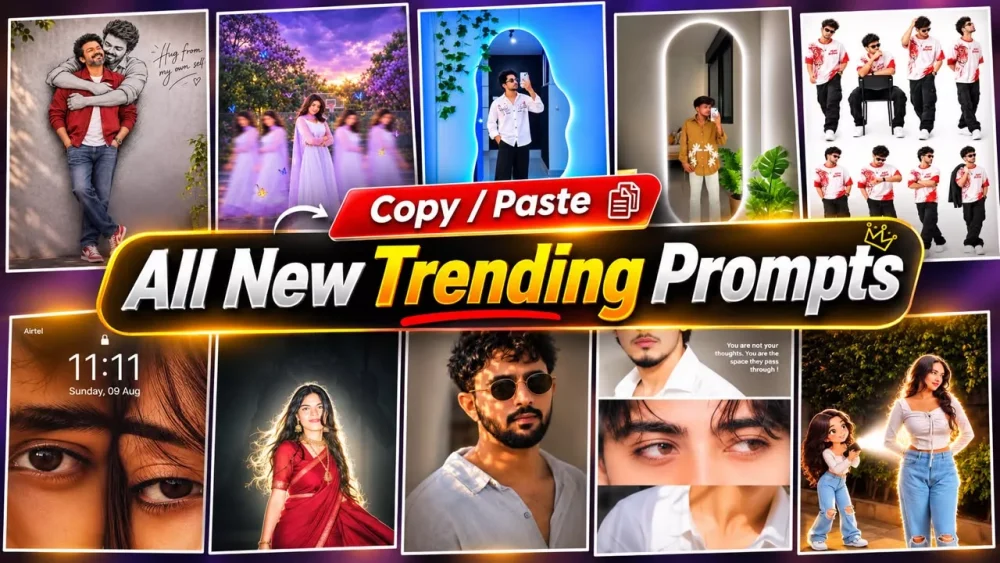
Unlimited New Trending Ai Photo Editing Prompt – I have been planning this for a while, and now I am finally able to share it with you here. In this article, I am providing a new “trading prompt”—a single, ready-to-use prompt that you can simply copy and use without any hassle. You can find it by visiting our website; it is featured in our latest article, right at the top. We have also provided a full explanation of how to use this prompt. We cover two methods—using Google Gemini and ChatGPT—both of which yield excellent results. You can choose whichever one you prefer.
Details Of Unlimited New Trending Ai Photo Editing Prompt
In this article, I am going to share a wide variety of trending prompts with you. You often come across new, viral prompts on social media—sometimes, a single image created using a specific prompt goes viral. It wouldn’t be practical to write an entire article for just one prompt, so I decided to create a comprehensive guide that features a large collection of these trending prompts. This way, you get real value from reading the article. I will also provide a detailed, step-by-step guide explaining exactly what you need to do and how to go about it. Everything you need to know will be covered right here in the article.
Methots Of Creating The Image
We will explore two methods for creating these images, and I will explain exactly how to use each one. Once you follow the steps properly, you’ll get a clear idea of the process. First, there’s ChatGPT—you can easily generate images using it. Alternatively, Google Gemini is also excellent for creating such images; you can use either tool to generate them.
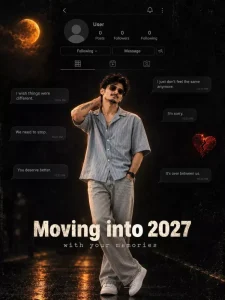
NEW CHAPTER♥️😎 Cinematic vertical emotional poster, 3:4, a dark moody "moving on" concept. The background is near-black with a subtle grungy texture and a faded social media profile screen. The profile shows a grey default avatar circle, the label "User", counts of 0 for Posts, Followers and Following, a "Following" button, a "Message" button, and an add-person icon. A back arrow, bell icon, and menu dots sit at the top, with a tab row of grid, reels and tagged icons.
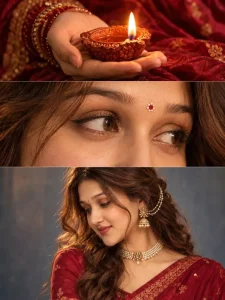
DEEWALI Specia 🪔l @rajaneditz A vertical triptych photo collage, three horizontal panels stacked, thin seamless cuts between them, shot as realistic analog-style portrait photography, warm Diwali mood, deep maroon and burnt orange palette.
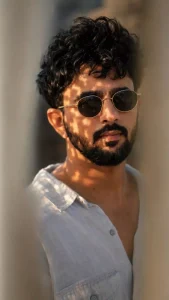
A hyper-realistic 8k close-up portrait of a handsome young man with curly dark hair, a light mustache, and a subtle goatee. He is wearing vintage round metal-framed sunglasses with gold arms and dark lenses. The lighting features dramatic dappled sunlight casting intricate leaf shadows across his forehead and cheeks.Foreground is blurred with a shallow depth of field, showing soft out-of-focus vertical shapes.Warm, cinematic golden-hour lighting, high contrast, detailed skin texture, shot with a 85mm f/1.4 lens, National Geographic style photography, octane render, photorealistic, 8k resolution.
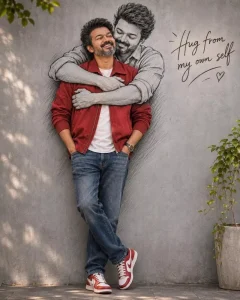
A creative portrait featuring a man standing and laughing cheerfully with same face as uploaded photo. He is wearing a red jacket, denim trouser, and red-and-white sneakers. On the gray wall behind him is a large black-and-white line-art sketch depicting himself embracing him from behind. The arms of the sketch wrap around the real man, creating the illusion of a warm hug from his "own self." To the right of the wall, there is some aesthetic handwritten text. "Hug from my own self.
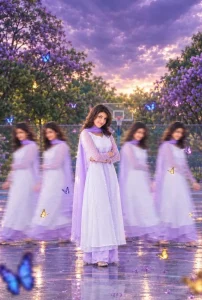
Using the uploaded photo, recreate the exact cinematic design of the reference: one person standing sharply in the centre, with 4-5 duplicate versions of the SAME person walking on both sides with realistic motion blur. Add beautiful blue, purple, and goiden butterflies flying around the person. Background: outdoor basketball court, green trees, purple flowering trees, and a dramatic cloudy lavender-purple sky. IMPORTANT: Preserve the uploaded person's exact face, hairstyle, hair texture, original dress, colours, accessories, body proportions, and identity. Do not change the outtit. matching bangles, Keep the central person crystal clear and only the walking duplicates motion-blurred. Match the reference composition, butterfly placement, liglighting, coloursnd cinematic photography style as closely as possible. Full-body portrait, 4:6 vartical ratio, photorealistic, no text, no watermark. place the entire subject exactly in the visual center of the canvas centered both horizontally and vertically, around the 50% x 50% position. Do not place the subject near the bottom, lower third, or lower half. Keep equal negative space above and below the subject. Keep the subject relatively small, occupying only about 60-70% of the overall canvas, while maintaining a perfectly balanced. centered composition.
What do you need to create this type of image?
You will need a well-crafted prompt and specific details. I have provided a prompt in this article, but there is something else you need to consider: you must prepare your own source image. You should select a photo where your face is clearly visible—this will ensure the best possible result and make the final edit look perfect. Choose an image where your face is distinct and clear; this will lead to a high-quality outcome. Once you use that image to generate the result, you will see that the final output turns out excellent.
How To Create Image With ChatGpt?
To create an image, first copy the prompt you want to use. Then, open ChatGPT and paste the prompt there. Next, click on the plus (+) icon to upload a reference image—as previously mentioned. Finally, hit ‘generate,’ and it will create a high-quality image for you. That’s how you can get an excellent image ready.
How To Create Image With Gemini?
To create it with Google Gemini, first of all you have to repeat the same process but let me tell you. First of all you have to copy the prompt which was provided to you in this article. After that you have to upload the reference image there. If your photo looks best with the reference then you have to upload it and if you do the same work in the type of details which I had told you then you have to upload it. Then after that you will get the generate button from there, then you have to paste the prompt there and generate it and one more thing you have to select the model in it, so you have to select the pro model, by which you will get a very good result. With this your photo looks best.