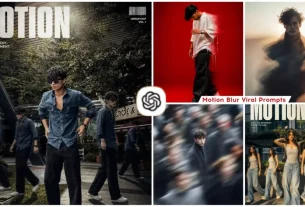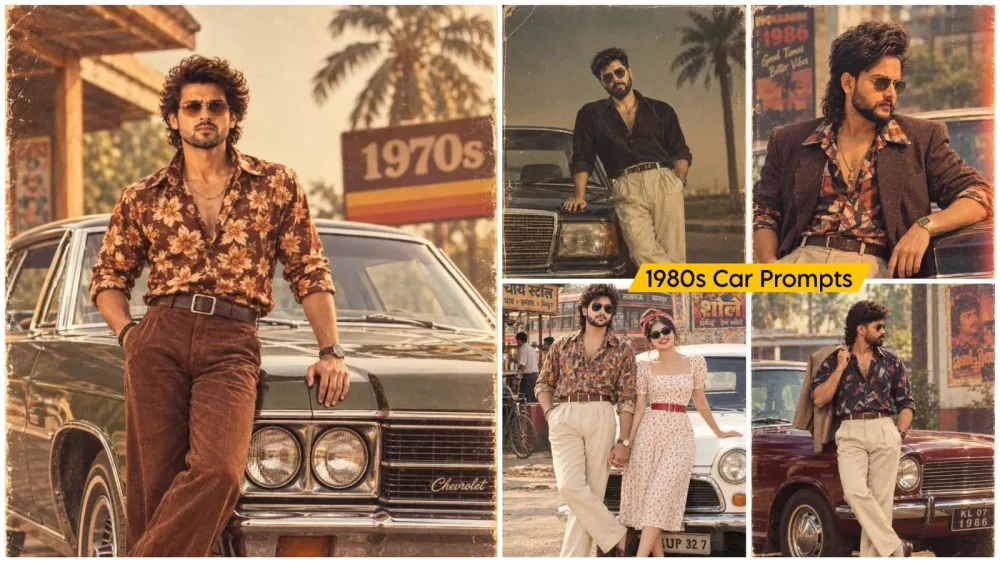
1980s Car Ai Photo Editing Prompt – Nowadays, people are using photo editing to create images with an 80s aesthetic—a style that is quite easy to achieve using simple techniques. These methods yield excellent results and make your editing look truly impressive. If you want to create a photo featuring a luxury car from the 80s, this article will guide you through the entire process and the specific steps involved, ensuring a high-quality edit. Just follow the procedure I outline here.
About 1980s Car Ai Photo Editing Prompt
Essentially, it transforms your current photograph into a scene set in the 1980s. A standard photo of yours gets converted into a classic, retro-style image featuring premium vintage cars—the kind of aesthetic that is hugely popular these days. People have a real fondness for those old-school, premium-looking vehicles compared to modern cars. If you’d like to create photos like this, simply follow our method to produce your own viral-worthy edits. Just follow the simple steps and start creating.
What does the photo editing look like for this style?
If you look at photographs from the 1980s, they weren’t nearly as sharp as today’s images; nowadays, you get HD-quality photos where your face appears in crisp, high definition. A retro look typically features soft details, slight film grain, warm tones, and natural shadows, giving the image a distinct character. That is the kind of look you want to achieve. Simply adding an old car isn’t enough; you need to transform the visual style of the entire image. We can handle this process effectively and deliver exactly that result for you.
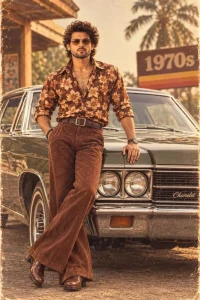
Use my uploaded photo as the exact face reference. Recreate the reference image as closely as possible: full-body portrait of me standing confidently and leaning against a dark olive-green vintage Chevrolet car, one hand resting on the hood and the other hand inside my trouser pocket, legs crossed naturally.
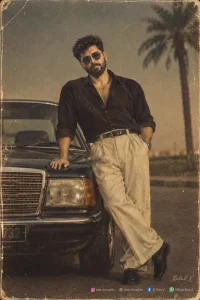
Old photo prompt 1980s The Golden Era style. Prompt :A vintage 1980s retro-style full-length portrait of a man using i uploaded photo men Keep the men's face and features exactly the same.Keep the face 100% same as in the reference image. Keep the face sutable to the photo atmosphere and color. The face must remain 100% the same as the uploaded photo, without any alteration."– Add a small handwritten cursive artist signature “Bilal x” in the bottom-right, thin hairline stroke, no glow. – Below it, place small clean social icons in original colors with text: Instagram: bilal_thoughtts Thread: bilal_thoughtts Facebook: AI Gen V WhatsApp Channel: Official Bilal X – Icons aligned horizontally, low opacity, modern typography, subtle and naturally integrated. face 100% match this photo
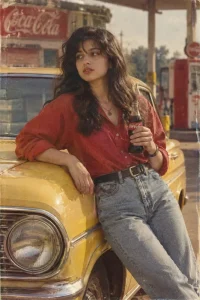
Use my uploaded photo as the only reference for my face and identity. Recreate the image with my facial features, face shape, skin tone, hairstyle, and identity kept exactly unchanged. Create an authentic 1980s retro cinematic photograph. I am naturally leaning against a yellow vintage car, holding a glass Coca-Cola bottle in my left hand, while my right hand rests casually on the car.Preserve the exact pose, outfit, hairstyle, accessories, props, car, background elements, framing, and overall composition from the reference image. Give the entire scene a genuine 1980s aesthetic with subtle vintage film grain, slightly faded analog colors, realistic film texture, soft natural lighting, period-accurate atmosphere, authentic retro photography, mild chromatic imperfections, and a classic 35mm film look.Keep the result photorealistic and natural, with realistic skin texture, fabric details, reflections, shadows, and proportions. Do not modernize the scene. Do not change my face, expression, hairstyle, body proportions, clothing, or identity. High detail, 8K, ultra-realistic photography, authentic 1980s color grading, 35mm analog film, cinematic composition, natural depth of field, realistic vintage texture.
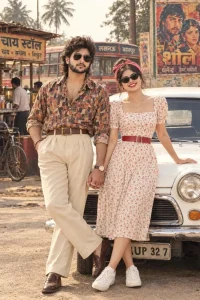
Ultra HD 8K photorealistic retro 80s couple front pose looking directly at woman front facing camera smiling beautiful smile teeth visible red lipstick black cat-eye sunglasses off-white midi dress red small floral print puff short sleeves square neck red leather belt waist red bandana headscarf on hair bun white sneakers left hand on white vintage car right hand holding man's hand legs crossed man front facing curly mullet hair mustache black sunglasses.
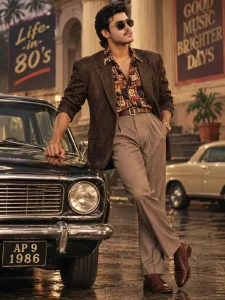
Cinematic full-body portrait of a young handsome Indian man in his 20s, clean-shaven, 1980s retro Bollywood style, wavy black hair, wearing round black sunglasses, looking to the side with a confident expression. He is leaning stylishly against a vintage black 1980s car, right hand on the car hood, left hand in pocket, legs crossed.He is wearing a dark brown textured blazer over a colorful retro printed shirt with geometric patterns in red, black and beige, high-waisted beige pleated trousers with a brown leather belt, brown socks and polished brown formal shoes, gold wrist watch on left wrist.Background: 1980s city street at dusk, wet road with reflections, old building with pillars, two large vintage billboards - left one says "Life in 80's" and right one says "GOOD MUSIC BRIGHTER DAYS", a cream-colored vintage car parked behind, palm trees, warm golden cinematic lighting. Car details: front number plate clearly visible "AP 9 1986", chrome bumper and round headlights. Style: ultra realistic, 80s film
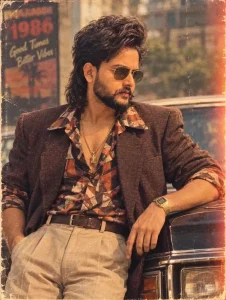
What would I have looked like in the 80s?
Transform this photo into an authentic 1980s look while keeping my facial features and identity unchanged. Add realistic 80s fashion, hairstyle, makeup and vintage photography aesthetics"
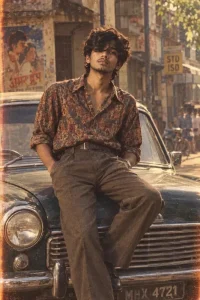
Transform my photo into a realistic 1980s Indian retro portrait, preserving my exact identity, natural facial features and proportions. Sitting casually on the hood of a classic vintage car, one leg down and the other slightly bent, relaxed confident expression, retro shirt with high-waisted trousers, old street background, warm sunlight, authentic analog film, subtle grain and faded 1980s colors.
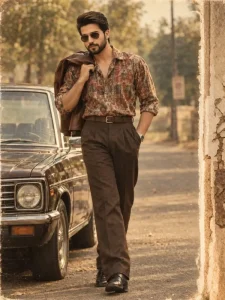
Create A Image Ultra-realistic 1980s cinematic full body portrait man walking in brown leather jacket carried over his shoulder. using the first image's styling and composition with the second person's exact face and identity preserved. Wearing vintage aviator sunglasses, retro 80s outfit and hairstyle, black shoes, casually posing beside an old classic sedan on a quiet vintage roadside street. Warm faded analog tones, soft golden daylight, subtle film grain, aged photo texture, authentic 1980s photography, natural proportions, shallow depth of field, 4:6 vartical ratio.
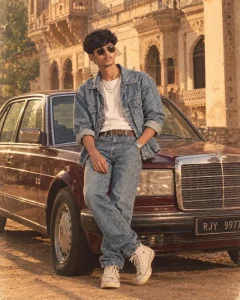
Ultra-realistic cinematic full-body portrait of a stylish young South Asian man leaning casually against a vintage dark-maroon Mercedes sedan, authentic 1980s retro aesthetic. Thick wavy black hair, light beard, aviator sunglasses, confident side gaze. Wearing a faded blue acid-wash denim jacket with rolled sleeves, white T-shirt, layered silver chains, matching high-waisted jeans, brown leather belt, silver watch, and off-white high-top sneakers. Relaxed crossed-leg pose, one hand in pocket.
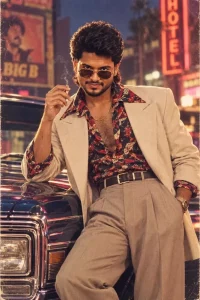
Medium portrait of a handsome South Asian man with a mullet, aviator sunglasses, open patterned shirt, gold chain, and cream suit jacket. Leaning on a vintage car at night in front of glowing neon city lights and retro posters. Cigarette smoke, warm neon glow, 80s film grain, photorealistic 8k.
How can you create a photo featuring a car using ChatGPT?
If you want to know how, follow this process to ensure your photo turns out perfectly. First, you will need a reference photo where your face is clearly visible. Second, you will need a specific prompt to ensure the editing is flawless; so, start by selecting a high-quality photo. Next, copy the prompt and open ChatGPT. Paste the prompt there, then click the plus (+) icon to upload your reference photo. Finally, hit generate, and it will create a fantastic photo for you.
How do you preserve the original face?
You need to ensure that the editing process doesn’t alter your facial features or cause a mismatch. It is crucial to keep your face shape, eyes, nose, and lips exactly as they are—do not change them. The goal is to modify the styling, not the face itself. You can explain this by saying, “Keep my face exactly as it is; you can make changes to the styling.” If you send this instruction, they will preserve your face 100% while applying the new styling over it.
Conclusion
There is one more thing to understand: whenever you use editing tools, you must handle photos with great care and ensure you do not compromise anyone’s identity. Never use someone’s photo without their permission. Additionally, if you create or edit a photo, avoid making unnecessary changes that violate the rules. 1980s Car Ai Photo Editing Prompt.