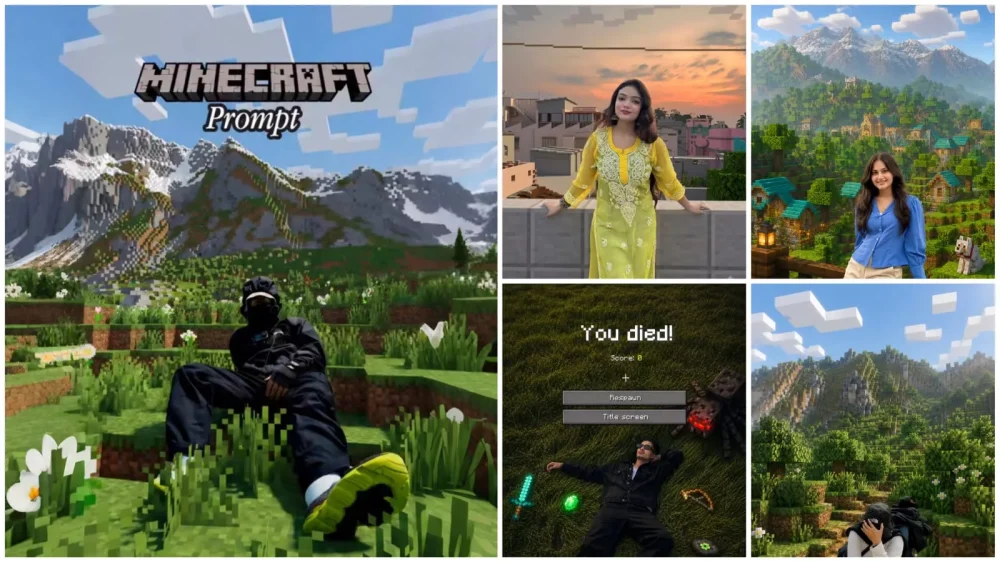
Minecraft Ai Photo Editing Prompt – You’ll notice that Minecraft-themed edits are a huge hit on social media, and people are commenting on these kinds of edits a lot. Give me a prompt, brother, but let me tell you, many people don’t share photos properly. Meaning, they don’t share photos properly. In today’s article, I’m going to share a method that can easily help you achieve this viral edit. This Minecraft-themed edit is inspired by the game. You’ll see the entire scene in a block or pixel style, and the entire background will be converted to that style. Your face won’t be converted there, and that’s why it’s become a favorite among so many people. I’ll explain how to create such photos in different styles.
Details Of Minecraft Ai Photo Editing Prompt
This Minecraft-style AI photo editing is a total game-changer. It takes an ordinary photo of yours and transforms the background—the entire scene—into a Minecraft-style location. The scene shifts to that signature blocky, pixelated aesthetic, yet the subject of the photo remains unchanged, looking completely natural. That is exactly why it has become such a favorite among people. I decided to share this editing technique with you so that you, too, can easily create these kinds of edits.
Here is how to create Minecraft-style edits using ChatGPT?
It is actually quite simple. First, you need to understand the process. Start by uploading an existing image of yourself to serve as a reference. Make sure to choose a photo where your face is clearly visible. Upload it to ChatGPT, then specify that you want to apply a Minecraft style to your photo. To automate this, simply paste the appropriate prompt into ChatGPT and hit generate; it will produce a perfect edit for you.
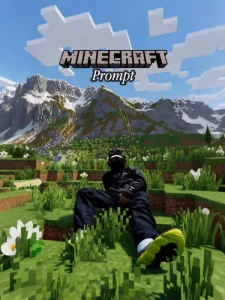
{ "task": "image_transformation", "style": { "overall_aesthetic": "High-quality cinematic Minecraft screenshot.", "rendering_technique": "Mixed-media: Photorealistic subject embedded in a voxel-based environment." }, "subject_rules": { "main_subject": "The human person from the reference image must remain completely photorealistic and unchanged. No pixelation or block filters on their body, clothing, or face.", "interacting_objects": "CRITICAL: Any non-human object in direct physical contact with the subject e.g. or nearby pets dogs MUST be converted into Minecraft block models or mobs. A real dog becomes a Minecraft wolf." }, "environment_rules": { "background_analysis": "Analyze the reference image background structure and recreate it entirely out of Minecraft voxel blocks.", "elements": "Trees, terrain, paths, and foliage must be cubic blocks with pixel art textures.", "atmosphere": "Replicate the foggy forest atmosphere using blocky volumetric fog layers appropriate for Minecraft." }, "composition_and_lighting": { "camera": "Maintain the exact camera angle and framing from the reference photo.", "lighting": "Minecraft daylight with gentle haze and consistent block-based shadows." } } enhance
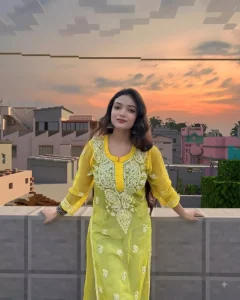
Keep the human subject 100% photorealistic and completely untouched. No pixel filter, stylization, or lighting remap on the skin. Preserve exact facial details, pores, fabricweave, hair strands, natural shadows,expression, and posture.Rebuild the background as a structurally accurate Minecraft voxel replica of the original location without reinterpretation. Match the exact layout, spacing, depth, geometry, perspective, horizon line, camera height, focal distance, framing, and subject scale.Replicate paths with the same curve and width, trees with matching trunk positions, height, and canopy spread, buildings with accurate silhouettes, windows, and roof angles, and rocks, benches, fences, and signs as Minecraft block equivalents while preserving their exact position and proportions. Any object touching the subject must be converted logically into Minecraft geometry.
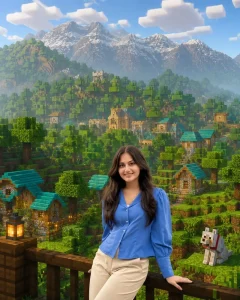
Keep The Human Subject 100% Photorealistic And Unchanged (No Pixelation Or Stylization), While Rebuilding The Background As An Accurate Minecraft Voxel Replica Of The Original Location. Match The Reference Image's Layout, Perspective, Geometry, And Object Placement Exactly.
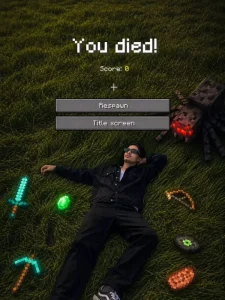
USE 100% OF THE FACE AND BODY, OUTFIT, HAIRSTYLE AND EXACT PHOTO AND BACKGROUND SAME FROM MY ATTACHED REFERENCE IMAGE. CREATE A CINEMATIC TOP-DOWN SCENE INSPIRED BY A MINECRAFT DEATH SCREEN. THE PERSON IS LYING SPREAD OUT ON GRASS, REALISTIC POSE, SUMMER ATMOSPHERIC LIGHTING, SLIGHTLY DESATURATED TONES, FOOTPRINTS VISIBLE IN THE GRASS. SURROUND THE PERSON WITH FLOATING OR PLACED PIXELATED MINECRAFT-STYLE ITEMS INCLUDING A DIAMOND SWORD, BOW, PICKAXE, EMERALD, STEAK, ENDER EYE, MUSIC DISC, AND SPIDER MOB. ADD A REALISTIC MINECRAFT 'YOU DIED!' GAME OVER OVERLAY AT THE TOP WITH PIXEL FONT, INCLUDING 'SCORE: 0', CROSSHAIR SYMBOL, AND TWO RETRO UL BUTTONS LABELED 'RESPAWN' AND 'TITLE SCREEN'. BLEND REALISTIC PHOTOGRAPHY WITH PIXEL-ART GAME ELEMENTS NATURALLY.SOFT SHADOWS, MOODY WINTER AESTHETIC, ULTRA DETAILED, VERTICAL COMPOSITION, DSLR REALISM, SUBTLE DEPTH OF FIELD, HIGH CONTRAST, 9:16 RATIO."NEGATIVE PROMPT:"LOW QUALITY, BLURRY FACE, DISTORTED BODY, EXTRA LIMBS, WRONG FACIAL FEATURES, CARTOON BODY, UNREALISTICa
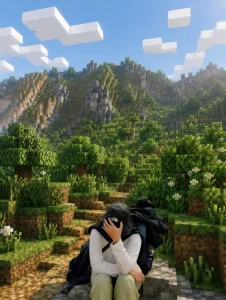
Transform reference images into cinematic Minecraft scenes. Keep the human subjects completely photorealistic and unaltered. Don't alter any objects; stick to the original photos. Use Minecraft daylight, soft fog, realistic block shadows, tiny blocks, and premium cinematic rendering.
Who can create this photo editing?
That is the key point to understand here: the editing style I am about to explain isn’t restricted to just boys, girls, or couples. It is designed so that anyone—whether a boy or a girl—can use it. It is a universal prompt that alters the background while keeping your subject looking natural; it won’t alter your face or identity in any way. However, there is one specific prompt I’ve provided that is tailored for boys, so please do not use that one for girls.
How you can preserve your facial features.
When creating a photo using AI, a common issue is that the generated face often doesn’t match your actual appearance—it fails to capture your likeness correctly. The simple solution is to provide specific instructions ensuring that these elements remain unchanged; you need to specify that your face, hairstyle, and expressions must be kept exactly as they are. If you include these details, your photo won’t undergo unwanted changes, and there won’t be any facial mismatch. I have already explained this to you—simply use the right prompts, and you won’t face any issues.
Conclusion
I hope you found this editing useful. I’ve explained all the details of editing, going over each step thoroughly and explaining how to do it. If you encounter any problems, please contact us. We’ll explain how to do them. If you encounter any other problems, we’ll explain how to fix them and create a better photo.