10+ Boys Vintage Retro Style Ai Photo Editing Prompts For Google Gemini – We shared many tips with you on creating retro photos of girls. You used them and created your own photos, but we didn’t share much about this editing technique for boys. Then I thought, why not bring you an article featuring some unique retro photos? You may have noticed that you’ve created many simple vintage photos, demonstrating that our trends are changing with time. Now, if people are doing something different here, you should do that too. You should definitely create such photos, and here I’ll teach you how to create them. If you’re interested, you can follow this article. In it, you’ll learn how to create different types of photos.
10+ Boys Vintage Retro Style Ai Photo Editing Prompts
In our third retro photo, we taught you how to create the most Indore-style photos, which I showed you. The symbol was you standing behind a wall, and the background was a simple monochromatic one. This time, it’s going to be completely different. Here, you’ll be sitting on a wall, and you’ll see the sea right behind you. You’ll see lotus flowers in it. There are a few different types, and this style is also very popular on Instagram. This is why we selected this one. If you see it once or create it, you’ll get the idea that a change in the trend is needed. Similarly, it’s happening with all trends. I’ll provide you with prompts for those as well, gradually.
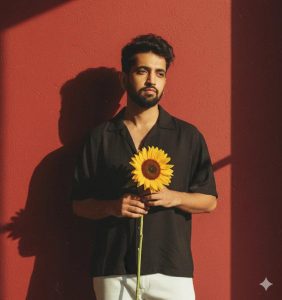
Create a retro vintage grainy but brigher image of the reference Dir ture but draped in a perfect black wine colar Pinteresty aesthetic retro shirt with white pant and holding a sun flower in hands. It must feel like a 90s movie and romanticising windy environment. The boy is standing against a solid wall deep shadows
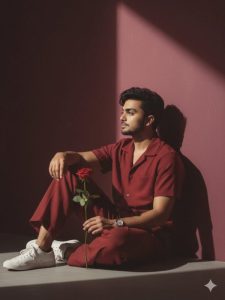
A full-body, side-angle portrait of a handsome 25-year-old boy me(use my image for refrence with accurate

face), approximately 5'5" tall.He is sitting on the ground in a stylish pose against a solid deep wine-colored wall, he is looking from left to right ahead with deep shadows creating a 90s movie and romantic, windy environment.He is wearing a perfect red wine-colored, retro aesthetic shirt with matching pants and white sneakers.He has a silver watch and is holding a single rose flower.
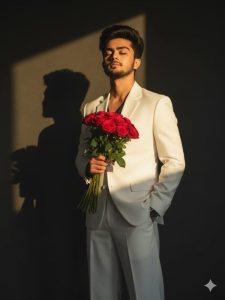
Ultra-realistic cinematic portrait of a stylish young man standing against a dark minimal background with a soft golden sunlight beam casting dramatic shadows. He is wearing a crisp, elegant white suit (blazer and wide-leg trousers) with one hand casually in his pocket and the other holding a bouquet of red roses close to his chest. His hair is voluminous and slightly tousled, styled naturally with texture. His expression is serene and confident, eyes closed, basking in the warm sunlight. The composition highlights the play of light and shadow, with a strong shadow silhouette falling on the wall behind him. The mood is romantic, artistic, and editorial - capturing both sophistication and vulnerability. Shot in high resolution, with cinematic tones, sharp details, and soft contrast.
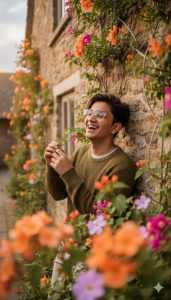
Hyper-realistic overhead 9:16

close-up of myself with glasses, playfully leaning against an ivy-covered stone wall of an old countryside cottage during golden hour. I'm laughing with my head slightly tilted back, one hand brushing away a dangling vine, wearing a textured earth-tone knit sweater layered over a soft white t-shirt. The flowering vines are in full bloom with orange, magenta, and lavender hues, softly blurred in the foreground. Warm, cinematic lighting with a pastel sky glow
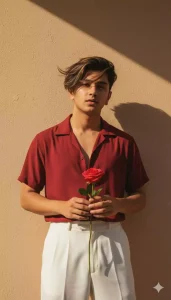
Create a retro vintage grainy but brigher image of the reference Dir ture but draped in a perfect red wine colar Pinteresty aesthetic retro shirt with white pant and holding a rose flower in hands. It must feel like a 90s movie and romanticising windy environment. The boy is standing against a solid wall deep shadows
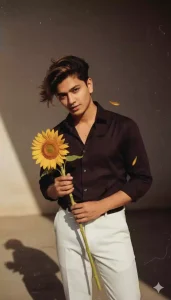
Create a retro vintage grainy but brigher image of the reference Dir ture but draped in a perfect black wine colar Pinteresty aesthetic retro shirt with white pant and holding a sun flower in hands. It must feel like a 90s movie and romanticising windy environment. The boy is standing against a solid wall deep shadows
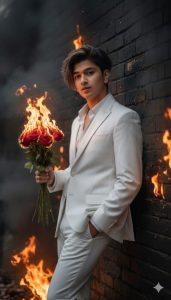
Ultra-realistic cinematic portrait of a stylish young man leaning casually against a dark wal, wearing a crisp elegant white suit. One hand in pocket, the other holding a burning bouguet of red roses, the flames touching the wall and setting it on fire. Smoke rises and spreads across the background, creating a dangerous and dramatic atmosphere. His hair is yoluminous, naturally tousled, expression calm and powerful, contrasting the chaos. Photorealistic skin, cinematic
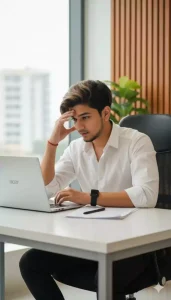
A realistic, high-resolution office scene: a young man with "he has haircut is same style and beardcut is same style and face is same. sits at a clean white desk, intently focused on his open silver Acer laptop. He wears a crisp white button-up shirt with the sleeves slightly rolled up, a black smartwatch on his left wrist, and a thin red thread bracelet on his right wrist. His right elbow rests on the desk while his right hand touches his forehead in a thoughtful pose.
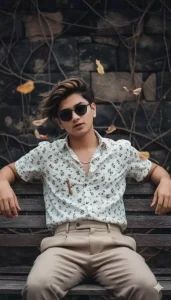
Create a retro, vintage-inspired image-grainy yet bright-based on the reference picture. The boy should be wearing in a white shirt with small brown flower prints,paired & plated beige pant styled in a Pinterest-inspired aesthetic. The vibe must capture the essence of a 90s movie dark-brown-haired baddie, hair waving by a windy, romantic atmosphere. He is sitting on a wooden bench as a few leaves blow in the air, while dramatic contrasts add mystery and artistry tothe scene,create moody yet enchanting
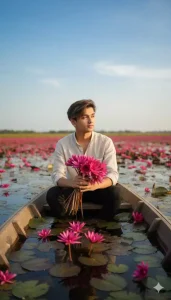
"A person sitting on a boat in a lotus-filled wetland, holding a bunch of fresh red water lilies. All around, vibrant red water lilies bloom across the water, creating a calm and romantic atmosphere. Clear sky, soft natural light, realistic photography style."
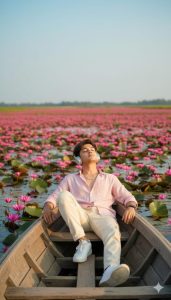
To take this young Indian boy photo reference and generate image effectively and cinematic look he have skinny personality he is wearing un button lite colour pink shirt and and cream colour cargo pant and he wearing watch small silver chain his neck he slidely sitting on a boat and giving best pose the boat in a river the river Full of Lotus flowers and he using headset and enjoying music to little closed eyes to seeing the sky he is wearing white colour stylish shoes
How To Select Photos :-
And to create such a photo, you have to follow the same style as I explained to you: if you want to use your photo here, then use the correct face in it. Using the correct face means that the face that is visible there should be understood correctly by Google Gemini because if it sees your face correctly, it will be visible. After that, the photo that will be generated for you will have a perfect face in it, whereas many people complain that their faces are not matching. Brother, you must follow this thing, whatever photo you are using here, it should be of high quality, plus you just have to add the part of your photo with the face there. The rest of the layer will be generated automatically.
How To Create 10+ Boys Vintage Retro Style Ai Photo Editing Prompts
Now, to create this photo, first copy the prompt we provided. Different prompts in different styles were shared, and you can choose whichever one suits you best. If you want to copy it, I’ve provided a button for copying. Clicking on it will automatically copy it. After that, you’ll need to go to the Google Gemini website. A button will be provided below. You can go directly there by clicking on it, or you can use the application if you prefer. Now, first, you need to paste the prompt there. Paste the prompt there, then select the “plus” option and select “upload photo.” Here, you’ll need the photo you just explained. Add it, then generate it. It’ll take a few seconds. It creates your photo instantly. As you’ll see, Chatgpt used to take a lot of time. But that’s not going to happen here.
Conclusion
You can create your own photos using the details I’ve shared. The rest is up to you to decide how much you understand. Let me know if you understand anything, because we’re always trying to teach you something new here. We try to teach you some new editing techniques.