Couple On Tower Ai Photo Video Editing – Whenever a new trend emerges on social media, you should quickly learn how to use it to create viral videos or photos; once you master the technique, your own content stands a great chance of going viral. In this article, we are going to discuss one such trend that is currently very popular. By using it, you can create the perfect photo or video. I will explain exactly how to create it and outline the necessary steps. I will also describe the type of video and photo involved in this trend.
Details Of Couple On Tower Ai Photo Video Editing
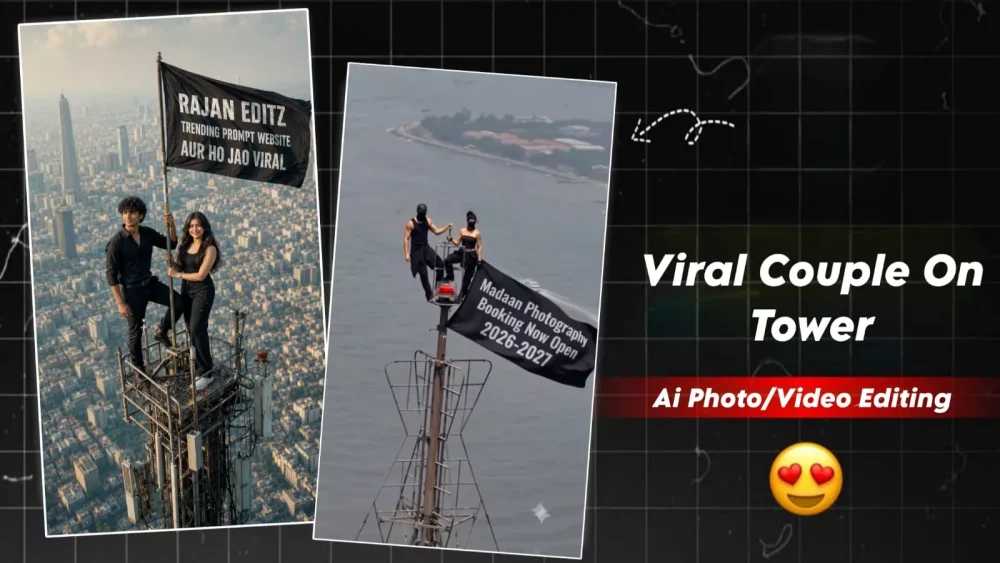
Take a look at this viral editing style; you can use it for your brand, a product, or even your own videos. You have plenty of options because of the way this trend works. Essentially, it features a shot—like the one that recently went viral—showing a high-rise building or tower. You can place your Instagram ID, your name, or your photo on the flag displayed there—or anything else you prefer. That is the key highlight. As for the people standing there, you can even use AI to generate images and convert them into video. We will walk through the entire process so you can understand exactly what it is and how to do it.
How To Create image ?
Now, learn how to create the image here, as that is a crucial step in making this video. You will need two photos for this: if you are a couple, use photos of yourself and your partner. You also need a reference image—this could be a flag design with specific text, an Instagram handle, or anything else you wish to display. Next, open ChatGPT; upload your photos first, and then upload the reference image or add the text. After that, paste the prompt—feel free to customize it if you like. Finally, hit ‘Generate,’ and your image will be ready, just like the one I showed you.
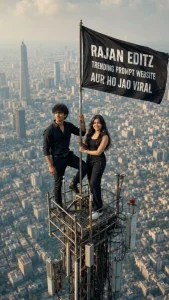
Image Prompt –
Create an ultra-realistic vertical 9:16 cinematic drone shot of two young Indian adults standing on the tiny top platform of a very tall communication tower above a huge modern city skyline. The city below is blurred with atmospheric haze, giving an extreme height and vertigo feeling.

A young man with curly black hair and short beard is wearing an all-black outfit, standing confidently with one foot raised and one hand holding the antenna pole. Beside him, a youna woman in a black sleeveless outfit stands calmly, also holdir.g the pole. A large black flag is attached to the tower and blowing strongly in the wind.
On the flag, write in bold white uppercase text:
rajaneditz.COM
SE PROMPT LELO
AUR HO JAO VIRAL
Keep the text clearly readable, centered on the flag, slightly following the cloth folds. Realistic lighting, warm daylight, telephoto lens compression, high altitude aerial photography, detailed metal tower, cinematic shadows, documenta. y realism, 8K, HDR, no extra people, no logo, no watermark
Video Prompt –
animate this photo as the flag is weaving in slow wind. Keep the rest still and add a little zoom in motion
Aspect Ratio 9:16
How to Create This Video?
Now it is time to create the video, as you need to learn how to do that here. First, take the image you generated using ChatGPT and save it. Then, open the ‘Google Flow’ website—I have provided a direct link here that you can use to get started. Once there, sign up, start a new project, click the plus (+) option to upload your photo, and then paste the video prompt to generate the video; it will create your final video in just a few seconds.
Conclusion
You can create a viral video by leveraging a viral trend on Instagram. I have already provided the details here; simply follow the steps to create it. If anything is unclear or you encounter any issues during the process, feel free to reach out to us for help. We can explain the process to you in a video format—you can find the explanation on our YouTube channel.