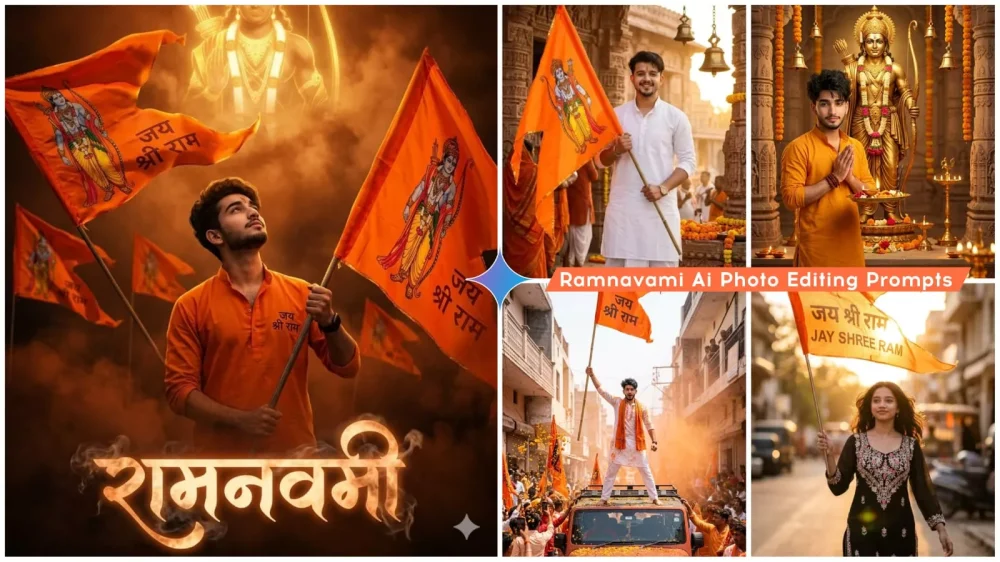
Ram Navami Ai Photo Editing Prompts – Ram Navami is a significant Indian festival, celebrated as the birth anniversary of Lord Rama. On social media, you will often see people sharing photos to showcase their devotion and express their faith. In today’s digital age, by utilizing tools like Google Gemini, you too can easily transform a simple photograph into a Ram Navami-themed image—one that captures the complete atmosphere of the Lord Rama temple, divine radiance, and deep devotion. In this article, we will learn how to convert a standard photo into a Ram Navami-style image, how to craft professional-quality prompts, how to generate realistic and professional-looking visuals, and explore some tips and tricks that will prove useful to you.
Details Of Ram Navami Ai Photo Editing Prompts
It offers a distinct “festival look” that transforms your ordinary photographs into images perfectly suited for Ram Navami. It allows for professional-quality editing without requiring any advanced technical skills. If you wish to apply this style, absolutely no prior editing knowledge is necessary. It serves as ready-made content for social media, enabling you to effortlessly create and prepare the perfect photos for your Instagram, WhatsApp, and Facebook profiles. It also offers creative freedom, allowing you to customize various elements to your liking. For instance, you can customize the temple—designing it to resemble the Ram Mandir in Ayodhya—or incorporate unique details such as a bow and arrow motif. You can add a variety of such distinct elements to personalize your creation.
Here Are The Essential Requirements For Editing:
you should always have these items ready while performing the editing process. First and foremost, for Google Gemini, you need to have a clear, HD reference photo on hand. Since you will be using a specific image as a reference, that photo must be in Full HD resolution. Its background should be completely simple, and it should not feature too many people. If you wish to generate an image of yourself, it should be a solo shot—featuring only you. You also need to have access to Google Gemini; I will explain how to access it later on. Finally, you should have a basic idea of how to formulate a prompt. However, there is no need to stress about the prompt itself; rest assured that the image generated will turn out looking completely professional—provided, of course, that you create it correctly.
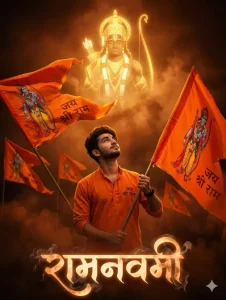
Ultra-realistic 4K cinematic Ram Navami scene with warm orange and dark dramatic (slightly horror-style) atmosphere, glowing saffron tones, and smoky background.
A giant divine image of Lord Ram in the sky, glowing with golden aura.
In the foreground, a young man (use uploaded photo) wearing a bhagwa kurta with "जय श्री राम" written on it, holding a large saffron flag with "जय श्री राम" and Lord Ram image.
Surrounded by multiple saffron flags waving, all with "जय श्री राम".
Cinematic lighting, volumetric fog, high contrast, realistic shadows, HDR, depth of field.
At the bottom, smoky glowing text "रामनवमी".
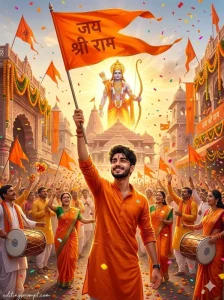
Create a vibrant Ram Navami festival celebration scene where a young Indian man stands proudly in the middle of a grand Ram Navami street procession filled with thousands of devotees celebrating with music, saffron flags, flower petals, and confetti flying through the air. The devotee is joyfully raising a large saffron flag high above his head with “Jai Shri Ram” written boldly on it while smiling with spiritual pride. The street is decorated with long lines of saffron banners, marigold garlands, temple arches, and festive lights hanging across the road. Devotees around him are dancing with dhol drums, throwing flower petals, and chanting devotional slogans while waving saffron flags. In the background a massive glowing statue of Lord Ram stands above the temple entrance holding a bow and arrow, radiating divine golden light that illuminates the entire celebration. The atmosphere is energetic and spiritual with bright saffron color tones, cinematic lighting, and dramatic festival energy captured in ultra-realistic photography style with extremely detailed textures. FACE LOCK — NON-NEGOTIABLE IDENTITY RULE Use the uploaded reference image as the only facial identity source. The face must remain 100% identical including identical jawline, same beard density & pattern, same moustache shape, same eye shape & eyelid fold, same eyebrow thickness, same nose bridge & tip, same lips & facial proportions, same natural skin tone, same hairline and hairstyle. Do not add or remove facial hair. Ultra-HD razor-sharp facial clarity required. LIGHTING & ATMOSPHERE Golden sunset lighting mixed with saffron festival colors illuminating the street procession. Flower petals floating through the air, confetti sparkling in sunlight, devotional smoke from incense drifting across the crowd. Highly cinematic depth of field with glowing temple lights in the distance. QUALITY Ultra-realistic HDR cinematic photography, extremely detailed textures, photorealistic lighting, 8K ultra HD clarity. TEXT / SIGNATURE Add “editingprompt.com” at the bottom-left corner, HANDWRITTEN SIGNATURE-STYLE typography, thin cursive strokes, small size, subtle premium elegance, white or soft off-white color. ASPECT RATIO • 3:4 vertical
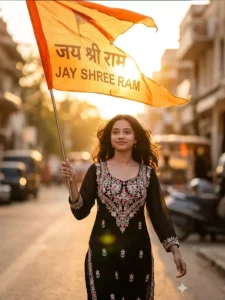
A stylish Indian girl walking during sunset holding a saffron flag with “Jay Shree Ram” written on it. Warm golden sunlight, wind blowing the flag and her hair, soft smile with confidence, dreamy bokeh background, ultra-realistic, Instagram aesthetic
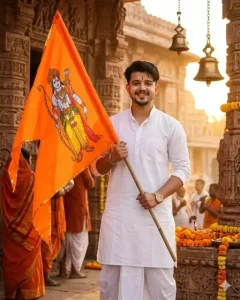
A young Indian man standing in front of an ancient Ram temple during Ram Navami sunrise, holding a saffron flag with Lord Rama symbol, tilak on forehead, wearing traditional kurta and dhoti, golden sunlight illuminating the temple bells and flowers, spiritual atmosphere, cinematic lighting, ultra realistic, 8k
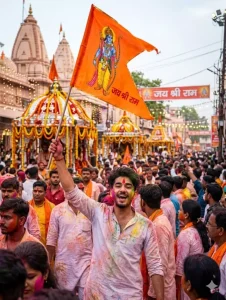
Energetic young Indian man leading a Ram Navami street procession, holding a saffron flag of Lord Rama, crowd chanting “Jai Shri Ram”, colorful gulal powder in the air, festive decorations and temple chariots behind, vibrant festival lighting, cinematic photography, ultra detailed, 8k
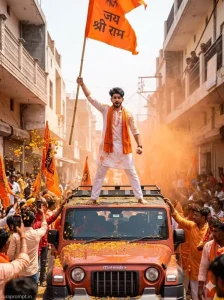
Use the uploaded reference face exactly as the facial identity source. The face must remain 100% identical to the reference image with zero alteration. Maintain the same eye shape, eyelids, nose bridge, lips, jawline, facial proportions, natural skin tone, and hairstyle. Do not apply beautification filters or smoothing. Preserve natural pores and realistic skin texture so the face appears perfectly recognizable in ultra-HD detail. Generate a high-energy, documentary-style Ram Navami Shobha Yatra portrait at 8K ultra-HD resolution in a 3:4 vertical aspect ratio. The scene is set in the middle of a packed Ram Navami procession moving through the narrow lanes of an old North Indian city, possibly Ayodhya, Varanasi, or Lucknow, in the height of afternoon festive chaos. The young Indian man stands boldly on the rooftop of a moving modified Mahindra Thar with off-road tires and a custom saffron wrap on the hood, his boots planted wide apart on the roof rack for balance, his posture tall and utterly fearless as he surveys the massive crowd below and around him with the calm authority of someone born for exactly this kind of moment. He wears a crisp white cotton kurta with saffron embroidery along the collar and sleeves, paired with white pyjama trousers, and a thick saffron gamcha wrapped casually around his neck with both ends falling across his chest. His hairstyle is natural and slightly wind-tossed from the movement of the vehicle, short on the sides and textured on top, matching the raw energy of the scene perfectly. In his raised right fist he holds a tall bamboo staff flying a giant saffron flag with “जय श्री राम” written in bold Devanagari script in vermilion red, and the flag snaps violently in the wind above him creating a dramatic curved shape against the sky. Around the Thar in every direction there is an ocean of people, hundreds and hundreds of devotees carrying smaller saffron flags, some in white and saffron kurtas, some in just saffron, their faces blurred beautifully by the shallow depth of field as they chant with open mouths and raised arms creating a wall of festive energy that the camera captures as living motion. The air itself is electric and textured with drifting orange gulal powder creating a warm haze at crowd level, marigold petals raining down from rooftops above, and faint white smoke from incense stalls lining the narrow lane. The lighting is bright and contrasty midday Indian sunlight coming straight overhead, creating sharp natural shadows under the subject’s brow and chin that give his face incredible sculptural definition while the crowd below is bathed in flat festive light that keeps every flag and face readable. Camera simulation is a Nikon Z8 with a 35mm f/2.0 wide-angle lens, ISO 200, shutter speed 1/800s to freeze both the subject and the peak motion of the flag, a slight upward tilt to the camera placing the subject against the open sky in the upper third of the frame. Color grading is punchy and saturated with saffron orange, vermilion red, and clean white as the dominant tones, giving this image the feel of a powerful photojournalistic cover shot from a national magazine. Negative prompt: blurred face, distorted anatomy, cartoon style graphics, low resolution textures, watermark artifacts, extra limbs, unnatural skin, plastic look, empty crowd, fake fog overlay, digital painting effect. Add “auraprompt.in” as a small watermark at the bottom-left corner, Petit Formal Script font, thin elegant cursive strokes, soft white color rgba(FFFFFF), 1px letter-spacing, subtle premium handwritten signature style, slight transparency, minimal and refined, no background on text, blends naturally into the image.
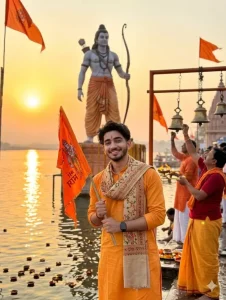
A peaceful yet powerful devotional scene near a sacred river during sunset. A young Indian man wearing a saffron kurta and traditional stole stands on the ghats holding a saffron Jai Shree Ram flag while facing the camera with a calm devotional smile. Behind him are glowing diyas floating on the river and a majestic statue of Lord Ram in the distance holding a bow. The background shows temple bells, saffron flags fluttering, and devotees performing evening aarti. The sky is filled with golden sunset light reflecting on the river water, creating a spiritual cinematic atmosphere. The man's face is in clear focus and slightly zoomed toward the camera, while the background remains beautifully blurred with warm divine lighting. Ultra realistic, spiritual cinematic style, 8K quality, dramatic golden glow, Take Face From Uploaded image Keep same 100%
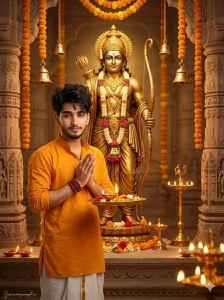
(Use uploaded reference face exactly, zero modification) FACE LOCK — ZERO MODIFICATION POLICY Face must remain 100% identical to the uploaded reference image. No reshaping, no beautification filters, no smoothing effects. Preserve natural facial structure, jawline, eyes, nose, lips, beard pattern, moustache shape and hairstyle exactly as the reference image. Ultra-HD crystal-clear facial detail required so the identity remains perfectly recognizable. ASPECT RATIO • 3:4 vertical STYLE Ultra-realistic devotional photography inside a grand Hindu temple. Professional DSLR cinematic portrait style. 8K ultra-high resolution. SCENE DESCRIPTION Create a highly realistic spiritual scene inside a magnificent Ram temple decorated with saffron flags, marigold garlands, brass lamps and glowing diyas. At the center of the temple altar stands a beautifully crafted golden idol of Lord Ram holding a bow, surrounded by flower garlands and sacred decorations. POSE The devotee is standing respectfully slightly to the right side of the idol with folded hands in prayer while holding a traditional pooja thali containing a glowing diya, flowers and incense sticks. OUTFIT DETAILS Bright saffron traditional kurta with a white dhoti and a light cotton shawl draped across one shoulder. ACCESSORIES Traditional rudraksha bracelet Simple sacred thread around wrist BACKGROUND Grand temple interior with carved stone pillars, hanging bells, glowing oil lamps and devotional decorations. Background softly blurred for cinematic depth. LIGHTING Warm golden temple lighting from diyas and lamps illuminating the devotee and the idol with a divine spiritual glow. CAMERA & STYLE Captured with professional 85mm portrait lens. Ultra-sharp focus on the face with creamy cinematic background blur. NEGATIVE PROMPT cartoon style, CGI character, face distortion, blur, extra limbs, watermark artifacts. TEXT / SIGNATURE Add “rajaneditz.com” at the bottom-left corner, HANDWRITTEN SIGNATURE-STYLE typography, thin cursive strokes, small size, subtle premium elegance, white or soft off-white color.
How To Create Photos With Google Gemini
To create a photo, the first step is to open Google Gemini. You can access this on a desktop computer, a laptop, or any other device. I have also provided a direct link to the browser interface to ensure you encounter no difficulties. Next, you need to upload a reference image—simply upload one of your standard photos. You will then need to enter a professional-grade prompt. However, there is no need to write one from scratch; I have already shared several options within this article. Simply copy the one you like best, paste it into Gemini to initiate the generation process, and wait just a few seconds. Your photo will be ready with such professional-quality results that you will be astonished by how incredible the editing turned out.
How Can You Make Your Photos Even Better?
Look, if you want to make your photos look more professional and stunning, the very first thing you should learn is how to perform color adjustments—because while you might initially capture the image, there are certain elements you will need to fine-tune manually. Use an application like Lightroom to adjust the colors, brightness, and other such settings to your personal preference, until it looks just right to you. Furthermore, ensure that your face appears clear and sharp (in HD quality); clean it up within the editing tool if necessary. Finally, crop the image to fit standard social media dimensions—for instance, crop it to the 4:5 aspect ratio suitable for Instagram—so that you can upload it anywhere.