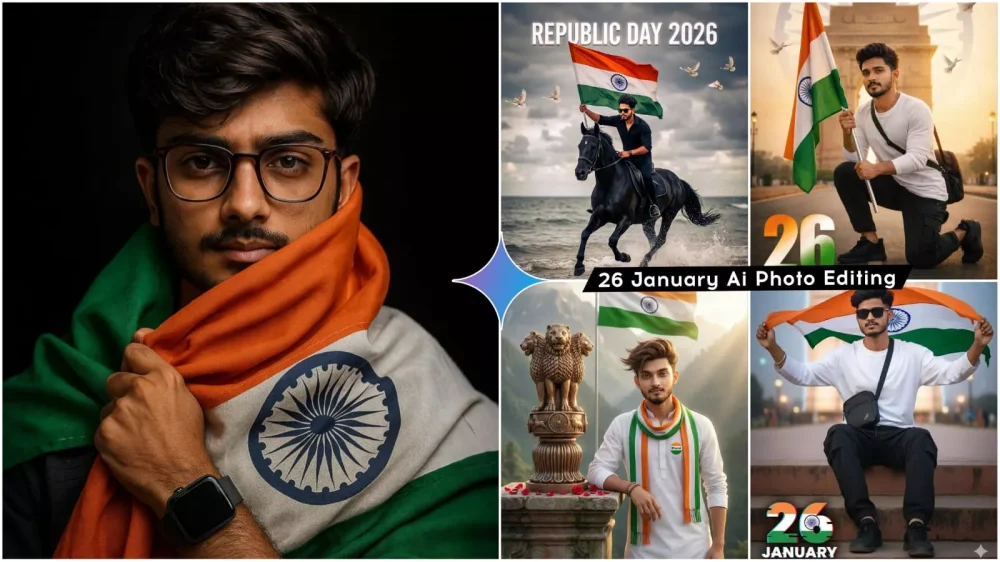
26 January Ai Photo Editing Prompts – On January 26th, our country is steeped in national pride and patriotism, and nowadays, AI has added a whole new dimension to it. As you’ll see, people are now creating various types of photos for January 26th that are incredibly impressive and realistic. You can create these using Google Gemini. Gemini has made this process much easier. You can create any kind of photo and achieve perfect results using these prompts. In this article, I’m going to tell you how to create different types of photos for January 26th. I have some examples and prompts that I will share with you, and you can use them to create similar photos. I’ll share the details with you; you just need to read and understand how to create them.
Details Of 26 January Ai Photo Editing Prompts
There are several ways to create photos for January 26th, and I can explain some of the styles to you. I’m explaining them right now. Just take a look and understand them. Here, you’ll see portraits with a tricolor background, where the Indian flag is in the background, and you’re saluting it. In short, the photos will incorporate our tricolor flag. You might see different styles. Some might have text related to January 26th, while others might show you holding the flag and waving it. Anything related to January 26th will be featured here. I’ve shown you some examples of these photos. You can use them and create similar pictures.
Edit With Google Gemini
Google Gemini helps you in this way: it converts your lines of text into an image, based on an idea you have. It understands the small details of your idea. For example, let’s say you imagine yourself standing inside a school, holding a flag, with many boys in the background. You can describe this to Gemini in Hindi, or in English if you prefer. Then, you can use your own photo as a reference. After that, Gemini will create a perfect picture for you that looks completely realistic. This is how you can create Republic Day photos.
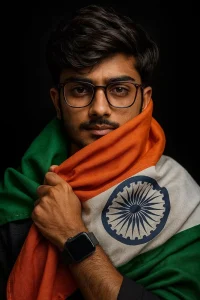
A PROUD YOUNG INDIAN MAN STANDING AGAINST A DARK BACKGROUND, WRAPPED IN THE INDIAN NATIONAL FLAG (TRICOLOR WITH SAFFRON, WHITE, AND GREEN), HOLDING IT CLOSE TO HIS CHEST WITH ONE HAND. HE HAS SHORT, NEATLY STYLED HAIR, A TRIMMED BEARD, AND IS WEARING GLASSES AND A SMARTWATCH. THE ASHOKA CHAKRA ON THE WHITE STRIPE IS CLEARLY VISIBLE. THE LIGHTING IS DRAMATIC AND FOCUSED ON HIS FACE, CREATING A BOLD, PATRIOTIC, AND EMOTIONAL ATMOSPHERE.
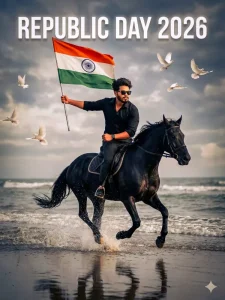
Keep my face exactly the same as the uploaded photo. Do not change or edit my face. 100% Aspect Ratio: 3:4 Create an ultra-realistic cinematic image using the reference photo.

POSE DETAILS: The Victory Charge / Galloping Charge Pose

Horse full speed gallop in shallow water, flag held high straight forward like you're leading the nation to victory. Body slightly leaned ahead, intense

look. (Most iconic & energetic pose - same as your main photo) expression

OUTFIT DETAILS:All black sleeve fold shirt outfit black luxury sunglasses black apple smart watch

EXPRESSION: Brave, patriotic, fearless Calm but powerful facial expression

BACKGROUND & ENVIRONMENT: Same beach and sea background Dramatic cloudy sky White doves flying in the sky Natural ocean reflections on wet sand No background change

LIGHTING & STYLE: Same lighting as reference Natural daylight with cinematic contrast Soft highlights on face and flag Realistic shadows Ultra-HD, photorealistic look
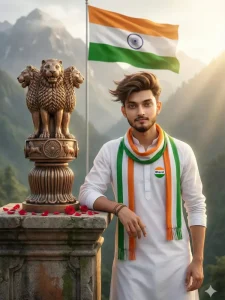
A HYPER REALISTIC, ULTRA-HIGH-DEFINITION 3D CINEMATIC PORTRAIT OF A YOUNG INDIAN MAN STANDING PROUDLY BESIDE THE LION CAPITAL OF ASHOKA (ASHOKA STAMBH). THE MAN HAS FAIR-TO-WHEATISH SKIN, SHARP FACIAL FEATURES, LIGHT STUBBLE BEARD, AND STYLED VOLUMINOUS HAIR SWEPT SLIGHTLY BY THE WIND. HE IS WEARING A CLEAN WHITE TRADITIONAL KURTA WITH FULL SLEEVES AND A TRICOLOR SCARF (SAFFRON, WHITE, AND GREEN) DRAPED NEATLY AROUND HIS NECK A SMALL ROUND BADGE ON HIS CHEST CLEARLY READS "BHARAT". HE IS LEANING CASUALLY WITH HIS RIGHT ARM RESTING ON A WEATHERED STONE PEDESTAL. ON TOP OF THE PEDESTAL STANDS A BRONZE COLORED ASHOKA STAMBH WITH FOUR DETAILED LIONS, CARVED REALISTICALLY WITH HISTORICAL ACCURACY. FRESH RED ROSE PETALS ARE SCATTERED ON THE STONE SURFACE AROUND THE STATUE.
IN THE BACKGROUND A LARGE INDIAN NATIONAL FLAG (TIRANGA) WAVES PROUDLY ON A TALL FLAGPOLE, WITH SAFFRON, WHITE, AND GREEN COLORS CLEARLY VISIBLE AND THE ASHOKA CHAKRA SHARP AND CENTERED BEHIND THE FLAG, MIST-COVERED GREEN MOUNTAINS RISE DRAMATICALLY, CREATING A SERENE AND MAJESTIC ATMOSPHERE
LIGHTING IS SOFT GOLDEN-HOUR SUNLIGHT COMING FROM THE RIGHT SIDE, CREATING WARM HIGHLIGHTS ON THE FACE, STATUE, AND FABRIC TEXTURES, WITH GENTLE SHADOWS FOR DEPTH CINEMATIC DEPTH OF FIELD, SHARP FOREGROUND, SLIGHTLY BLURRED BACKGROUND. PATRIOTIC, PEACEFUL, AND INSPIRATIONAL MOOD ULTRA-REALISTIC TEXTURES, 8K RESOLUTION, PROFESSIONAL COLOR GRADING, DSLR-STYLE FOCUS, HIGH DYNAMIC RANGE, EXTREMELY DETAILED, MASTERPIECE QUALITY.

Keep my face exactly the same as the uploaded photo.
Do not change or edit my face. 100%
Create an ultra-hyper-realistic cinematic photograph using the uploaded reference photo.
Face must remain 100% identical to the reference image
no face reshaping, no beauty filter, no Al facial A modification.
Preserve original skin texture, facial structure, expression, beard details, and identity exactly.

SUBJECT:
A young Indian man sitting on the sharp edge of a rugged rocky cliff in the mountains.
Full body visible, side-profile view.
Confident yet emotional posture, arms open wide.
Wavy, masculine, slightly messy hair.

POSE DETAILS:
Side view full-shot from head to toe
One hand gripping the rocky cliff tightly for balance
Other hand hanging downward, holding and waving the Indian national flag
Both arms slightly open, expressing freedom, pride, and courage
Legs relaxed, seated on the cliff edge
Body slightly leaning forward into the mist

OUTFIT DETAILS:

Black ov
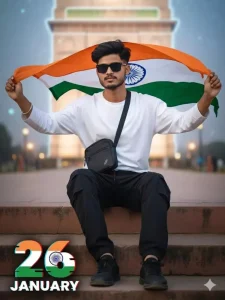
Ultra-realistic modern patriotic portrait of the uploaded Indian boy sitting casually on a concrete step, holding the Indian tricolor flag behind him flowing in the wind. White oversized long-sleeve T-shirt, black cargo pants, black sneakers, sling bag. India Gate neon-lit in the background, as a subtle holographic overlay, cinematic dusk lighting, shallow depth of field, crisp 8K DSLR quality. Bold graphic 26 in tricolor, "JANUARY" with glitch-blur typography. Don't change my face. Voluminous hairstyle black sunglasses hand Indian flag.
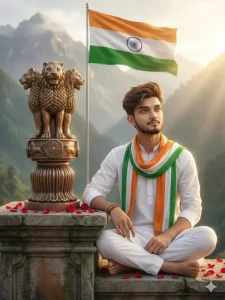
A HYPER REALISTIC, CINEMATIC 3D PORTRAIT OF A YOUNG INDIAN MAN SITTING CALMLY BESIDE THE LION CAPITAL OF ASHOKA (ASHOKA STAMBH). THE MAN HAS A HANDSOME YOUTHFUL FACE, FAIR-TO-WHEATISH SKIN TONE, SOFT LIGHT BEARD, SHARP JAWLINE, AND THICK VOLUMINOUS HAIR STYLED UPWARD WITH A GENTLE SIDE SWEEP HIS EXPRESSION IS PEACEFUL, THOUGHTFUL, AND PATRIOTIC, LOOKING SLIGHTLY TO THE RIGHT TOWARD THE DISTANCE.

HE IS SEATED CROSS LEGGED ON A WEATHERED STONE PLATFORM, BAREFOOT, WEARING A CLEAN WHITE TRADITIONAL KURTA PYJAMA A LONG INDIAN TRICOLOR SCARF (SAFFRON, WHITE, AND GREEN) IS DRAPED LOOSELY AROUND HIS NECK, FALLING NATURALLY OVER HIS CHEST. A SIMPLE BEADED BRACELET IS VISIBLE ON HIS WRIST. RED ROSE PETALS ARE SCATTERED ON THE STONE SURFACE AROUND HIM.

TO HIS LEFT STANDS A BRONZE COLORED ASHOKA STAMBH MOUNTED ON A CARVED STONE PEDESTAL. THE LION CAPITAL FEATURES FOUR FINELY DETAILED LIONS STANDING BACK TO BACK, WITH THE ASHOKA CHAKRA ENGRAVED ON THE CIRCULAR BASE, SCULPTED WITH HISTORICAL ACCURACY AND REALISTIC METALLIC TEXTURE. BEHIND THEM, A TALL FLAGPOLE HOLDS A LARGE INDIAN ΝΑΤΙΟΝAL FLAG (TIRANGA) WAVING GENTLY IN THE WIND, WITH VIVID SAFFRON, WHITE, AND GREEN BANDS AND A CRISP NAVY BLUE ASHOKA CHAKRA IN THE CENTER.

THE BACKGROUND SHOWCASES MAJESTIC HIMALAYAN MOUNTAINS COVERED IN SOFT MIST AND GREENERY, CREATING A SERENE AND SPIRITUAL ATMOSPHERE WARM GOLDEN-HOUR SUNLIGHT STREAMS FROM THE RIGHT SIDE, PRODUCING SOFT HIGHLIGHTS, NATURAL SKIN TONES, AND CINEMATIC SHADOWS.

SHALLOW DEPTH OF FIELD KEEPS THE MAN AND ASHOKA STAMBH IN SHARP FOCUS WHILE THE MOUNTAINS FADE INTO A SMOOTH BLUR. ULTRA REALISTIC TEXTURES, HDR LIGHTING PROFESSIONAL COLOR GRADING, DSLR QUALITY FOCUS, PEACEFUL PATRIOTIC MOOD, CINEMATIC COMPOSITION, MASTERPIECE QUALITY, 8K RESOLUTION, EXTREMELY DETAILED, PHOTOREALISTIC.
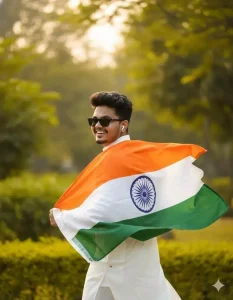
WRAPPED IN PRIDE, SMILING WITH
FREEDOM-CREATE A VIBRANT PORTRAIT OF A JOYFUL YOUNG MAN CELEBRATING INDIAN PRIDE, WRAPPED IN THE INDIAN NATIONAL FLAG (TRICOLOR WITH ASHOKA CHAKRA). HE IS DRESSED IN A TRADITIONAL WHITE
KURTA-PAJAMA, SMILING AND GLANCING
BACK OVER HIS SHOULDER. THE
BACKGROUND FEATURES SOFT GREENERY
AND WARM LIGHTING, EMPHASIZING THE FESTIVE AND PATRIOTIC ATMOSPHERE.
HIGH-RESOLUTION, NATURAL COLORS, LIVELY AND CELEBRATORY MOOD, I STYLE
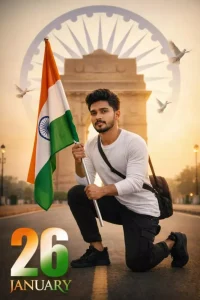
Ultra-realistic cinematic portrait of the same young South Asian man kneeling at India Gate, holding the Indian tricolor flag, wearing a white long-sleeve T-shirt, black cargo pants, black sneakers, and a cross-body bag, with golden-hour light, Ashoka Chakra in the sky, white doves, centered road, DSLR style, shallow depth of field, cinematic color grading, and “26 January” in tricolor at the bottom 🇮🇳
How To Create Image With These Prompts
Now, let’s see how you can create this kind of photo; it’s very simple. You’ll need a reference image of yourself. For example, you can use a selfie, and from that one selfie, you can create different types of photos. What you need to do is open Google Gemini. The link will be provided here. First, paste the prompt there (I’ve already copied it for you). Then, go to the plus icon and upload your photo – the selfie we mentioned. After that, click on the generate button. It will take a few seconds, and then a fantastic photo will be ready for you. You’ll be very happy when you see it!
The Final Touch.
After your photo has been edited, you absolutely must give it the final touch. Adjust the colors using any color grading application. Fill in the colors according to your preference. It’s simple: open the Lightroom application. There, you can adjust all the colors and other settings. One more thing: if you see any imperfections in the “January 26th” text, you can remove it and write something else there yourself. And finally, be sure to add your logo. That’s the best part – Google easily creates any photo for us. With just a few tweaks, you can make it even more impressive.