
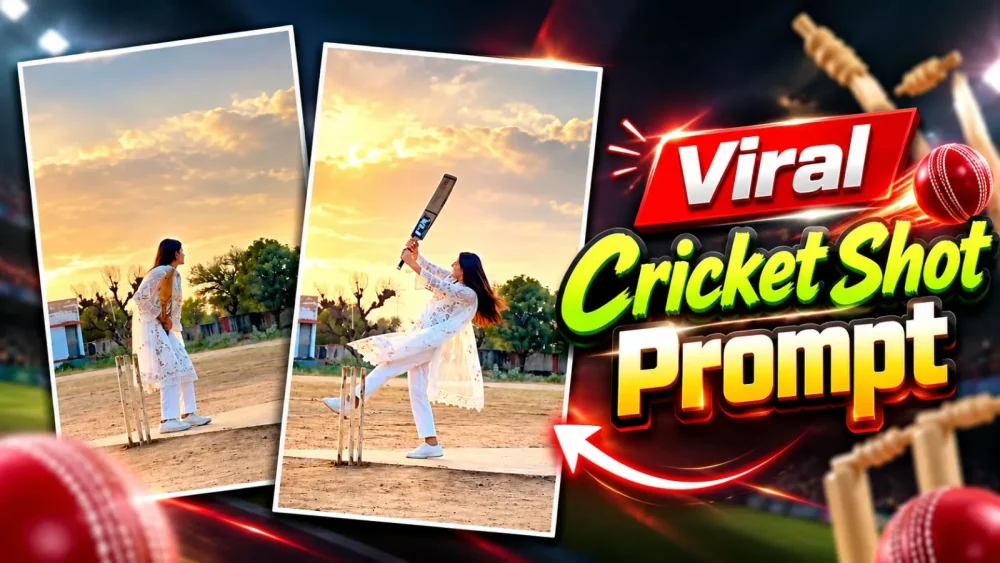
Cricket Shot Ai Video Editing Prompt – Videos featuring cricket shots are going viral on social media, with many people posting clips of themselves playing ‘pull shots.’ Are these videos created in a realistic way? Well, you can certainly create such videos authentically—if you know how to play cricket, you can easily film yourself executing these shots. However, the specific videos that are currently going viral are created using a particular method, and I will show you exactly how to produce them. This article provides a detailed guide covering the necessary steps to create these videos, as well as how to make them go viral. Read on to learn how you can create your own.
Details Of Cricket Shot Ai Video Editing Prompt
There are several different processes for creating this type of video. First, I will explain the editing part, and then we can discuss the rest. The editing will work like this: you will be shown playing cricket—the ball will come toward you, and the video will be recorded from behind you as you play a full shot; the footage will then transition into slow motion. By presenting your video in this way, you’ll have your final clip. I will walk you through both steps—how to create it and what specific details you’ll need.
Process Of Creating This Video
Let’s talk about the process—what it entails and how you can go about creating these. We’ll cover whether it’s a simple task or something that requires more effort. First and foremost, you will need a prompt. Beyond that, you’ll need to understand the process itself; the procedure remains the same regardless of which tool you choose to use.
With Refrence Video Prompt –
VILLAGE CRICKET PULL SHOT – GOOGLE FLOW REFERENCE-VIDEO PROMPT
(Upload: @video1 = cricket_reference_10s_MUTED.mp4, @image1 = your photo. Works for boy or girl. 10s, 9:16)
DURATION: 10 seconds.
ASPECT RATIO: 9:16 vertical.
REFERENCE VIDEO (MASTER)
@video1 is the master reference. Recreate it exactly, frame by frame: the same camera position, camera angle, framing, camera distance, lens look, slow motion timing and the same continuous shot. Copy every movement exactly as in @video1: the active batting stance, the bat waggles, the tap of the bat on the pitch, the backlift, the ball arriving at waist/chest height, the pull shot and the bat swing path, the ball flying up into the sky, the slow-motion one-leg finishing pose, turning to the camera, hiding the face behind the bat, the smile and walking away. Same timing as @video1.
LOCATION: Keep the location exactly as in @video1 — the same dusty village cricket ground, the same cement pitch, the same three wooden stumps in the same place next to the batter, the same sky-blue building, the same trees and the same hazy evening sky. Do not change or add anything to the location.
IDENTITY
@image1 is the ONLY identity reference. Replace the person in @video1 with the person in @image1 — same face, gender, age, skin tone, body shape and hairstyle as @image1. Do not copy the original person’s face from @video1.
Clothes and shoes come from @image1 (same colours and style), identical in every frame. If the legs or shoes are not visible in @image1, use plain trousers matching the top and white sneakers.
Only one person in the video.
BAT AND BALL: Same bat and ball movement as @video1. Plain wooden bat with no stickers, no brand name, no text.
REALISM: Photorealistic real phone video, natural skin, natural motion, same lighting as @video1.
AUDIO: Preserve the original background music and its timing from @video1 if supported. Do not add dialogue, voice-over or unrelated sound effects. No lip-sync, no speaking.
STRICT RULES
– Do not invent new scenes, do not cut to close-ups, do not change the camera angle.
– No extra people. No text, captions, logos or watermarks.
– Keep 9:16 vertical.
FINAL RESULT: The exact same video as @video1, with only the person replaced by the person from @image1.
With Reference Photo Prompt –
Create an ultra-realistic cinematic video matching the provided reference video as closely as possible. Vertical 9:16 aspect ratio, 4K quality, natural lighting, realistic human movements, and a continuous single camera shot.
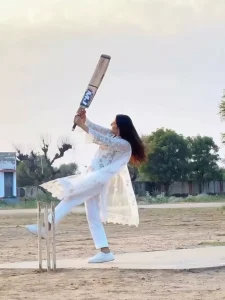
Scene and Character: A young Indian woman wearing a beautiful white embroidered salwar kameez, matching white trousers, and a lightweight white dupatta. Her long, dark hair is tied back. She is standing on a flat, dusty cricket ground in a rural Indian village. Three cricket stumps are placed beside her on the left side of the frame. In the background, there are green trees, a small rural building, an open field, and a pale cloudy evening sky.
ACTION — SECOND BY SECOND:
0–2 seconds: The woman stands beside the cricket stumps, holding a wooden cricket bat with both hands. She bends forward slightly and looks toward the expected direction of the cricket ball. Her posture is focused and natural.
2–4 seconds: She prepares to play a cricket shot, adjusting her stance and bringing the bat upward. Her white dupatta hangs naturally and moves gently with her body.
4–6 seconds: She swings the cricket bat upward with both hands, turning her body naturally. One leg rises as she performs an energetic batting follow-through. Her long hair and white dupatta flow naturally with the movement.
6–8 seconds: She continues the batting action, lifting the bat high above her shoulder and briefly balancing on one foot. Her movements resemble the reference video, with realistic body weight and natural cloth physics.
8–10 seconds: She brings the bat down in front of her, steps forward, and finishes the movement. She turns slightly toward the camera with a relaxed facial expression while standing on the cricket pitch.
CAMERA AND VISUAL STYLE: Fixed camera position, full-body wide shot, eye-level perspective, the woman visible from head to toe throughout the video. Keep the cricket stumps visible on the left. No cuts, no camera shakes, no sudden zooms, and no scene transitions. Soft natural daylight, realistic shadows, natural skin texture, detailed white fabric embroidery, realistic hair movement, and authentic rural Indian surroundings.
IMPORTANT CONSISTENCY RULES: Maintain the same woman's face, hairstyle, white outfit, cricket bat, body proportions, background, and camera angle throughout the entire video. Make the action continuous, physically believable, and as close to the reference footage as possible. Do not add a visible cricket ball unless it is present in the reference.
NEGATIVE PROMPT: Cartoon, animation, unrealistic movements, extra fingers, deformed hands, distorted face, duplicate person, extra cricket bats, floating objects, changing clothes, changing background, incorrect cricket stumps, flickering, unnatural body movement, camera cuts, artificial lighting, text, subtitles, logos, and watermarks.
How To Generate Video With Rafrence Video?
The first step is that, regardless of the tool you use, you will be provided with a specific prompt to generate a video directly. All you need is a reference image. Here is what you need to do: copy the prompt from here, then open Google Flow. Create a new project, click the plus (+) icon, and upload your reference image. Once you have selected the image, paste the prompt, set the aspect ratio to 9:16, and hit generate—your viral-style video will be ready in no time.
How To Generate With Reference Photo?
The second method is to open the Google Flow website. Once there, click the plus (+) icon at the top to start a new project, and upload the reference video—which I have provided here. You will also need to upload a reference photo of yourself; make sure to use a full-body photo. Next, you will need a prompt, which you can find on our site. Simply copy it from there, paste it into the tool, and hit ‘generate.’ This will easily create your viral video, yielding excellent results.
Conclusion
I hope you’ve grasped the concept behind this editing. I’ve tried to cover all the details and explain the entire editing process. If this makes sense to you, let us know—we’ll bring you even more fantastic tools like this one.


