

Instagram Viral Boys Ai Photo Editing Prompts – Photos with AI are becoming a huge hit these days. While I was scrolling through Instagram, I saw that various photos of young men had been created and uploaded to Instagram. They were going viral. What had been done to them was shown in a video format. Initially, a normal photo was shown. After that, the second time, a perfectly edited photo was shown. I thought, why not talk about it and explain to you if you want to make such videos, or create such photos, how to do it so easily that you won’t even know if it’s editing or a template? I’ll explain it to you in such a way that you’ll be truly hooked. We learned this so easily.
1000+ Google Gemini New Prompts
Details Of Instagram Viral Boys Ai Photo Editing Prompts
In the photos I’m about to share, you’ll find photos of various formats and styles, with different clothing styles. I saw a viral photo of a man resembling Spider-Man. Most of you may not know, but this photo is generated using AI, and you can recreate the exact same photo with your own face with the same results. It won’t look like it was created with his AI. We’ve selected several other similar photos in different styles that were very popular on Instagram. I’ll share their details in this article. I’ll tell you how to easily create more such photos using Google Gemini. You can use a prompt for this. We’ll explain how to do it later.
How To Viral These Photos On Instagram
There are some tricks to make your photos go viral on Instagram. With the help of which you can make your photos viral. These tips and tricks will be very useful for you. First of all, you have to keep the quality of the photo such and its output such, which I am giving here. It should be such that when the audience scrolls, they stop after seeing your photo. And if there is another trick, if you want it to go viral, create four-five different types of photos. Similar ones which match and use them in the photo template. You get the option of template on Instagram. Using photo templates in that, you can use them in songs. That too will make your photos very viral.
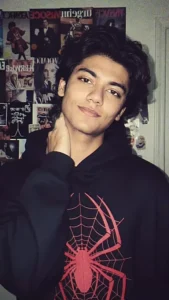
Without changing my original face, create a portrait of a me captured with a 199Os-style cameral using a direct front flash but not in eyes. My messy dark brown hair, posing with a calm yet playful smile like in the picture. Me wears a modern oversized black hoodie with red spider with web in centre. The background is a dark white wall covered with aesthetic magazine posters and stickers, evoking a cozy bedroom or personal room
atmosphere under dim lighting. And my one hand is on my neck.
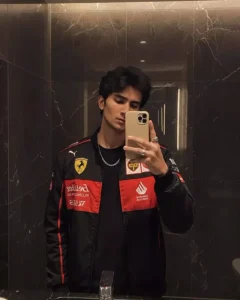
Create a hyper-realistic mirror selfie of me (use my face from the uploaded selfie) wearing the same black Ferrari racing jacket with red and yellow patches, black t-shirt underneath, silver rings, and chain. I'm holding a phone with a beige MagSafe case, posing in a dimly lit modern bathroom with dark marble
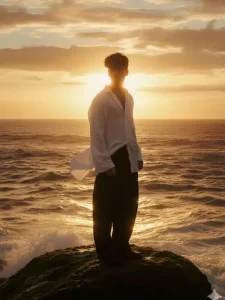
Hi here’s the prompt
Based on the referenced face and body, create a wide cinematic surreal shot in either vertical or horizontal format: the atmosphere is nostalgic, melancholic, yet peaceful. The character is posed in a relaxed 3/4 angle, expressing a sense of enjoyment under the sunset by the sea. Strong highlights(reflections shimmering on the water surface)dominate the lighting. The primary color palette is warm golden tones, almost monochromatic. Film grain texture and halation (a soft bloom around the light)give the image a vintage, dreamlike quality.The character wears a loose white shirt with its tail flowing in the wind andwide-legged black trousers, standing on rocks near the sea (the character occupies only about 20% of the overall scene,appearing small within the vast
environment)balanced on a rock
-posture calm and relaxed. The face is
obscured by backlighting in one
interpretation, yet in another version the facial details remain visible.
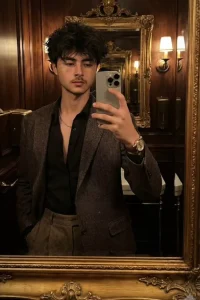
Create a hyper-realistic mirror selfie of me (use my face from the uploaded selfie) wearing the same black Ferrari racing jacket with red and yellow patches, black t-shirt underneath, silver rings, and chain. I'm holding a phone with a beige MagSafe case, posing in a dimly lit modern bathroom with dark marble walls.

The lighting is soft and moody, capturing the same hairstyle, pose, and reflection angle as in the reference image - stylish, confident, cinematic vibe. Add a moody filter .
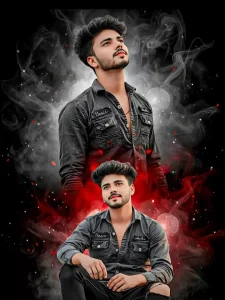
"Create a vertical fan-art style portrait in 16:9 tall orientation, using my uploaded photo, ensuring the face remains 100% real and unedited.
Feature two versions of me in one vertical frame one seated or relaxed pose, and one standing or looking upward - showing emotional variation. The background should mix black, white, and red hues, with glowing highlights, faint smoke or mist, and soft artistic blur for depth.(Used Uploded image don't change face)
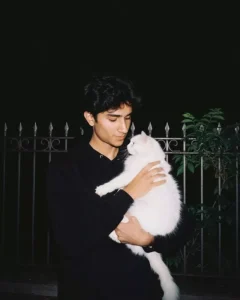
Imagine the photo is clicked at night with flash on, on a vintage camera. the person in the provided photo is wearing a black hoodie, he's standing with holding a white cat in their hands. the photo looks aesthetic as the person is looking towards the cat and the cat towards them. this looks overall like a sweet moment captured in film. the background is all black and has some green leaves behind a metal fence.
How To Use Instagram Viral Boys Ai Photo Editing Prompts
Now, how can you generate this photo? I’ve discussed different styles here, but generating it won’t be easy. So, understand these things properly. Then your photo will be generated perfectly. I’ve shared the prompts here. What you need to do is copy whichever prompt you think is right. A button has been added for copying. Click on it, and it will be automatically copied. After copying, open Google Gemini. Here, you need to paste the prompt you copied from. Paste it there. Then, go to the “Plus” option and upload your photo. You need to upload your photo there; a selfie-type photo is required here. I’ve already discussed this in previous articles, but I’m still explaining it. Upload your selfie here and then generate. Your result will be the same as the prompts you used here.
Conclusion
This is just the beginning of Instagram’s photo editing trend. You’ll see even more amazing results in the future, as you’ll often see creators uploading professional photos on Instagram who don’t know anything about editing. Those who know only basic editing skills can now easily create such professional photos with Gemini. And in the future, you’ll see this trend grow even more, as it allows you to add a cinematic, realistic, and stylish look with just one click. Therefore, prepare now to avoid future problems.


